Skip to content
Vaulthalla LogoVaulthalla

Sovereignty

Sovereignty you can check on a Tuesday

Sovereignty is not a mood. It is a list of things you can check: where your data lives, who holds the keys, whether you can leave, and whether recovery works without anyone's permission.

  • Keys sealed on hardware you control
  • No vendor account, no telemetry
  • Recovery that needs no Valkyrian Labs service
Odin works on a laptop in a public reading room high above the clouds

The Final Cloud

Every cloud you rent is someone else's server, under someone else's terms. The Final Cloud is the one you own: the last move, because nothing can make you move again.

That is a promise, and promises are cheap. So this page is not a manifesto. It is nine principles, and next to each one, the command, the screen or the guarantee you can check yourself, on an ordinary day, without taking our word for anything.

Principles one to three

Your data, your keys, your exit

1. Ownership and availability

The bytes live where you put them

A vault lives on your server's own disks or in a bucket in your own account. Its metadata lives in your PostgreSQL. Nothing sits in between that belongs to us.

The Tuesday test: your internet connection drops mid-morning. People on your network keep working: a local vault never needed the internet, and a file already held locally in a bucket-backed vault is served from its encrypted local copy with no request to the provider.

Bring your own storage
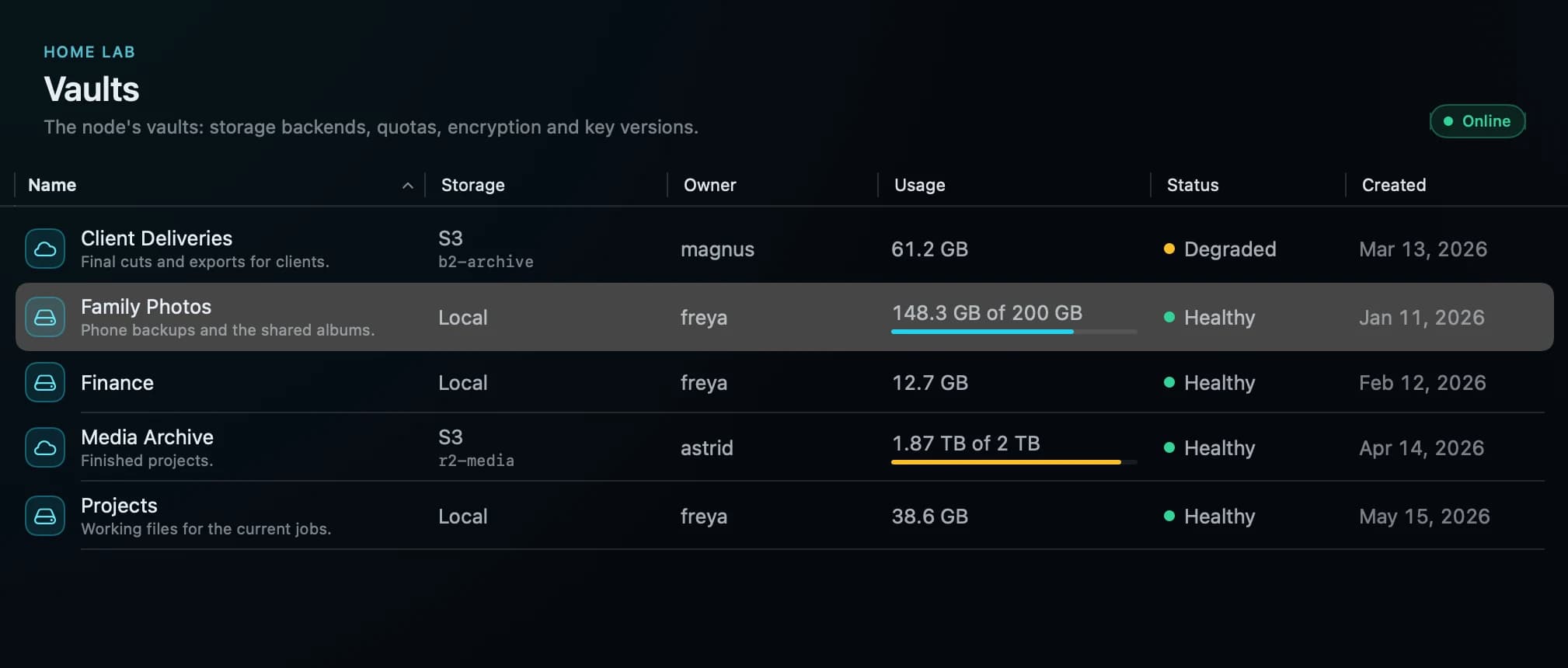
The vault list in Vaulthalla Desktop: local and S3 vaults with backend, owner, usage against quota and health

2. Keys you hold

Keys sealed on your hardware, copies where you send them

Every vault has its own AES-256-GCM key, wrapped by a master key that TPM2 seals on Linux and the Secure Enclave seals on a Mac. Valkyrian Labs receives no keys, no exports and no recovery material.

Copies go only where you send them: a GPG-encrypted export, a recovery kit you create offline on your own computer, or your own 1Password through Vaulthalla Desktop.

vh vault keys export all --recipient <gpg-fingerprint> --output vaulthalla-vault-keys.json.gpg

Holding keys is a responsibility as well as a right. Whoever administers the server can read its vaults, and the costs are spelled out below.

Keys and recovery
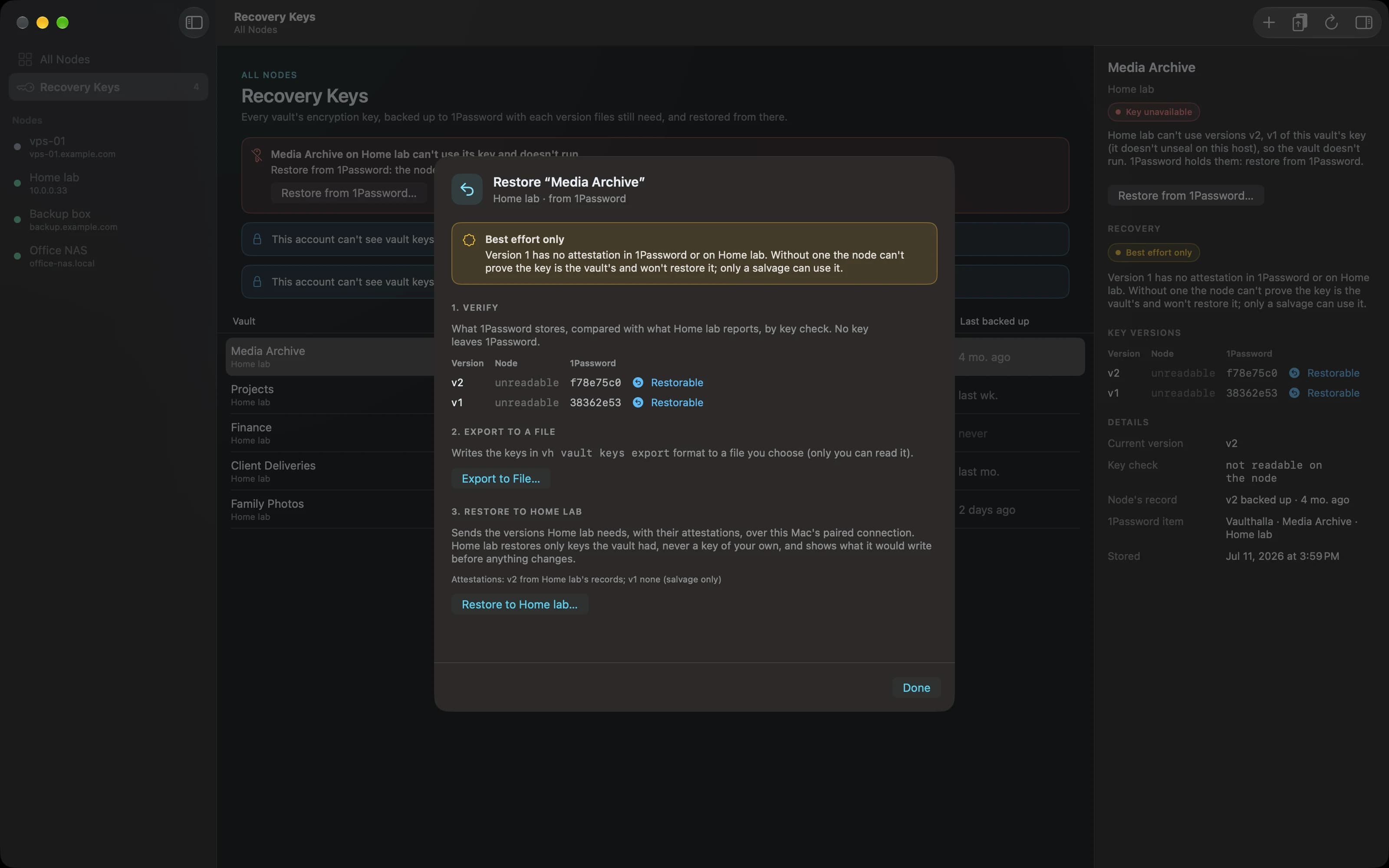
The Restore from 1Password sheet in Vaulthalla Desktop: verify the stored key versions, export them to a file, or restore them to the node

3. Freedom to change providers

Attach, detach, move on

The Tuesday test: your provider raises its prices. Detach the vault and every file is fetched, verified and kept locally, with key envelopes copied. Detach never writes to or deletes from the bucket. Then attach the vault to an empty bucket somewhere else. Its ID, keys, permissions and shares stay the same throughout.

vh vault remote detach finance --confirm finance vh vault remote attach finance --api-key r2-main --bucket finance-vault

The format does not tie an object to a bucket: each sealed object's header binds the vault, the object, the key version and a salt, never a bucket. A direct bucket-to-bucket move is not built yet; detach and attach is the path today.

Attach and detach a bucket
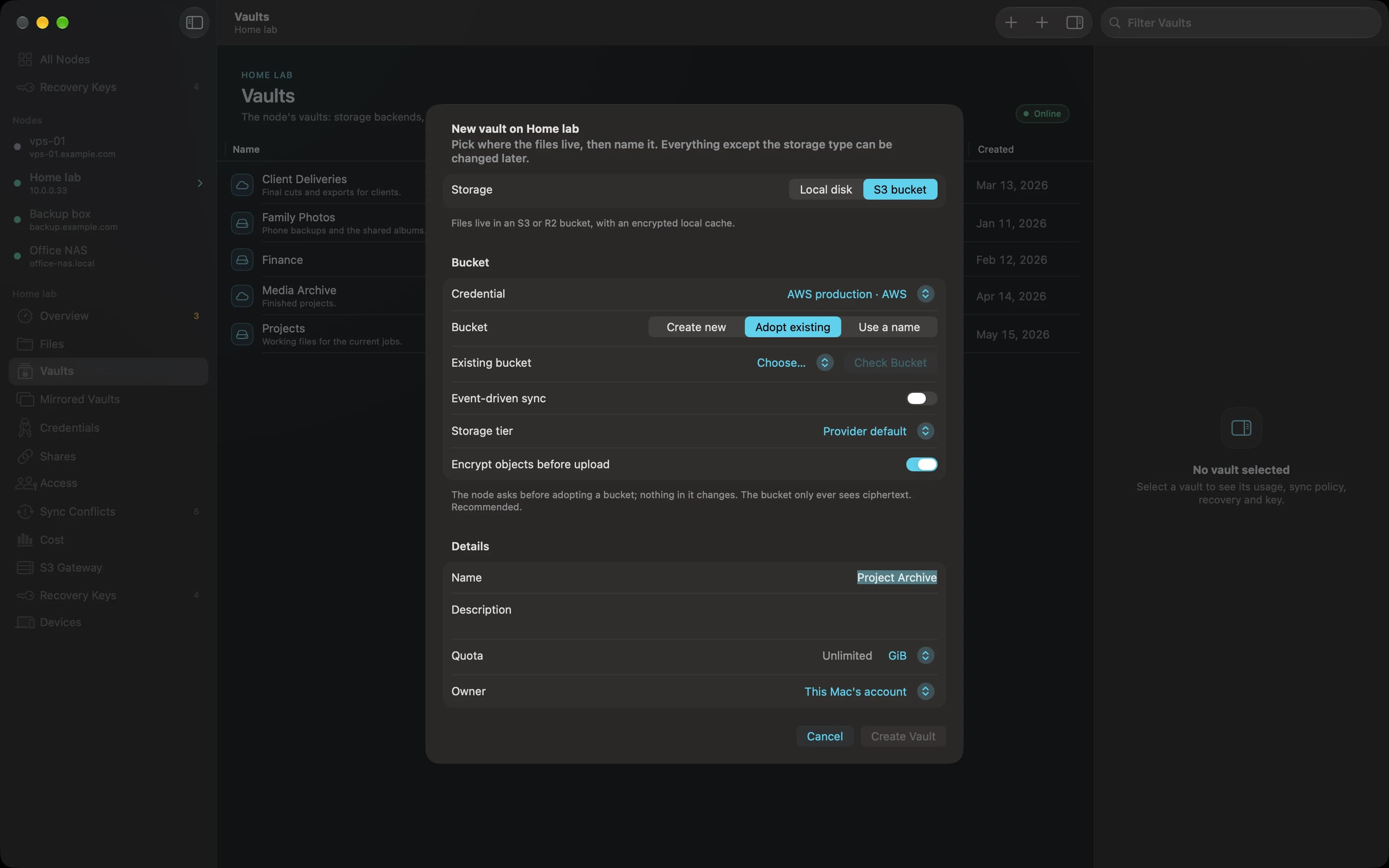
The New Vault sheet in Vaulthalla Desktop, set up for an S3 bucket: credential, adopting an existing bucket, storage tier and encryption before upload

4. Open protocols and standard formats

Your data should outlive any one program, including ours. Every way into a vault is a standard one:

  • S3 with SigV4, tested with AWS CLI, boto3, rclone and MinIO mc.
  • A plain folder: a FUSE mount at /mnt/vaulthalla on Linux, and Finder on the Mac.
  • Standard cryptography: AES-256-GCM for contents, X25519 envelopes for recovery kits, OpenPGP for key exports and read grants.
  • A documented vault format: the VHF1 specification and its test vectors are in the server repository.
  • MCP for AI agents, acting under your own permissions.

5. No mandatory account, no telemetry

Install, run and recover without creating an account anywhere. The server sends no telemetry and asks no central service for permission to encrypt, sign anyone in or recover.

The outbound requests in the code are few and named. When a password is set, a Have I Been Pwned range lookup sends the first characters of its hash and gives up after a few seconds; breach lists are bundled, so offline hosts still work. A signed price-catalog refresh exists and ships switched off. Vaulthalla Desktop checks for its own updates against a signed appcast.


6. Independent recovery

Recovery that does not ask anyone's permission

Restore from your bucket and your recovery kit into a server you run, even if the old one is gone. No account or payment needed. The recovery tools are part of the server you already run, and its source is yours under the AGPL, so recovery needs no Valkyrian Labs service to exist. For vaults in the default opaque layout, files, names, trash and key versions come back from the bucket; users, roles and shares come back from your database backup.

Independent recovery paths

The vault’s keys can be restored along four independent paths. One: a recovery kit made offline with vh-recovery kit create; the bucket holds key envelopes wrapped to it. Two: a GPG-encrypted key export. Three: your own 1Password, through Vaulthalla Desktop, with no account at Valkyrian Labs. Four: a mirrored vault on a linked server, promoted with vh mirror takeover. A fifth path, optional Vaulthalla Cloud key backup, is planned and not yet available. For the data: your bucket plus your recovery kit, given to vh vault recover on a fresh server you run, rebuild the vault even when the old server, its database and its TPM are gone. Files, names, trash and key versions come back from the bucket. Users, roles and shares come from your database backup.

01The keys

Every version still needed

Vault keys

AES-256-GCM, one set per vault

Path 1

Recovery kit

Made offline. The bucket holds key envelopes wrapped to it.

vh-recovery kit create

Path 2

GPG key export

Encrypted to a GPG key you hold.

vh vault keys export

Path 3

Your own 1Password

Backed up from Vaulthalla Desktop. No account with Valkyrian Labs needed.

Path 4

Mirrored vault

A linked server already holds the keys and a full copy.

vh mirror takeover
Planned

Optional

Vaulthalla Cloud key backup

Not yet available. Never required.

02And the data

Your storage provider

Your bucket

Encrypted objects

Plus the encrypted manifest and key envelopes

Kept offline

Your recovery kit

Opens the key envelopes

On a fresh server

vh vault recover

Rebuilds files, names, trash and key versions.

Hardware you control

A server you run

Vault restored

Keys verified against the kit

Even with these gone

old serverits TPMits database

Users, roles and shares live in the database, not the bucket: restore those from your database backup.

Keys are restored only if the original server's attestation verifies against a key your kit pins; a fresh server can never vouch for itself. The 1.22.1 restore drill passed 30 of 30 checks on a 2,000-file test vault, and 16 of 16 on live Cloudflare R2. Restore a vault from its bucket.

Check it yourself

Recovery and migration paths, as commands

A kit made offline, a restore you can rehearse, and a walk-away guarantee for mirrored vaults: vh mirror detach turns a mirror's copy into an ordinary vault in any state, without asking the other server.

# on your own computer, offline
$ vh-recovery kit create --output vaulthalla-recovery-kit.json
# on the server: every current and future key version is wrapped to the kit
$ vh vault keys recipient add photos --public-key 9jB0b7LvRAo3+fTz//m8OhJQkp39Kcd1PjiFpjtmrTs= --label "Kit 2026-11"
# on a new server, with the old server, database and TPM gone
$ vh vault recover --api-key r2-main --bucket finance-vault --kit vaulthalla-recovery-kit.json --dry-run
# plans the restore and changes nothing; run again without --dry-run
# on the server that holds a mirrored copy
$ vh mirror detach finance --dry-run --json
$ vh mirror detach finance
# the copy is now an ordinary vault: nothing deleted, no bucket touched

Mirrored vaults shipped in server 1.27.1 and relink in 1.28.0. They have no docs page yet: see the 1.27.1 and 1.28.0 release notes.

Odin and Zeus, off duty, waiting out a wash cycle in a neighborhood laundromat

Ordinary days

What sovereignty looks like on a Tuesday

Mostly, it looks like nothing happening. Files open in Finder. A backup job writes to its bucket with a key that can reach nothing else. A sync stalls on its budget and tells you why instead of running up a bill. The menu bar stays quiet. Sovereignty is not a stand you take once. It is every ordinary day on which everything is yours and nothing needs defending.

7. Respect for your existing infrastructure

Vaulthalla moves into your house; it does not remodel it. On Linux the package recommends PostgreSQL, nginx and certbot rather than demanding them. Point it at the PostgreSQL you already run (11 or later, or a remote server), let sudo vh setup nginx --domain vault.example.com --certbot write a site for your web server, or set things up your own way. Your disks hold your local vaults.

Your buckets are safe from it too. vh upstream protect r2-admin prod-backups --reason "not for Vaulthalla" excludes a bucket from every Vaulthalla operation, and an existing non-empty bucket is never taken over. On a Mac, every service runs as a hidden _vaulthalla user, none as root, and every listener stays on loopback until you run sudo vh setup caddy with Let's Encrypt, Cloudflare DNS or your own certificate.

8. Focus instead of application sprawl

Vaulthalla is a storage platform. No office suite, calendar, chat or app store, by design. Every component you do not run is one you never patch, configure or have to trust. The web console previews files and edits text and Markdown; your office and chat tools stay whichever ones you like. See the solutions for what that focus covers.

9. Trust, but verify

"Don't trust Vaulthalla. Verify it." That is the stance of SECURITY_AUDIT_PROMPT.md in the server repository: a read-only audit prompt you can hand to your own AI agent and point at the code. Server and Desktop are AGPL-3.0-or-later. Linux packages come from a signed APT repository and macOS packages are notarized; reproducible builds are still future work. Sensitive actions land in a hash-chained, signed audit trail, and vh audit verify checks the chain. That makes tampering detectable, not impossible: someone with root and the database could still rewrite it.

What sovereignty costs

Owning something means it is your problem. Here is the bill, in full.

  • You run a server. Disks, updates and a database backup. Users, roles and shares live in PostgreSQL; the bucket and the recovery kit do not carry them.
  • You hold the keys. Lose the server, every export, every recovery kit and every 1Password backup, and the data is gone. No one can bring it back, Valkyrian Labs included.
  • Whoever administers the server can read everything on it. Sovereignty moves trust to you. It does not remove it.
  • Your provider can still delete everything. Encryption keeps your data private, not present. Keep a second copy: a mirrored vault on a linked server, a local copy, or backups of your own bucket.
  • We are still your software vendor. Updates are signed by Valkyrian Labs, and you decide when to install them: sudo apt-mark hold vaulthalla holds a version until you are ready.

If that bill is too high for some of your data, rent for that data. Where others are the better choice.

FAQ

Questions

What does data sovereignty mean for storage?

That you can check, rather than trust, where your data lives, who holds its keys, whether you can leave a provider, and whether recovery works without anyone's permission. Vaulthalla backs each of those with a command or a guarantee you can test.

Can Valkyrian Labs read my files?

Valkyrian Labs receives no keys, exports or recovery material and does not run your server. Whoever administers your server can read its vaults, and Valkyrian Labs remains the vendor that signs the updates you choose to install.

Does Vaulthalla phone home?

It sends no telemetry and needs no account. The outbound requests in the code are a Have I Been Pwned range lookup when a password is set and a signed price-catalog refresh that ships switched off; Desktop checks for its own updates.

What happens to my data if Valkyrian Labs disappears?

Your server keeps running: there is no license key to renew and no service it must reach. The recovery tools are part of the server, and the source is public under the AGPL.

Can I leave Vaulthalla?

Yes. Your files are reachable as a folder, in Finder and over S3, so any S3 tool or a plain copy gets them out. Detaching a bucket never writes to or deletes from it.

Do I need Vaulthalla Cloud for any of this?

No. Vaulthalla Cloud is a planned, optional service whose first planned job is backup and recovery of vault encryption keys. Nothing on this page depends on it, and bring-your-own storage keeps every capability.

Odin and Zeus share breakfast at a counter before the city wakes

The Final Cloud

Check every principle yourself, starting today

Install one server, create one vault, and run the commands on this page. If any of it does not hold, the source is open and the issue tracker is public.