Skip to content
Vaulthalla LogoVaulthalla

Self-hosted cloud storage

Your own cloud drive, without the rest of the suite

Vaulthalla gives a household or a small team a private cloud drive on hardware they run: vaults in Finder, a mounted folder on Linux, a web console and share links. It does storage well and leaves the rest of your infrastructure alone.

  • Vaults in Finder through Vaulthalla Desktop
  • A key for every vault, encrypted at rest by default
  • One daemon beside PostgreSQL and nginx or Caddy

Every way in

The same vaults on the Mac, on Linux and in the browser

A vault is a folder tree with its own key and its own permissions. Open it from whichever device is in front of you, and the same rules apply each time.

On the Mac

Vaults in Finder, like any other cloud drive

Vaulthalla Desktop adds each vault you switch on under Locations in Finder. Files download when you open them, and macOS frees the space again when it needs it. Choose Keep Downloaded on a file or folder to keep it offline.

  • Create, edit, rename, move and delete from Finder. A delete goes to the server's trash.
  • A conflicting edit never overwrites anyone's work: it is saved next to the server's version as name (conflict from <Mac> <date>).
  • Finder shows exactly what your account may see, and it keeps working with the app quit.

The app's own Files browser, shown here, adds Quick Look, drag and drop and resumable transfers.
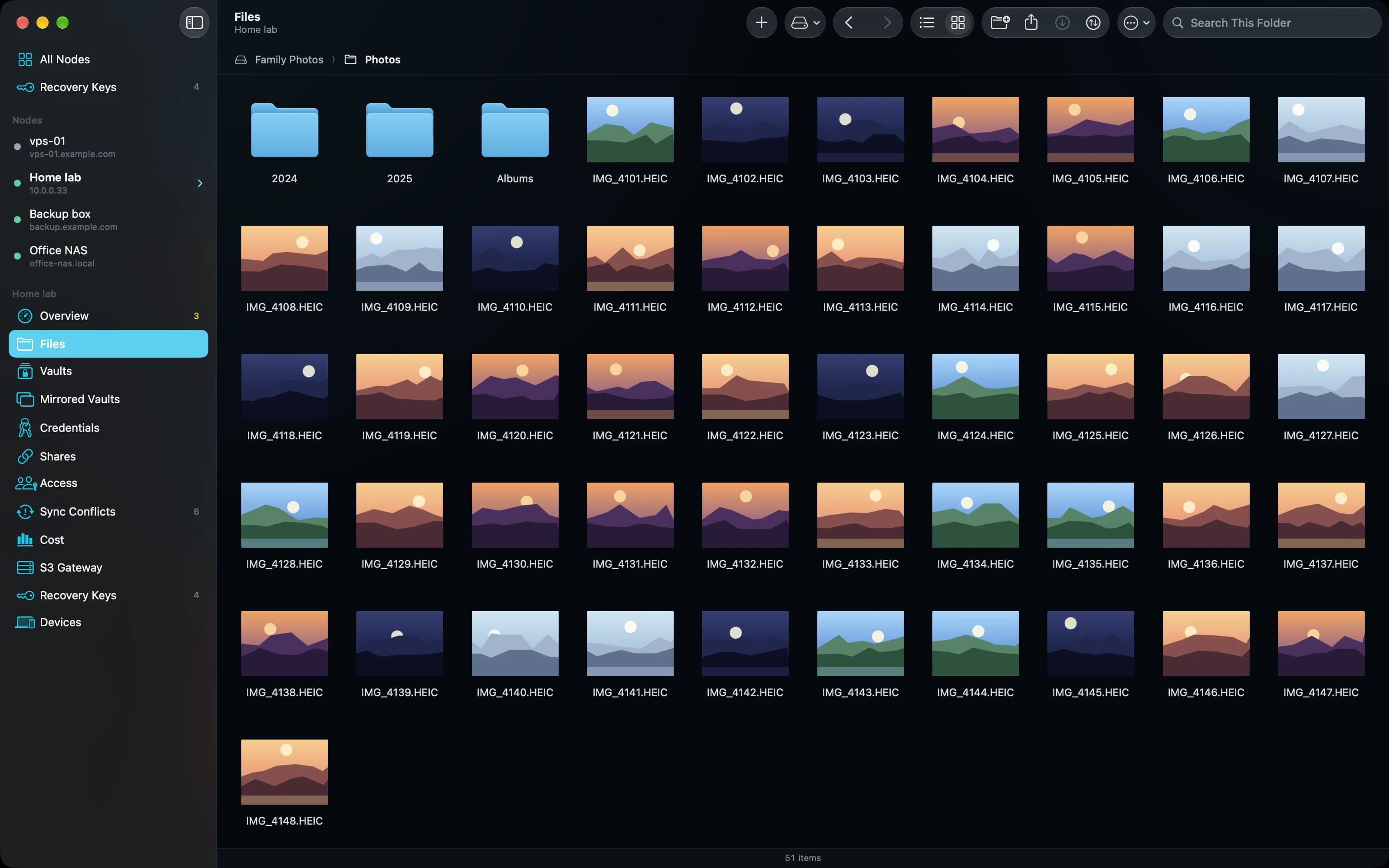
Vaults in Finder
The Vaulthalla Desktop Files browser in grid view, showing photo thumbnails from the Family Photos vault

On Linux

A mounted folder at /mnt/vaulthalla

On a Linux server, vaults appear as folders under /mnt/vaulthalla through FUSE. Each process is mapped by its Linux user to a Vaulthalla account, so shells, editors and scripts see what that person may see and nothing more. Files stay encrypted on disk, and the working copies the mount opens are encrypted too.

No mount on the host? vh fs lists, reads and writes vault files over the local socket.

Filesystem access

In the browser

A web console with real previews

The console ships with the server and works from any browser, including on Windows, phones and tablets.

  • Previews for images and PDFs, video and audio with seeking, and a 3D viewer for GLB, glTF, STL and OBJ.
  • Text and Markdown files open for editing, with saves that refuse to overwrite a newer version.
  • Uploads resume after a dropped connection or a page reload, in 64 MiB parts checked with SHA-256.
Previews and uploads
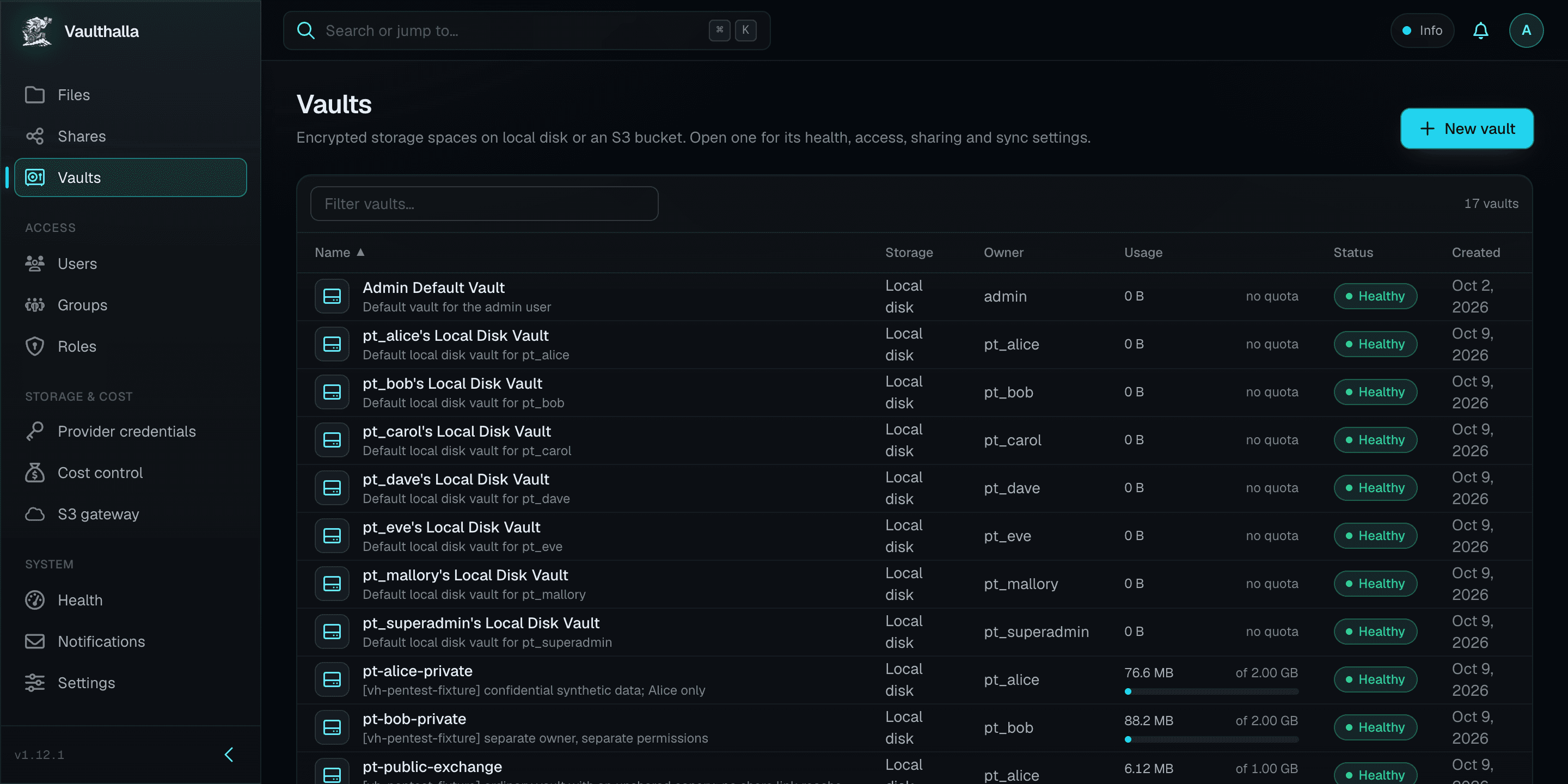
The Vaulthalla web console listing vaults with their storage, sync state and health

Files from the shell

Ordinary paths, real permissions

On Linux the mount is just a directory. On hosts without one, including every Mac server, vh fs does the same jobs through the control socket.

# Each vault is a folder; what you see follows your Linux user
$ ls /mnt/vaulthalla
Archive  Family Photos  Team Docs
$ cp minutes.md "/mnt/vaulthalla/Team Docs/meetings/"
$ ls "/mnt/vaulthalla/Team Docs/meetings"
minutes.md  q3-planning.md
$ vh fs ls docs /meetings
minutes.md  q3-planning.md
$ vh fs put docs ./budget.xlsx /finance/budget.xlsx
$ vh fs mv docs /meetings/q3-planning.md /archive/q3-planning.md
$ vh fs rm docs /drafts/old-plan.md
# rm moves the file to the vault's trash, where it can be restored

Commands from the CLI reference. vh fs put stores nothing unless the whole file arrives.

Send a folder to someone without an account, and stay in charge of it afterwards. Every share is a link with a purpose, an audience and an end.

Public or email-verified

A public link opens for anyone who has it. An email-verified link sends a six-digit code that works once, for 15 minutes, and gives the same reply for every address. Email-verified links need operator email (Resend or Amazon SES) set up on the server.

Choose what a link can do

Start from a preset (Browse and Download, Download Only, Upload Dropbox) or pick the operations yourself. A preview is a server-rendered JPEG, never the original bytes.

Revoke or rotate any time

Disable a link, rotate it to a new address, or let it expire. The link's token sits after the #, so it never reaches a server log or a Referer header, and every access lands in the audit trail.

People and keys

Decide who reaches what, and keep the keys

Access

Users, groups, roles and path overrides

Give each person an account, put people in groups, and grant vault roles such as reader or contributor per vault. Admin roles decide who may manage users, vaults and keys. When one folder needs different rules, a path override narrows them:

vh vault role override add archive --user alice --pattern "/finance/*" --download --disable

The same rules answer in Finder, on the mount, in the console and through S3. Folder sizes count only what the viewer may see, and multi-factor sign-in (passkeys or TOTP) is required for admins by default.

Users, groups and roles
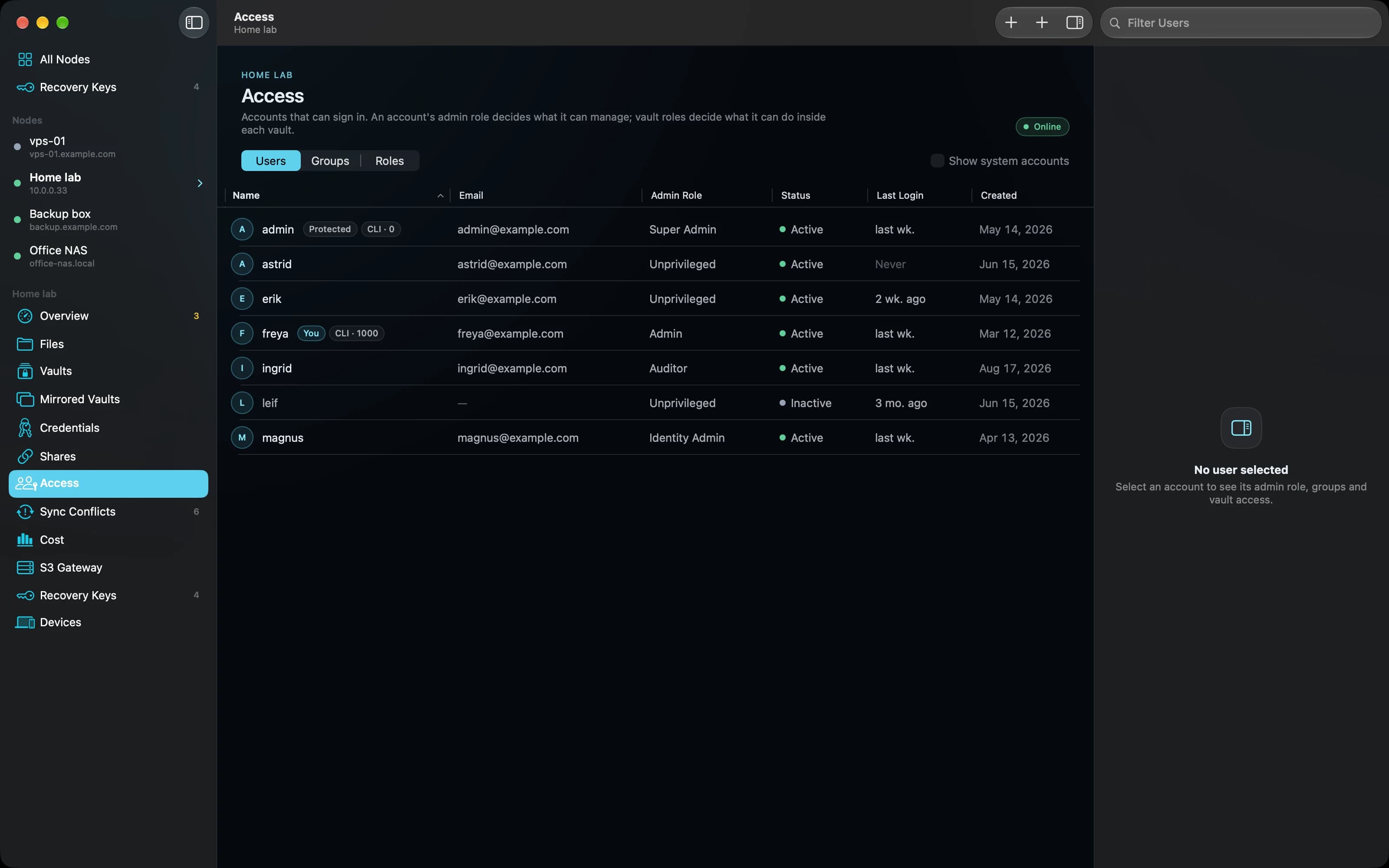
Vaulthalla Desktop, Access, Users: accounts with email, admin role, status and last login

Encryption

A key for every vault

Every vault has its own AES-256-GCM key, wrapped by a master key that the TPM seals on Linux and the Secure Enclave seals on a Mac. The server encrypts files at rest, so whoever runs it can read everything on it: that is you, or someone you trust.

When a vault lives in a cloud bucket, files are encrypted before upload. Your storage provider only ever sees encrypted, opaquely named objects. It can't see your file names, folders or contents. It can see how many objects you store, their sizes and when they change.

Who can read what

Architectural restraint

It respects the infrastructure you already run

One compiled daemon serves the Linux mount, the web console, sync, the S3 gateway and the listener Vaulthalla Desktop pairs with. Metadata lives in PostgreSQL, with nginx on Linux or Caddy on macOS in front. Upgrades come through apt or Homebrew, and a restart takes about a second.

One platform where there used to be three

Six ways in: Finder through Vaulthalla Desktop on the Mac, a mounted folder through FUSE on Linux at /mnt/vaulthalla, the web console and share links, S3 clients such as the AWS CLI, rclone and boto3, AI agents over MCP, and the vh command line. All of them reach one Vaulthalla server, a single daemon on hardware you control, with one permission model, per-vault AES-256-GCM keys, a sync engine, an S3 gateway and an audit trail. The server keeps the bytes on local disks, in your own S3-compatible buckets at your storage provider (Backblaze B2, Cloudflare R2, AWS S3 and others), or on a second Vaulthalla server that holds a mirrored vault.

01Ways in

02One daemon

03Where bytes live

Mac

Finder

Vaulthalla Desktop

Linux

Mounted folder

FUSE at /mnt/vaulthalla

Browser

Web console

and share links

S3 API

S3 clients

AWS CLI, rclone, boto3

MCP

AI agents

As your account

CLI

vh

The command line

Hardware you control

Vaulthalla server

One daemon

  • One permission model
  • Per-vault AES-256-GCM keys
  • Sync engine
  • S3 gateway
  • Audit trail
Hardware you control

On the host

Local disks

Encrypted at rest

Your storage provider

Bring your own

Your S3-compatible buckets

Backblaze B2, Cloudflare R2, AWS S3, and others

Hardware you control

Linked server

A second Vaulthalla server

Holds a mirrored vault

Vaults sit on the disks or buckets you choose. There is no plugin store and no app platform to maintain. How the daemon is built.

A cloud drive, on purpose

Vaulthalla stores, syncs, shares and protects files. It is not an office suite, a calendar, a contacts server, a chat app or an app store, and it does not install a platform of its own beside yours. Documents open in the apps you already use, and the server sits next to the PostgreSQL and web server you already run.

What it lacks today

The Mac app is the only sync client. There are no Vaulthalla apps for Windows, Linux desktops, iOS or Android: those devices use the web console, share links, the Linux mount or any S3 tool.

If you are weighing Nextcloud

Nextcloud is a collaboration suite: Files, Talk, groupware, office editing with co-authoring and more than 600 apps for its current release (as of November 2026), with desktop clients for Windows, macOS and Linux, mature mobile apps and a large hosting and support market. A production install runs PHP, a web server and a database, and its docs recommend Redis and cron beside them. If you want that suite, Nextcloud is the better fit. If you want a focused drive with encryption on for every vault and an S3 endpoint beside it, compare the two side by side.

Questions about a self-hosted cloud drive

Is Vaulthalla a Nextcloud alternative?

For file storage, sync and sharing, yes. It does not replace Nextcloud's office, chat, calendar or app ecosystem. Compare the two.

Can I use it from Windows, an iPhone or Android?

Through the web console in a browser, share links, or any S3 app. There is no native Vaulthalla app for those platforms; the only client app is Vaulthalla Desktop for the Mac.

Does Finder download every file to my Mac?

No. Files download when you open them, and macOS can remove local copies when it needs space. Keep Downloaded keeps a file or folder offline.

What happens when two people edit the same file?

From Finder, nothing is overwritten: the conflicting edit is saved as a copy named for the Mac and the date, next to the server's version. In the web console, a save that would replace a newer version is refused.

Can the person who runs the server read my files?

Yes. The server holds the keys while vaults run, so whoever administers it can read everything on it. Encryption protects your files from your storage provider, and file contents on a stolen disk when a hardware TPM or the Secure Enclave seals the keys, but not from the server's operator.

What do I need to run it?

A Linux amd64 machine (Ubuntu 24.04 LTS is tested) or an Apple Silicon Mac on macOS 14 or later. Linux uses PostgreSQL and nginx; the Mac package brings its own PostgreSQL and Caddy. Install guide.

A town gathers at night to watch family films projected onto the side of a building

Your own cloud

The family archive belongs at home.

Install the server on a machine you own, add Vaulthalla Desktop on your Mac, and bring the photos, documents and films home.