Skip to content
Vaulthalla LogoVaulthalla

Backup and disaster recovery

Recovery paths that do not fail with what they recover

A lost server, a lost key, a closed provider account and a deleted file each have their own way back. None of them needs an account with Valkyrian Labs.

  • Rebuild a vault from its bucket and your recovery kit
  • Mirror a vault to a second server you run
  • Back up vault keys to your own 1Password

Independent recovery paths

The vault’s keys can be restored along four independent paths. One: a recovery kit made offline with vh-recovery kit create; the bucket holds key envelopes wrapped to it. Two: a GPG-encrypted key export. Three: your own 1Password, through Vaulthalla Desktop, with no account at Valkyrian Labs. Four: a mirrored vault on a linked server, promoted with vh mirror takeover. A fifth path, optional Vaulthalla Cloud key backup, is planned and not yet available. For the data: your bucket plus your recovery kit, given to vh vault recover on a fresh server you run, rebuild the vault even when the old server, its database and its TPM are gone. Files, names, trash and key versions come back from the bucket. Users, roles and shares come from your database backup.

01The keys

Every version still needed

Vault keys

AES-256-GCM, one set per vault

Path 1

Recovery kit

Made offline. The bucket holds key envelopes wrapped to it.

vh-recovery kit create

Path 2

GPG key export

Encrypted to a GPG key you hold.

vh vault keys export

Path 3

Your own 1Password

Backed up from Vaulthalla Desktop. No account with Valkyrian Labs needed.

Path 4

Mirrored vault

A linked server already holds the keys and a full copy.

vh mirror takeover
Planned

Optional

Vaulthalla Cloud key backup

Not yet available. Never required.

02And the data

Your storage provider

Your bucket

Encrypted objects

Plus the encrypted manifest and key envelopes

Kept offline

Your recovery kit

Opens the key envelopes

On a fresh server

vh vault recover

Rebuilds files, names, trash and key versions.

Hardware you control

A server you run

Vault restored

Keys verified against the kit

Even with these gone

old serverits TPMits database

Users, roles and shares live in the database, not the bucket: restore those from your database backup.

Match the backup to the failure

A backup that lives on the same server, the same disk or the same provider account as your data fails with it. Vaulthalla gives each failure its own way back, and none of them shares the failure it recovers from. Restore from your bucket and your recovery kit into a server you run, even if the old one is gone. No account or payment needed.

What fails What gets you back What you need beforehand
The server, its database and its TPM vh vault recover on a fresh server A recovery kit enrolled on the vault, and a database backup for users, roles and shares
The master key on a working server vh vault keys import --recovery-kit A recovery kit, a GPG key export or a 1Password backup
Your provider account A copy that never lived with that provider Local copies, a mirrored vault on a linked server, or your own second bucket
Your Mac Revoke its pairing; vault keys live on the server Optional: vault keys backed up to your own 1Password
A file Trash, snapshots and versions Nothing extra for trash; snapshots and versions as the vault keeps them

No single backup command covers everything. Back up the database, configuration and state with your own tools, next to the bucket and the kit.

Five failures, walked through

The disk failed, the machine was stolen, or the host is gone along with its database and its TPM. A vault in a bucket with the opaque layout and an enrolled recovery kit comes back on any new server you install.

  1. Install Vaulthalla on a fresh machine and add an upstream credential for the bucket with vh api-key.
  2. Run vh vault recover with the credential, the bucket and your kit, first with --dry-run, then for real.
  3. It rebuilds files, names, trash, provider versions, snapshot records and key versions. Keys come back only if the old server's attestation verifies against a key your kit pins; a fresh server's own signature never counts. If that fails, --salvage re-encrypts under a new key instead.
  4. Restore users, roles and shares from your database backup. They are not in the bucket.

If the kit carries a freshness checkpoint, the restore refuses a bucket rolled back to an older state. A damaged manifest falls back to a blind rebuild under /Recovered. Vaults still on the older path layout need the database and key exports instead, and on a Mac server, sealed keys never move between Macs, so recover those vaults from key exports.

Restore a vault from its bucket

The commands

Every recovery path, in a terminal

# on your own computer, offline
$ vh-recovery kit create --output vaulthalla-recovery-kit.json
# on the server: only the public key is sent
$ vh vault keys recipient add finance --public-key 9jB0b7LvRAo3+fTz//m8OhJQkp39Kcd1PjiFpjtmrTs= --label "Kit 2026-11"
$ vh vault keys export all --recipient <gpg-fingerprint> --output vaulthalla-vault-keys.json.gpg
# a fresh server; the old server, database and TPM are gone
$ vh vault recover --api-key r2-main --bucket finance-vault --kit vaulthalla-recovery-kit.json --dry-run
$ vh vault recover --api-key r2-main --bucket finance-vault --kit vaulthalla-recovery-kit.json
# then restore users, roles and shares from your database backup
# database intact, master key lost
$ vh vault keys import finance --recovery-kit vaulthalla-recovery-kit.json
$ vh peer pair                          # on the core
$ vh peer link vault.example.com        # on the other server: prints a 6-digit code
$ vh mirror add finance --to backup-box # then on the mirror: vh mirror accept <offer>
# if the core is gone for good, on the mirror
$ vh mirror takeover --confirm
$ vh vault read-grant issue finance --recipient <fingerprint>
# a read-only S3 credential, delivered only as an OpenPGP message to that key

Commands from the server documentation and release notes. Key export, import and recovery recipients run from the server's own terminal or a paired device with approval, never from the web console or an AI agent.

Copies you hold

Keys in your 1Password, vaults on a second server

Vaulthalla Desktop

Every vault key, backed up to your own 1Password

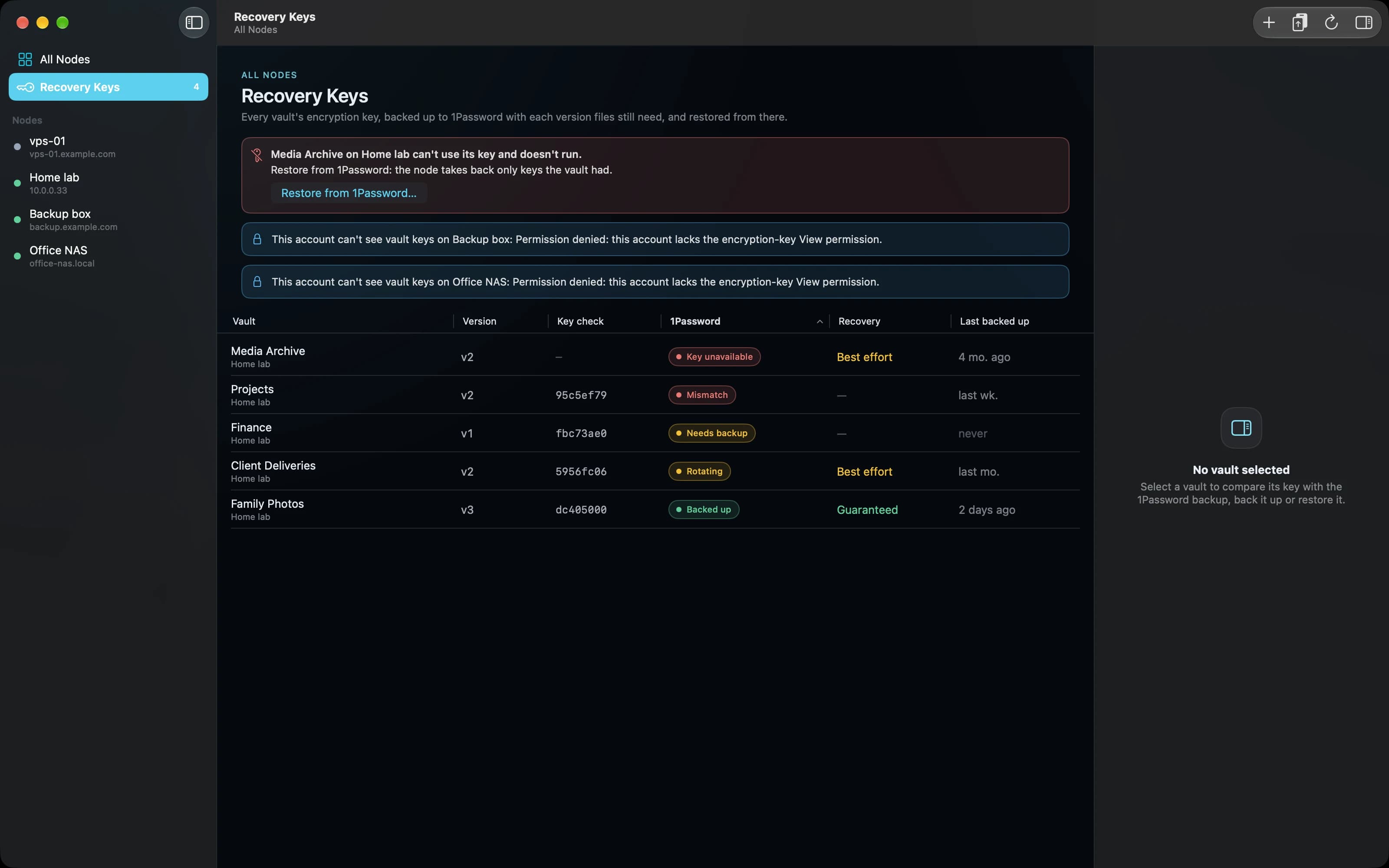
Desktop keeps one 1Password item per server and vault: the current key, every older version still needed, key checks and the server's attestations. Recovery Keys shows each vault's state across every server: backed up, needs backup, rotating, or a mismatch to look at.

It authorizes through the 1Password app with Touch ID and needs no account with Valkyrian Labs. Each Mac backs up under a key-backup grant the server shows and can revoke, and more than 60 exports in an hour pauses it.

Recovery keys in Desktop
Recovery Keys: each vault's encryption key, its 1Password backup state and how certain recovery is, including a key that needs restoring.

Restore

A restore takes back only the vault's own keys

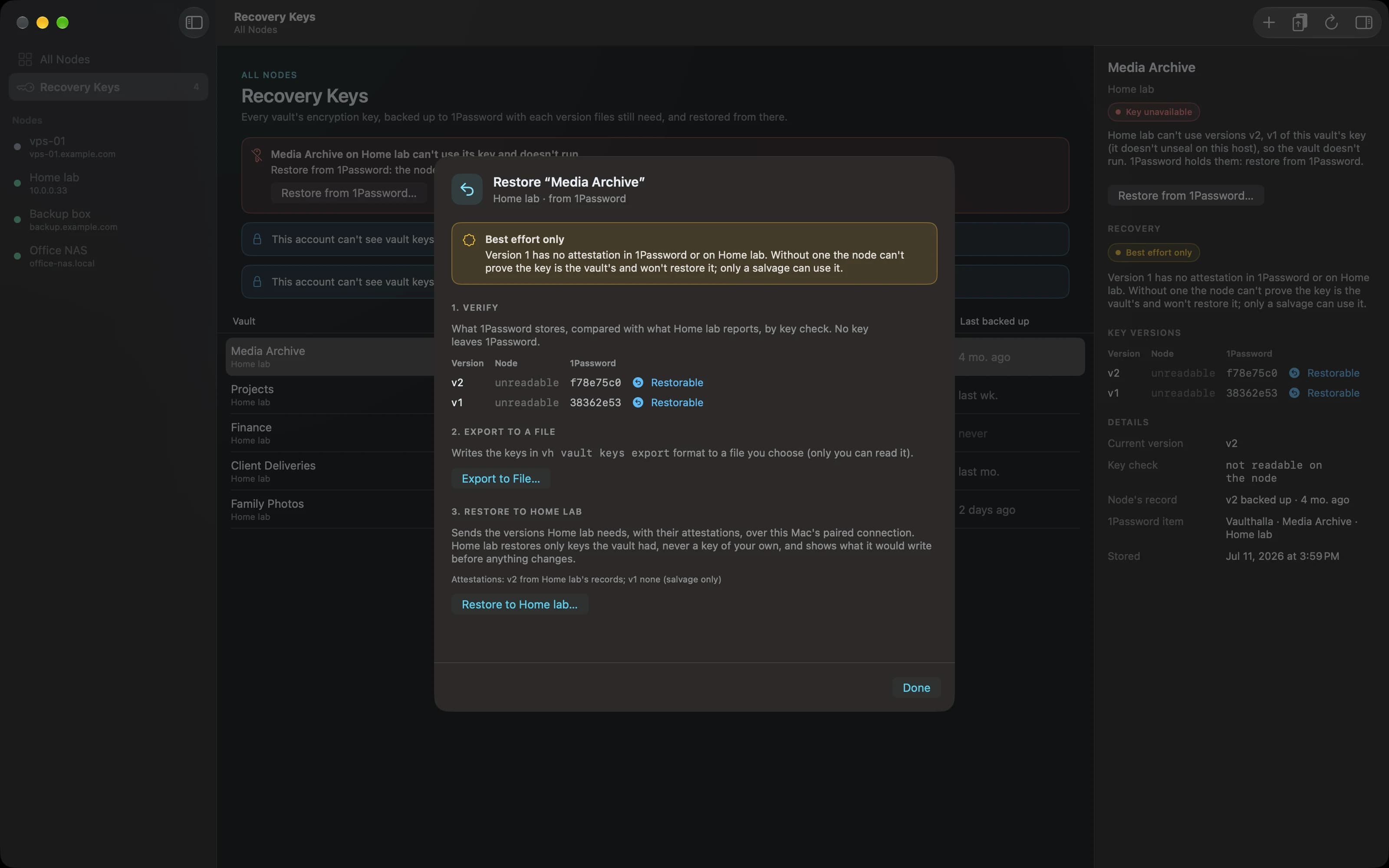
From 1Password you can verify the stored key versions, export them to a file, or restore them to the server. The server accepts only versions its own attestation proves belonged to that vault, so a backup can never be used to slip in a key of someone else's choosing. If a key cannot be proven, salvage re-encrypts under a new key as a separate, explicit step.

Secrets and key export
The Restore from 1Password sheet: verify the stored key versions, export them to a file, or restore them to the node.

Linked servers

A second server that already has the vault

Link two Vaulthalla servers and mirror a vault. One server is the core; the other holds a full encrypted copy that follows every change in order, with a daily scrub comparing the two. Contents travel as stored ciphertext and are never decrypted on the way.

If the core is gone for good, vh mirror takeover makes the copy the core. vh mirror detach turns the copy into an ordinary vault in any state, without asking the core.

Release notes for v1.27.1
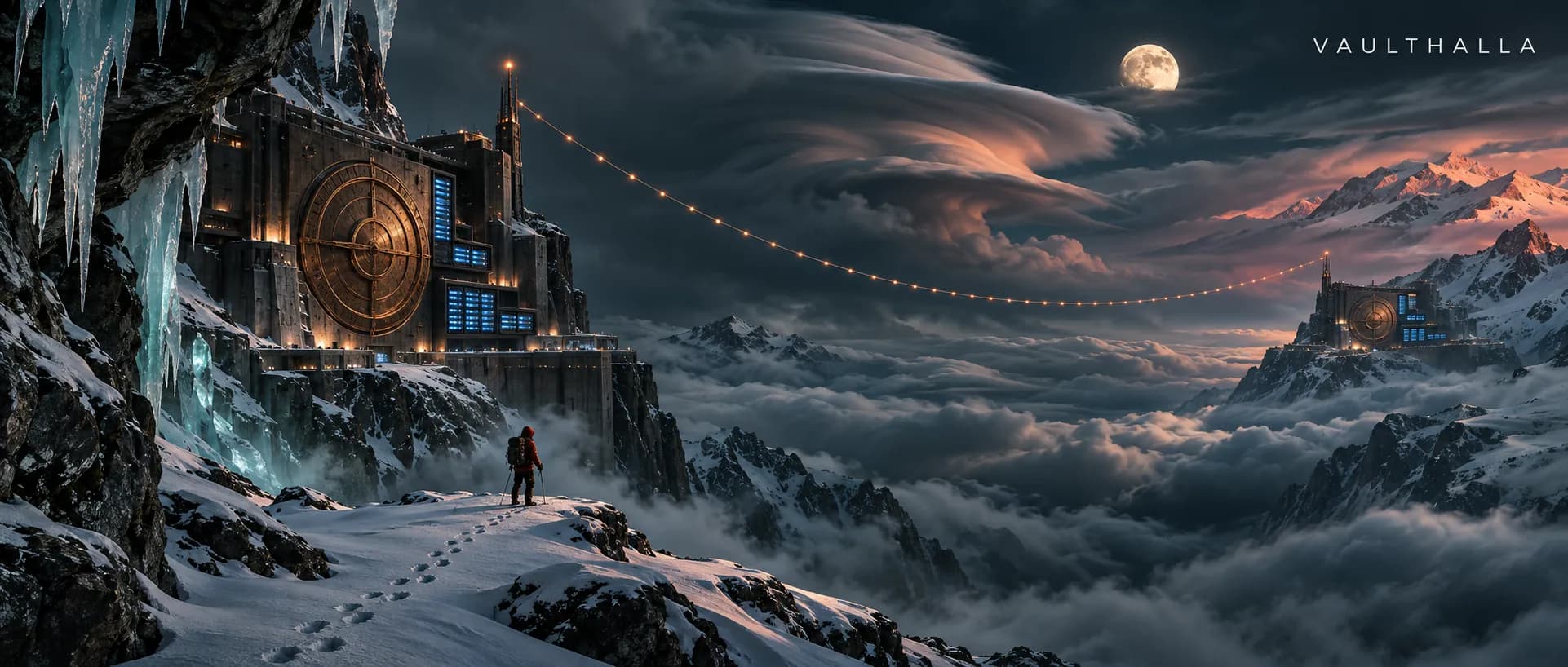
Two paired fortresses on mountains across a gulf, linked by a line of lights

The rest of the toolkit

Recovery kits and recipients

vh-recovery kit create runs offline on your own computer. Add its public key as a recipient and every current and future key version is wrapped to it, in the bucket under .vaulthalla/key/ (in the database for local vaults). The server only ever receives the public key.

GPG key export

vh vault keys export writes every key version still needed, encrypted to your GPG key. Without --recipient it warns and writes plain JSON, so always pass one. A rotation makes older exports stale.

Vault read grants

Give a backup orchestrator a read-only S3 gateway credential, delivered only as an OpenPGP message to a key you pinned. Up to four per vault.

A warning before you need it

An encrypting bucket vault with no recovery recipient and no current key export raises recovery_material_missing and marks the server degraded.

Rotation keeps the past readable

vh vault keys rotate re-encrypts live files and keeps retired key versions while any recovery data still refers to them. Revoking a recipient stops new envelopes; cutting it off fully takes a rotation.

Rehearse the restore

Run vh vault recover with --dry-run against your bucket and kit before you need it, and keep the database backup next to the kit.

Files in the release restore drill
2,000
Rebuilt from bucket and kit on a test S3 endpoint, server 1.22.1
Drill checks passed
30 of 30
Test S3 endpoint, November 6, 2026
Checks on live Cloudflare R2
16 of 16
The same restore against a real provider
Accounts needed
0
Self-managed recovery works with every Valkyrian Labs system gone

What recovery does not cover

  • No single command backs up everything. Users, groups, roles, shares, configuration and state live in the server's database and files. Back them up with your own tools.
  • A bucket is never enough on its own. A bucket restore needs your recovery kit too, by design: the key envelopes in the bucket open only with the kit, and a key export is the other way back.
  • Encryption does not keep data available. A provider can still delete it. Keep a copy somewhere else.
  • A mirrored vault is one core and one copy, not a cluster. Mirroring does not carry history (versions and snapshots), and switching the core of a vault that has a cloud bucket is not supported yet.
  • Local vaults live on one disk. Recovery envelopes protect their keys, not their files. Back the files up.
  • Read grants cover part of the upstream. They can include a read-only Backblaze B2 key for unencrypted B2 vaults; AWS S3 and Cloudflare R2 upstream keys are not supported yet.
Planned: Vaulthalla Cloud key backup

Vaulthalla Cloud is a planned, optional companion service from Valkyrian Labs. Its first planned service is backup and recovery of your vaults' encryption keys, planned to be offered free of charge at first. Vaulthalla Cloud is not yet available, and nothing on this page depends on it. Today, Valkyrian Labs recommends the 1Password key backup in Vaulthalla Desktop. What is planned

Questions people ask

Can I restore a vault if my server is completely gone?

Yes, if the vault lives in a bucket with the opaque layout and has a recovery kit enrolled. vh vault recover rebuilds files, names, trash and key versions on a fresh server from the bucket and the kit; users, roles and shares come from your database backup.

Is the bucket enough to recover on its own?

No. The bucket holds encrypted files, the encrypted manifest and key envelopes wrapped to your recovery kit, and nothing opens them without the kit or a key export.

What if my cloud provider suspends or closes my account?

Encryption does not help with that. Keep a copy that does not live with the provider: local copies on your server, a mirrored vault on a linked server, or your own second bucket.

Do I need an account or subscription to recover?

No. Self-managed recovery needs no account and no payment, and works even if Valkyrian Labs' services are gone.

How do I back up the Vaulthalla server itself?

No single command covers everything. Back up the PostgreSQL database, configuration and state with your own tools, copy or mirror the bucket, and enroll a recovery kit on every encrypted vault.

Can my existing backup tool read my vaults?

Yes, through a vault read grant: a read-only S3 gateway credential delivered as an OpenPGP message to a key you pinned, which S3-aware backup tools can use. Each vault allows up to four.

Does Vaulthalla keep file versions and snapshots?

Yes. Deletes go to the trash, snapshots and local versions keep earlier states, and provider versioning works on AWS S3 and Backblaze B2. Restore from the web console, Vaulthalla Desktop or the vh recovery commands.

A climber hands a strongbox through a gate to a keeper

Before you need it

Rehearse the restore while the server is still fine.

Enroll a recovery kit, run a dry run against your bucket, and keep the database backup next to the kit. Then a dead server is a procedure, not a crisis.