
Skip to content
Vaulthalla LogoVaulthalla

Bring your own storage

Your disks, your buckets, every feature

Vaulthalla runs on storage you own or rent in your own name: local disks, or S3-compatible buckets at AWS, Cloudflare, Backblaze and others. Nothing is held back for a hosted tier.

  • Full administration for AWS S3, R2 and B2
  • Providers see only encrypted, opaquely named objects
  • Detach and leave without touching the bucket
Retro poster of Zeus riding a chariot through storm clouds, holding up two hard drives

Bring your own storage

The foundation, not a tier

The principle

Storage in your own name, with every feature

Bring your own storage is how Vaulthalla works, not an option on a price list. Your vaults live on your disks, in your buckets, under provider accounts in your name, and every capability works there: files and sharing, the S3 gateway, sync and budgets, mirrored vaults, encryption and recovery. Today it is the only storage model offered.

Vaulthalla Cloud is a planned, optional service from Valkyrian Labs. Its first planned job is backup and recovery of vault encryption keys, with managed encrypted storage planned after that. It is planned as a convenience on top: never a requirement, and never a gate on features.

What is planned for Vaulthalla Cloud
Retro poster of Zeus on a mountaintop hurling lightning above the Earth, lettered "Bring your own thunder" and "Vaulthalla"

New vault

Create a bucket, or adopt one you have

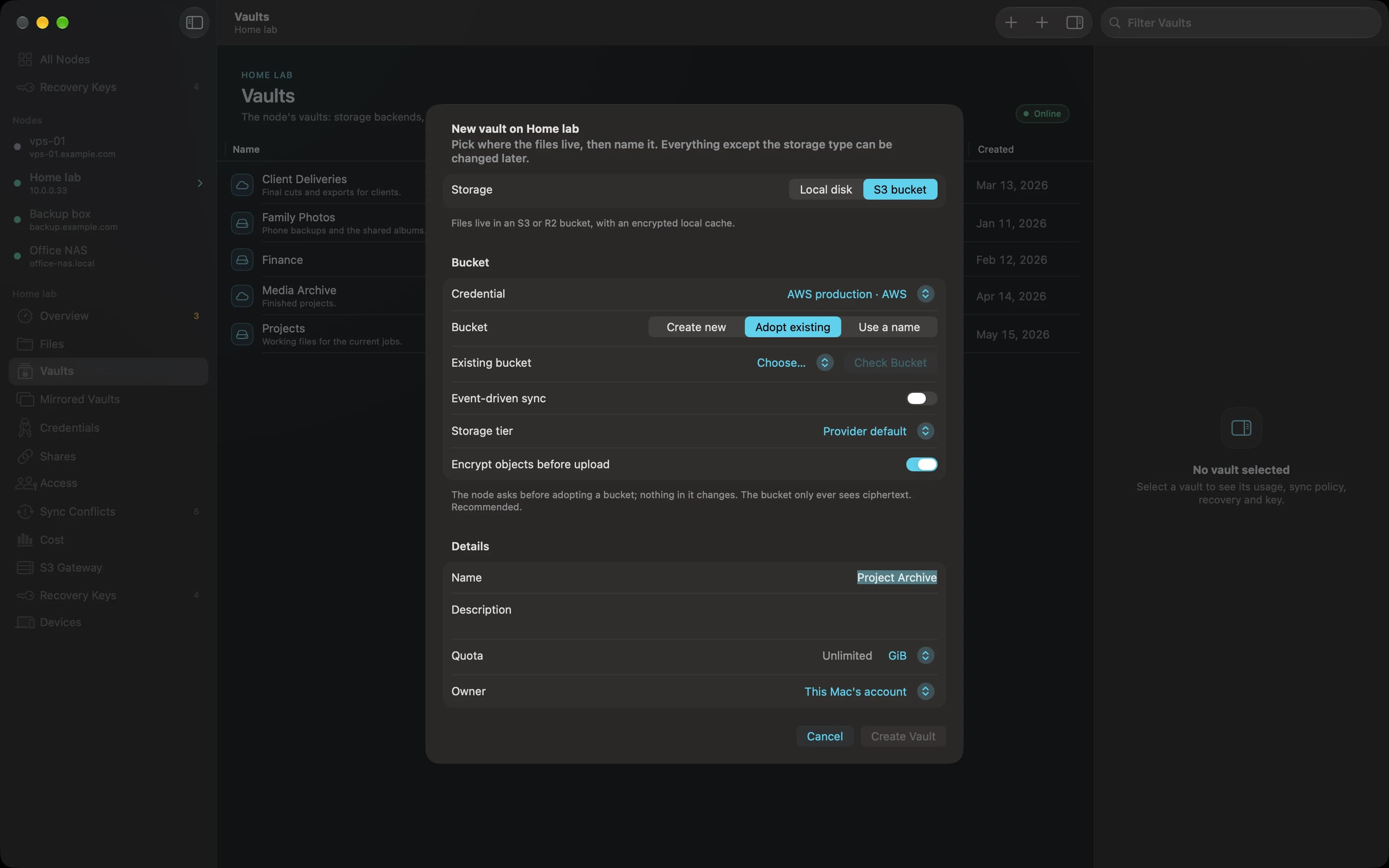
In the New Vault sheet in Vaulthalla Desktop, or with vh vault create --s3, pick a provider credential, create a new bucket or adopt an existing one, and choose the storage tier and encryption before anything is uploaded.

The credential is a vh api-key kept by your server: an endpoint, and a region that defaults to auto. Before adopting, adopt-check inspects the bucket read-only, and vh vault storage probe detects what it supports, such as conditional writes and versioning.

S3, R2 and B2 vaults
Vaulthalla Desktop's New Vault sheet set up for an S3 bucket: credential, adopting an existing bucket, storage tier and encryption before upload

Where your vaults live

Your disks

Local vaults keep their bodies on the server's own disks, encrypted, with quotas and a conflict policy.

Your buckets

Bucket vaults live in any S3-compatible bucket you own, reached through a provider credential stored on your server.

Your provider accounts

The bill, the account and the buckets stay in your name. Vaulthalla administers them on your behalf and lets go when you ask.

Supported providers

Any S3-compatible bucket can hold a vault. Three providers also get full administration, which means Vaulthalla can take inventory of the account, create or adopt buckets, apply protection locks, detach, and clean up only the buckets it created.

Provider What you get Event sync and prices
AWS S3 Vault storage and full administration, since v1.14.0 SQS events, priced
Cloudflare R2 Vault storage and full administration, since v1.14.0 Queues events, priced
Backblaze B2 Vault storage since v1.23.0, full administration since v1.25.0, version retention through lifecycle rules Neither
Other S3-compatible: MinIO, Wasabi and others Vault storage within what each bucket supports, and protection locks Neither

On plain S3-compatible storage you bring the bucket and Vaulthalla stores the vault in it. Work on unpriced providers runs only with --accept-unpriced. Backblaze B2 has no conditional writes, so Vaulthalla publishes the vault's manifest as a version log there, and if a bucket ever loses a capability, sync stops with bucket_capability_changed instead of quietly downgrading. Managed buckets and locks

Privacy from your provider

What your provider can and cannot see

Your storage provider only ever sees encrypted, opaquely named objects. It can't see your file names, folders or contents. It can see how many objects you store, their sizes and when they change. That is the default opaque layout, used by every new encrypting bucket vault since v1.22.1.

Who can see what

Who can read what, for three vault types. A, local vault: files are encrypted at rest with a per-vault key sealed by the TPM2 on Linux or the Secure Enclave on a Mac, and no storage provider is involved. B, bucket-backed vault with the opaque layout, the default for new encrypting vaults: your server encrypts files and names before upload, so your storage provider only ever sees encrypted, opaquely named objects. It cannot see your file names, folders or contents. It can see how many objects you store, their sizes and when they change. C, device-held keys, called sealed vaults, is designed but not yet built: keys would stay on your devices and the server would hold only ciphertext. In A and B you, the server’s operator, can read everything. Valkyrian Labs can read nothing in any mode: it receives no keys and runs none of your servers. It is the software vendor, and you control your server and its updates.

Vault type
Hardware you control

You the server’s operator

Your server

Encrypts at rest

Files on local disks, no provider involved

Per-vault key, sealed by the TPM2 (Linux) or Secure Enclave (Mac)

Can readEverything

  • Sees: Contents and names, through the server

The daemon holds the vault key while it runs.

no upload
Your storage provider

Your storage provider

No bucket

Not involved

Local vaults keep their bytes on your disks

Can readNot involved

  • Cannot see: A local vault never leaves your hardware
Software vendor

Valkyrian Labs

Ships the software

Signed packages

You decide when to update

Can readNothing

  • Cannot see: Receives no keys
  • Cannot see: Runs none of your servers

The software vendor. You control your server and its updates.

Hardware you control

You the server’s operator

Your server

Encrypts before upload

Files and names, both

Per-vault key, sealed by the TPM2 (Linux) or Secure Enclave (Mac)

Can readEverything

  • Sees: Contents and names, through the server

The daemon holds the vault key while it runs.

ciphertext
Your storage provider

Your storage provider

Your bucket

Opaquely named objects

  • o/3f9c1a…2.4 MB
  • o/a07e5b…18 KB
  • o/c41d92…610 KB

Can readNothing readable

  • Cannot see: File names, folders or contents
  • Sees: How many objects, their sizes, when they change
Software vendor

Valkyrian Labs

Ships the software

Signed packages

You decide when to update

Can readNothing

  • Cannot see: Receives no keys
  • Cannot see: Runs none of your servers

The software vendor. You control your server and its updates.

Designed, not yet built

Planned

You the server’s operator

Your devices

Hold the keys

The server stores only ciphertext

Keys stay on your devices (sealed vaults)

Can readEverything, on your devices

  • Sees: Contents and names, on your devices
  • Cannot see: Through the server alone: ciphertext
ciphertext only
Your storage provider

Your storage provider

Your bucket

Opaquely named objects

  • o/3f9c1a…2.4 MB
  • o/a07e5b…18 KB
  • o/c41d92…610 KB

Can readNothing readable

  • Cannot see: File names, folders or contents
  • Sees: How many objects, their sizes, when they change
Software vendor

Valkyrian Labs

Ships the software

Signed packages

You decide when to update

Can readNothing

  • Cannot see: Receives no keys
  • Cannot see: Runs none of your servers

The software vendor. You control your server and its updates.

Vaults created before v1.22.1 keep their older layout until vh vault migrate-layout: file contents are encrypted before upload, and file and folder names are visible to your storage provider. --no-encrypt stores objects exactly as sent. Whoever runs the server can read everything on it. Valkyrian Labs receives no keys and remains the software vendor: you control your server and its updates. How each mode works.

Portable by design, and easy to leave

Each encrypted object's header binds it to its vault, object, key version and salt, never to a bucket, so sealed objects are portable between buckets and providers. Leaving a provider, or Vaulthalla, takes three steps, and none of them needs us.

  1. Bring the vault home

    vh vault remote detach fetches and verifies every file, copies the key envelopes, and turns the vault back into a local one with the same ID, keys, permissions and shares. It never writes to or deletes from the bucket.

  2. Keep your keys

    vh vault keys export writes every key version the vault still needs, encrypted to your own GPG key. Recovery kits, made offline on your own computer, cover every current and future key version too.

  3. Decide about the bucket

    The bucket is still yours, in your account. Keep it as an extra copy, or delete it with your provider when you are done.

Recovery works the same way. Restore from your bucket and your recovery kit into a server you run, even if the old one is gone. No account or payment needed. Users, roles and shares live in the database, so keep a database backup for those. A one-step move between buckets is not built yet: today you detach to local disks, then attach the new bucket. Recovery · Key export

Commands

Leaving and spending, from the command line

# Bring 'finance' back to local disks. The bucket is never written to or deleted from.
$ vh vault remote detach finance --confirm finance
# Export every key version still needed, encrypted to your own GPG key
$ vh vault keys export all --recipient <gpg-fingerprint> --output vault-keys.json.gpg
$ vh vault sync set archive --s3-budget-preset conservative
$ vh pricing budget set-vault archive --mode enforce --max-run 0.25
# See planned requests, traffic and price before anything runs
$ vh vault sync dry-run archive

Without --recipient, a key export warns and writes unencrypted JSON. See secrets and key export and cost control.

Cost control on your own accounts

Your provider bills you, so Vaulthalla is built to spend your money carefully.

Budgets that stall

Request budgets cap each sync pass by operation and downloaded bytes. A pass that would cross a limit stalls with a reason, and the next pass picks up where it stopped.

Price caps

Price budgets cap a run, a day and a month, globally, per provider or per vault, and gateway keys get their own monthly caps. Estimates cover AWS S3 and Cloudflare R2.

No egress for local reads

A file already held locally is served from its encrypted local copy, with no request and no egress. An idle sync pass on an opaque vault costs one HEAD, and a rename rewrites no object.

What bring your own storage does not mean

  • You run it. No single backup command covers everything: back up the database, configuration and state, and your buckets with your own tools.
  • Encryption does not stop a provider deleting your data. Against a suspended or closed account, keep a second copy: local copies, a mirrored vault on a second server, or your own bucket backups.
  • One remote per vault today. Several equal remotes per vault are designed, not built.
  • Plain S3-compatible storage gets less. No provider administration, event sync or price estimates outside AWS S3, Cloudflare R2 and Backblaze B2.
  • No managed storage today. Vaulthalla Cloud's managed storage is planned, not available.

FAQ

Questions about bringing your own storage

What does bring your own storage mean in Vaulthalla?

Your vaults live on disks you own or in S3-compatible buckets under provider accounts in your name, and every feature works there. It is the only storage model Vaulthalla offers today.

Which storage providers are supported?

AWS S3, Cloudflare R2 and Backblaze B2 get full bucket administration. MinIO, Wasabi and other S3-compatible services work as plain vault storage, within what each bucket supports.

Do I need a Vaulthalla Cloud account?

No. Vaulthalla Cloud is a planned, optional service and is not yet available. Nothing in Vaulthalla needs it.

Will some features be reserved for managed storage?

No. Bring-your-own storage keeps every capability. Managed storage, when it comes, is planned as an optional convenience, never a prerequisite.

Can my storage provider read my files?

Not in the default opaque layout: the provider sees encrypted, opaquely named objects, plus how many there are, their sizes and when they change. Whoever runs the server can read everything on it.

How do I switch storage providers?

Detach the vault to local disks, then attach it to an empty bucket at the new provider. Through gateway upstream profiles, S3 clients keep the same endpoint while the account behind it changes.

What happens to my data if I stop using Vaulthalla?

Detach brings every file back to local disks and never touches the bucket, and you can export the keys to your own GPG key. Recovery.

Bring your own storage

Your storage, with nothing held back

Install the server, point a vault at a disk or a bucket you already pay for, and keep every capability on storage in your own name.

Debian and Ubuntucurl -fsSL https://apt.vaulthalla.sh/install.sh | bash