Skip to content
Vaulthalla LogoVaulthalla

Vaulthalla Desktop

Every Vaulthalla server you run, in one Mac app

Vaulthalla Desktop puts your vaults in Finder, watches every server from the menu bar and administers them all from one window. It pairs without passwords and backs vault keys up to your own 1Password.

Version 0.7.0 · Apple Silicon · macOS 27 or later

  • Vaults in Finder, downloaded on demand
  • Pairs with a Secure Enclave key and a six-digit code
  • Open source under the AGPL

Latest release

Vaulthalla Desktop

0.7.0Nov 28, 2026Apple SiliconmacOS 27 or later

Download for Mac43.6 MB
brew trust valkyrianlabs/tapbrew install --cask valkyrianlabs/tap/vaulthalla-desktop
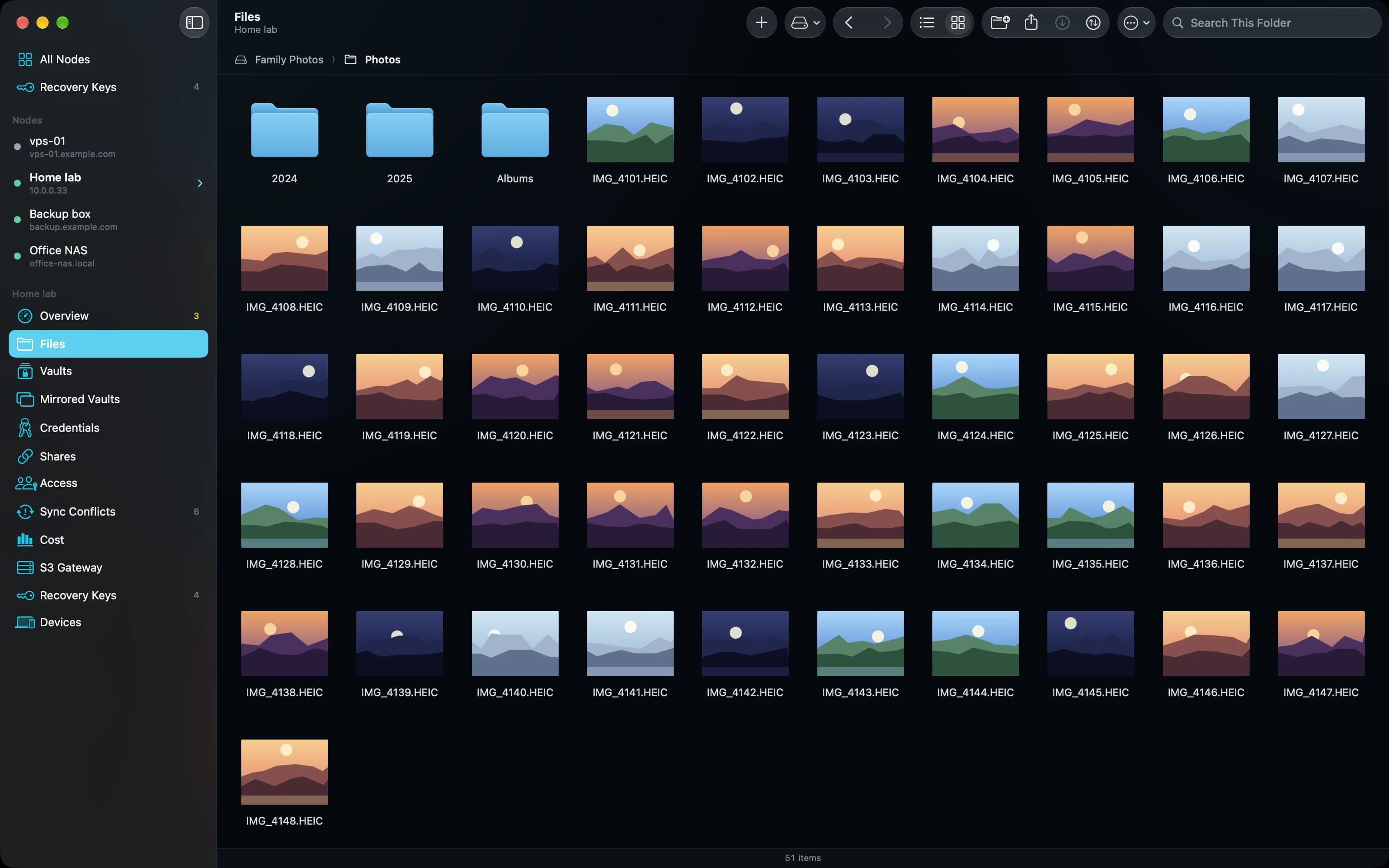
The Vaulthalla Desktop Files browser in grid view, showing photo thumbnails from the Family Photos vault

Every day

Part of the Mac, not another window to check

Finder

Your vaults under Locations

Switch a vault on in Settings › Finder and it appears under Locations, named after the vault and its server, like iCloud Drive.

  • Files download when you open them; large files are read in ranges. macOS reclaims the space when it needs to.
  • Keep Downloaded keeps a file or folder offline; Allow Removing Download lets it go again.
  • Edits, renames, moves and deletes go to the server. Deletes land in the server's trash, and files over 8 MiB upload in resumable parts.
  • A conflicting edit is saved as name (conflict from <Mac> <date>) instead of overwriting anyone.
  • It keeps working with the app quit.

The first time, macOS asks you to allow the extension under System Settings › General › Login Items & Extensions.

Finder in the docs

Menu bar

Every node at a glance, and a word when one needs you

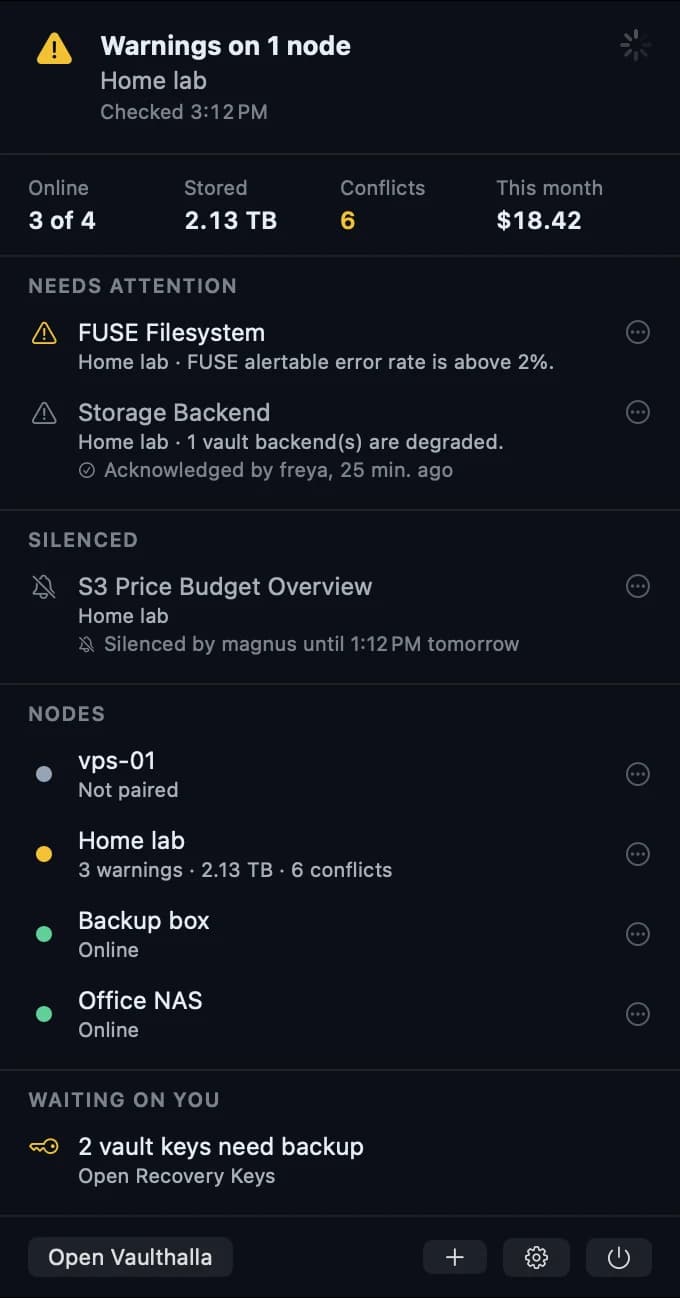
The menu bar icon shows the state of your whole fleet: all quiet, warnings, needs attention or not reporting. Its panel lists what needs attention, every node with favorites first, and the vault keys waiting on you.

Closing the window doesn't quit: Desktop keeps watching in the background and opens at login. Notifications cover a node going offline or coming back, errors and notable warnings, errors clearing, new sync conflicts and keys that need a backup. Each problem notifies once, with Acknowledge and Silence for a Day, and any node can be muted.

Menu bar and notifications
The Vaulthalla menu bar panel: fleet status, what needs attention, every node's state and the vault keys waiting on you

One window

Administer every server from one place

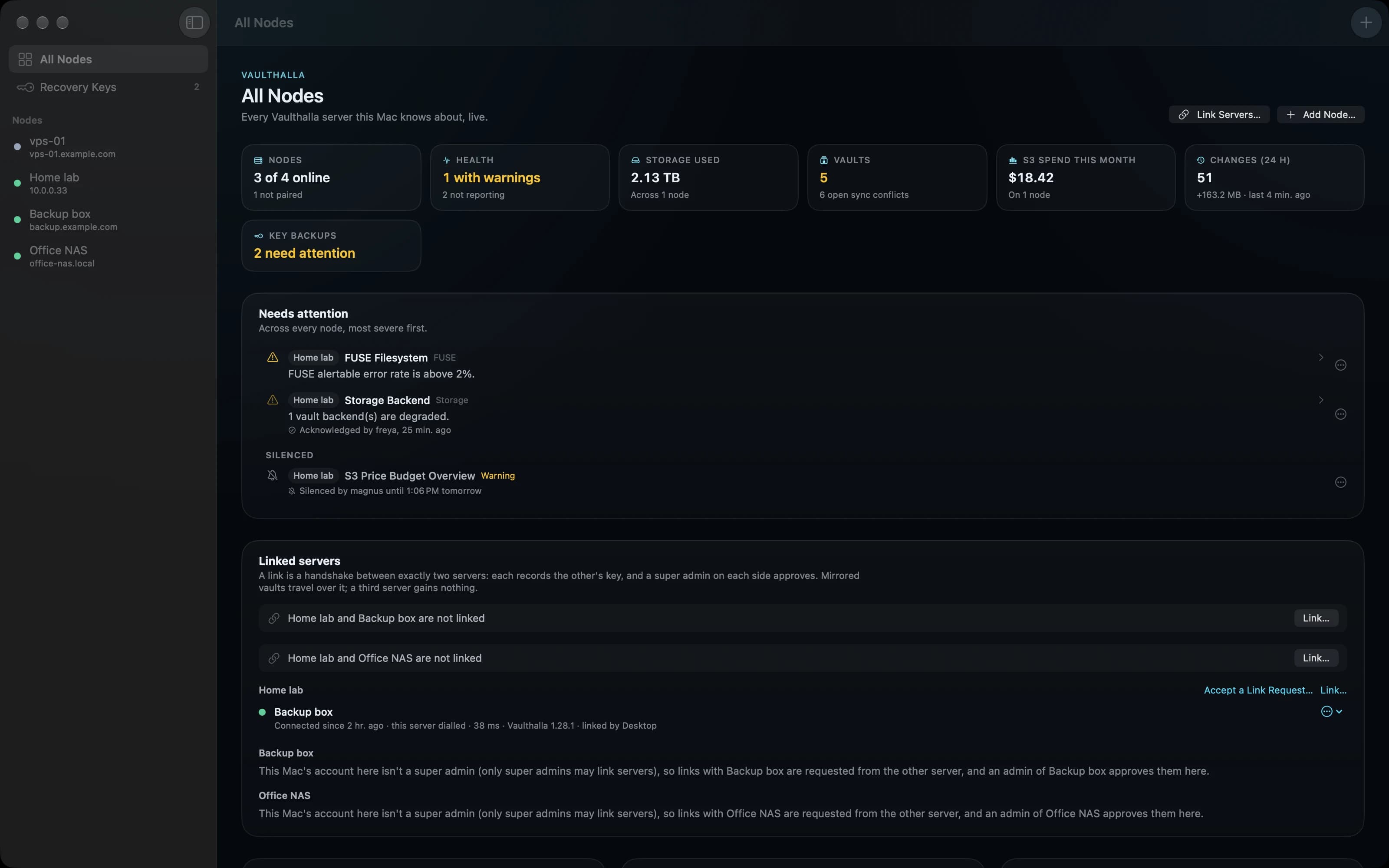
Pair as many nodes as you run: a home lab, an office NAS, a VPS. Each gets the same sections, and the All Nodes dashboard sums them up.

The All Nodes dashboard: four servers with health, storage used, vaults, S3 spend this month, key backups, what needs attention and the linked servers

The whole fleet on one screen

Health, storage used, vaults, S3 spend this month and key backups for every server, with what needs attention and the servers you have linked.

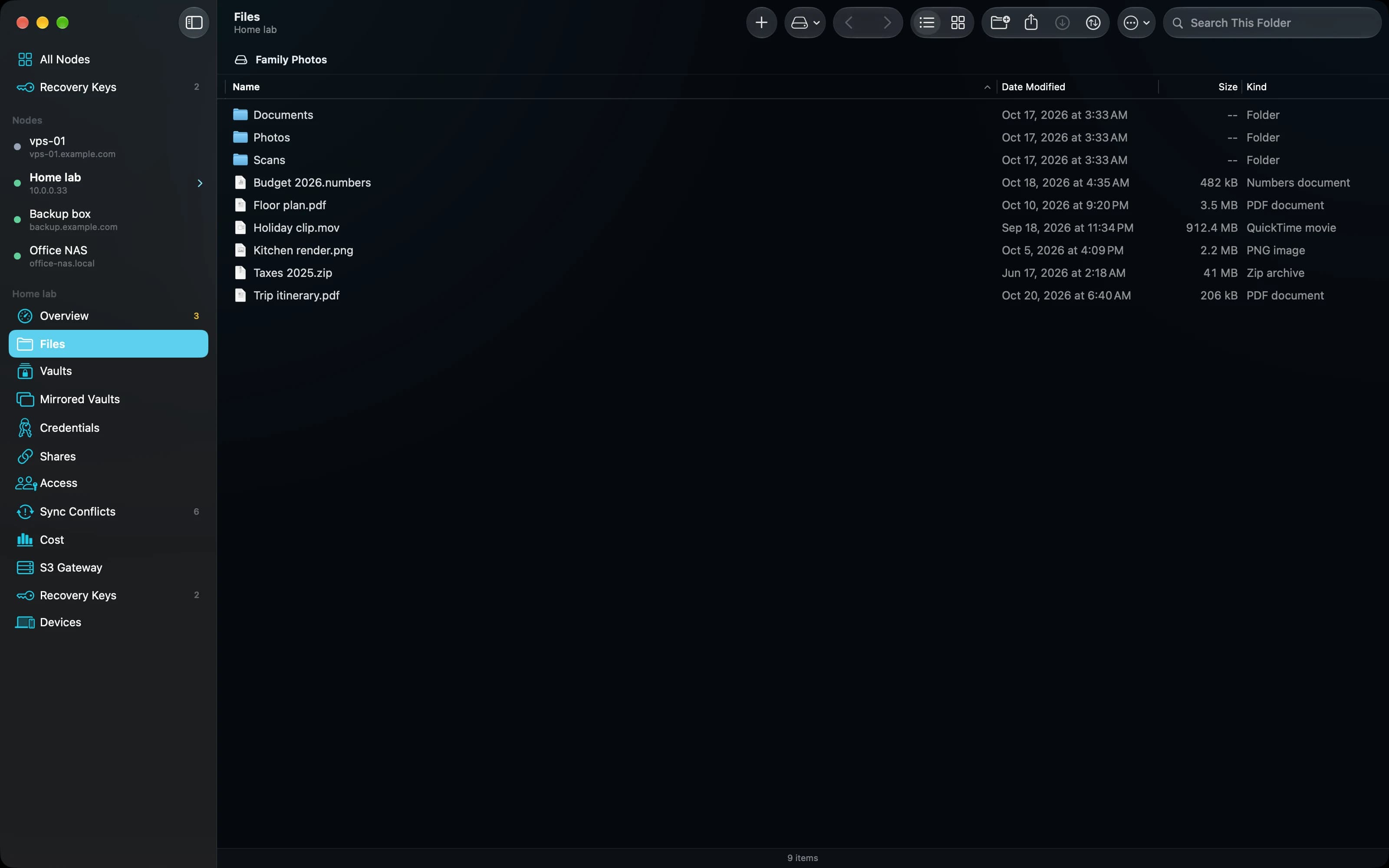
The Files browser in list view, with modified dates, sizes and kinds for a vault's folders and documents

Browse any vault

List or grid, Quick Look, drag to and from Finder, resumable transfers, and a file's history with snapshots and versions: plan a restore, then run it.

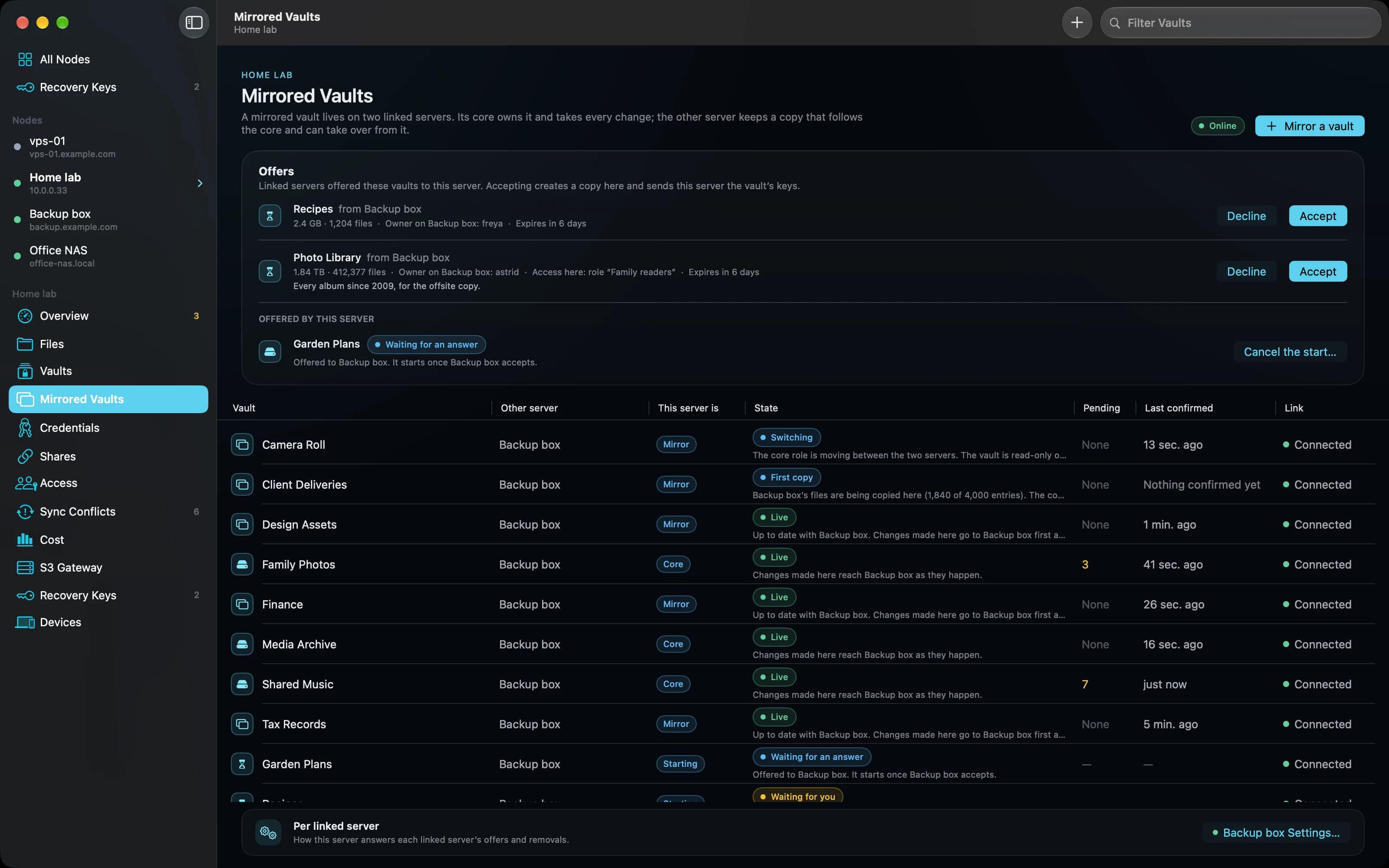
Mirrored Vaults: offers from a linked server, and every mirrored vault with its role, live state, pending changes and link status

Vaults kept on two servers

Offers from linked servers, and every mirrored vault with its role, live state, pending changes and link status. Needs server 1.27 or later.

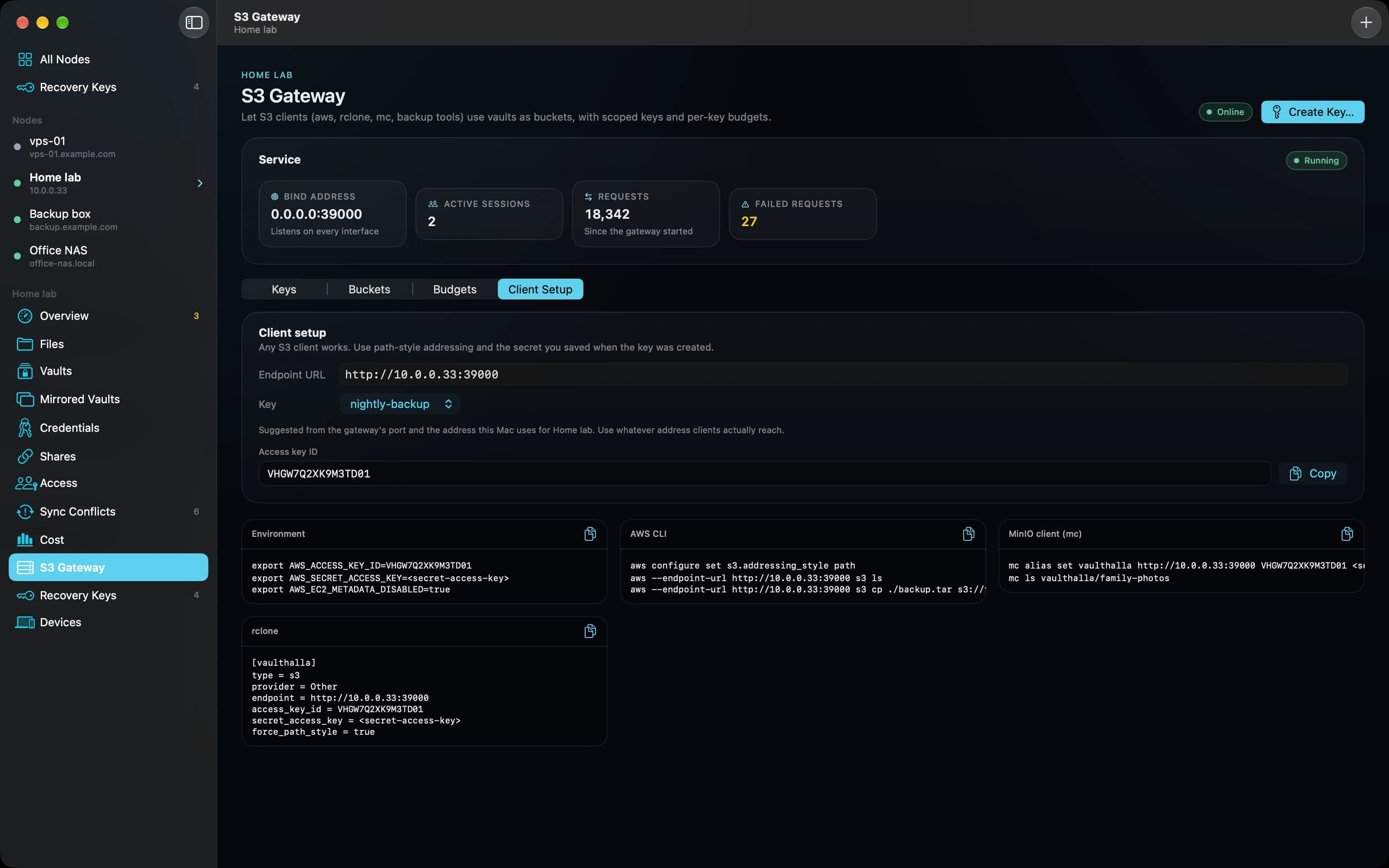
S3 Gateway client setup: endpoint, access key and ready-to-copy settings for the AWS CLI, rclone, MinIO client and environment variables

Connect S3 tools in a minute

The node's S3 endpoint, scoped access keys with budgets, and ready-to-copy settings for the AWS CLI, rclone, the MinIO client and environment variables.

Learn more about Connect S3 tools in a minute
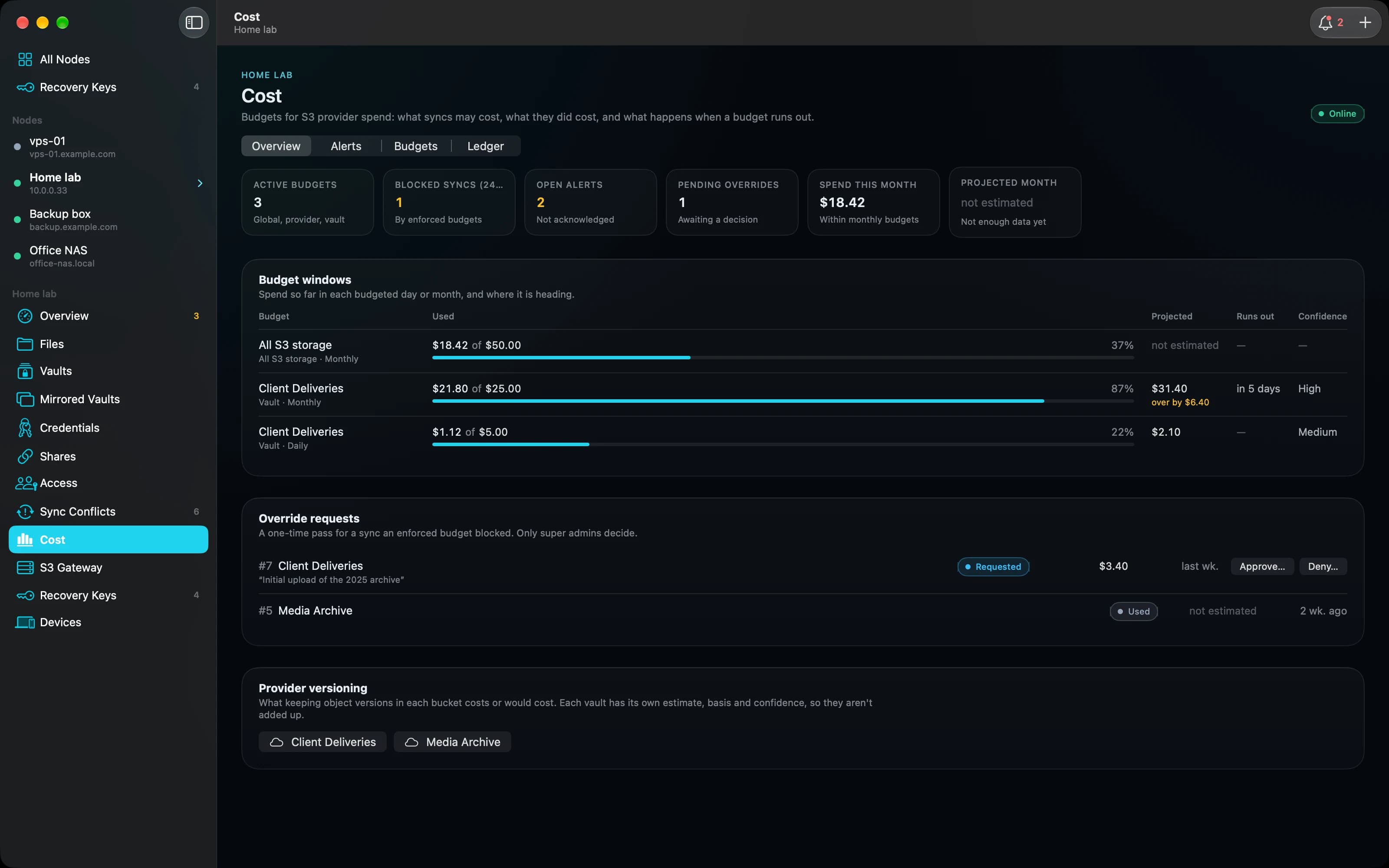
Cost: S3 budget windows with spend, projections and run-out dates, override requests and provider versioning

Know what your buckets cost

Storage and transfer cost by vault and backend, budget windows with projections and run-out dates, alerts and the ledger behind them.

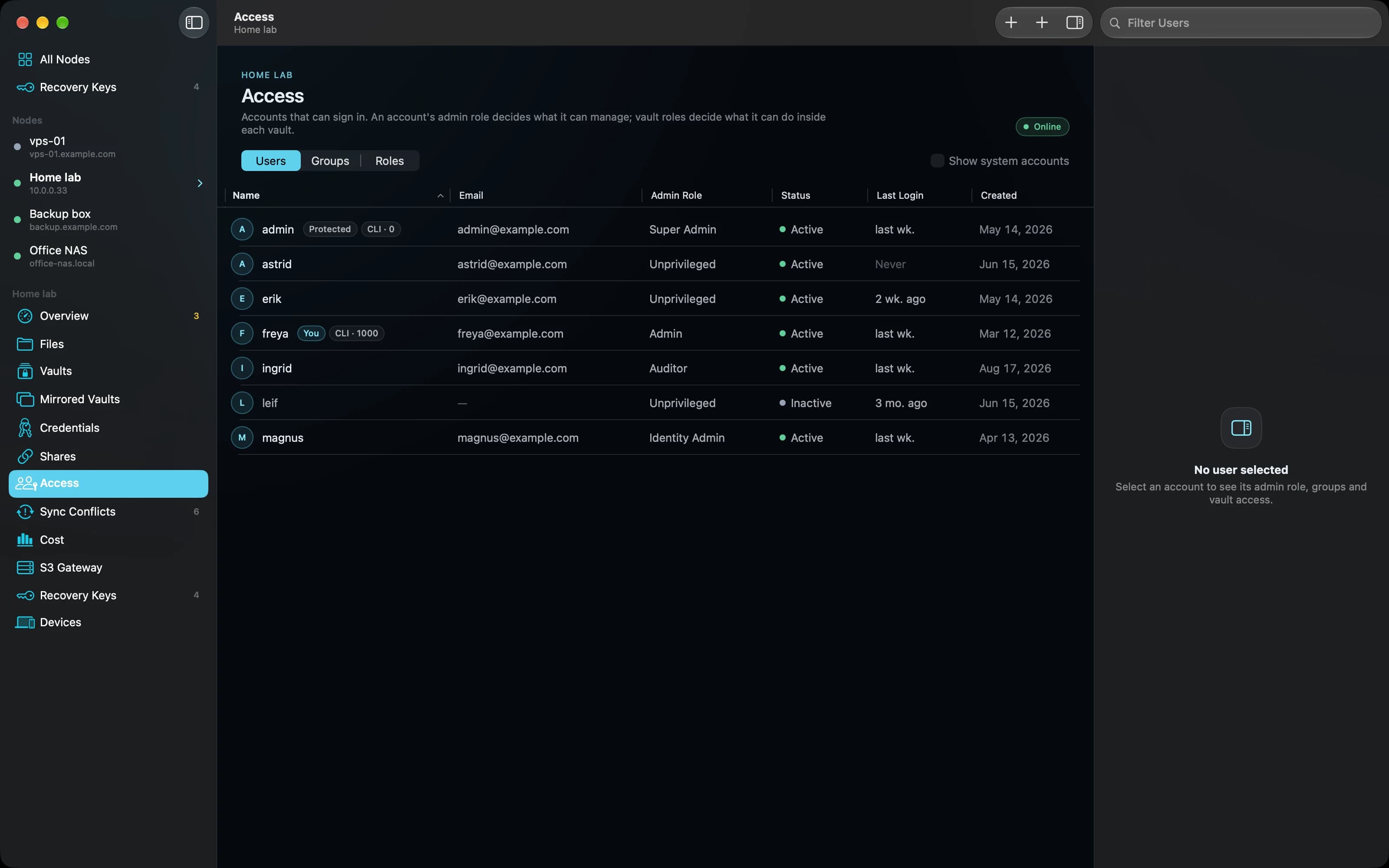
Access, Users: accounts with email, admin role, status and last login

People, groups and roles

Users, groups and roles with editors and inspectors, the same model the web console and the CLI use.

Pairing

Pair without passwords

This Mac

A device key that never leaves the Secure Enclave

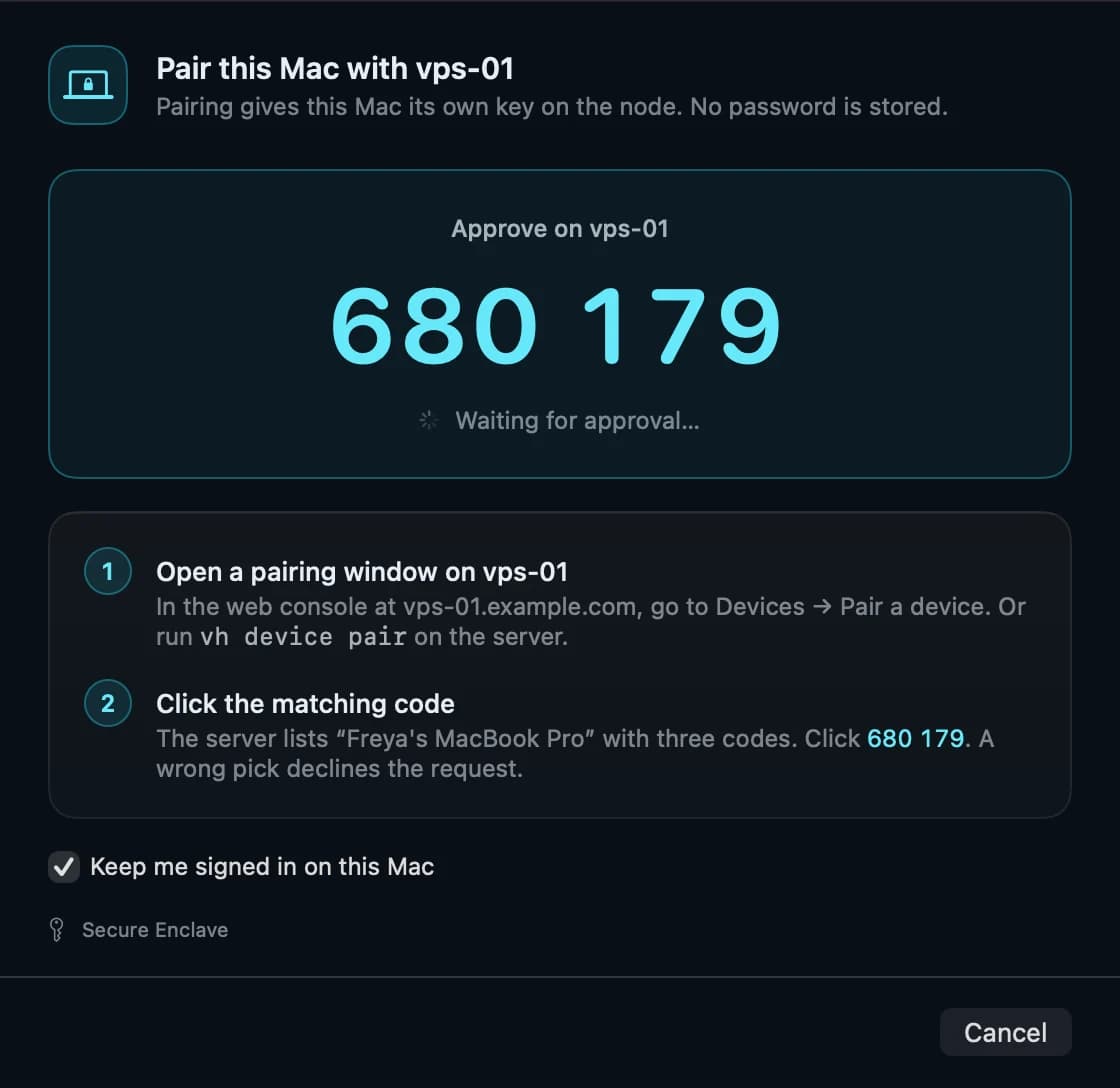
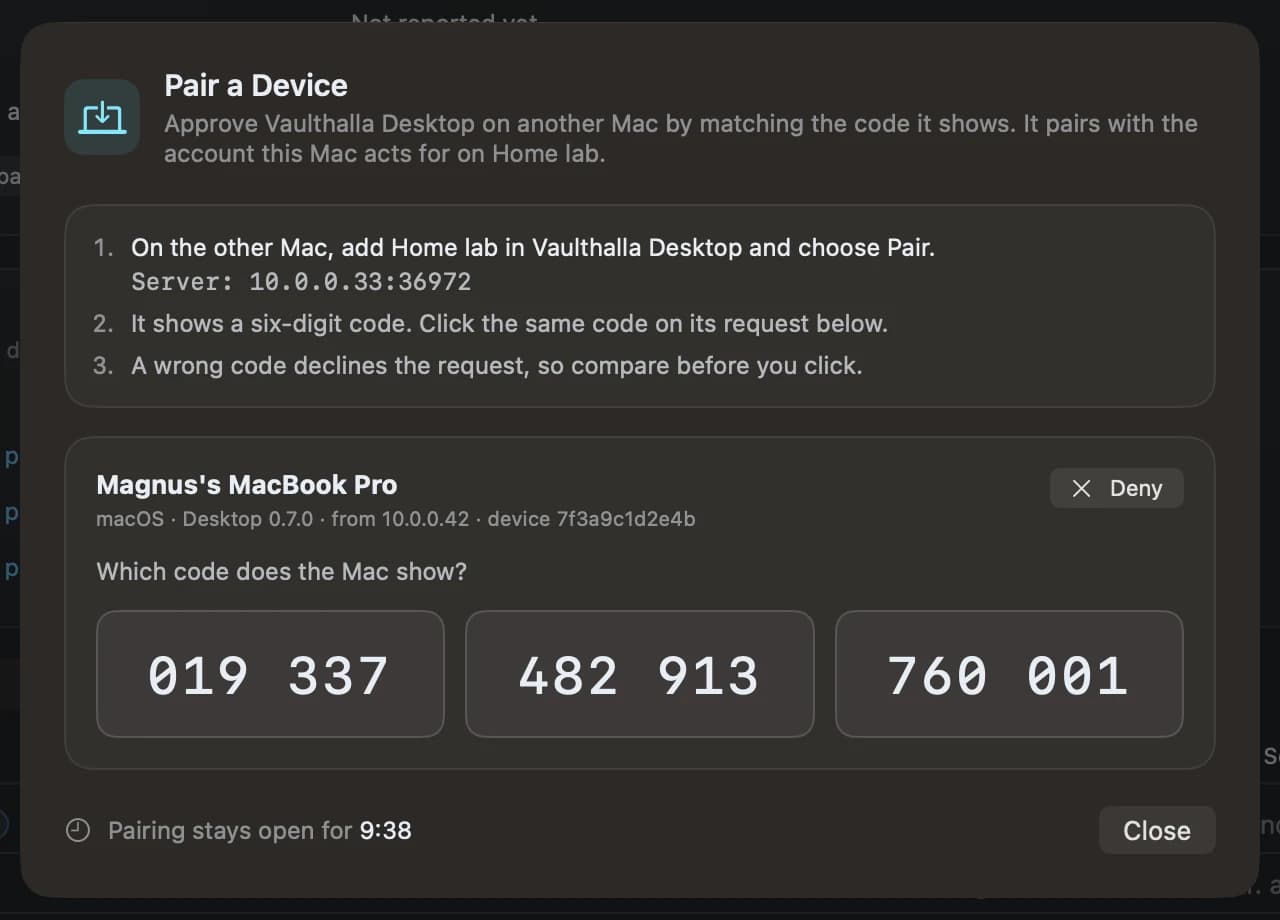
When you add a node, the Mac creates its own key in the Secure Enclave. The server owner opens a pairing window (Pair a device in the web console, or vh device pair), both sides derive a six-digit code, and the owner picks the matching code from three choices. A wrong pick declines the request.

From then on, Desktop talks to the node over mutual TLS 1.3 and pins the server's key instead of trusting the system's certificate store. It reaches remote nodes over the best route that proves that key: this Mac, the LAN, a VPN, then the internet. A server installed on the same Mac pairs without a code.

Pairing a Mac
Pairing this Mac with a node: a six-digit code to approve on the server, with the two steps to finish

Another Mac

Approve a new Mac from one you trust

Add a second Mac from Devices › Pair a device: it shows a code, you pick the same one on the Mac that is already paired. Rotate this Mac's key or unpair it from Devices › This Mac at any time.

The device listener answers only on the server itself until its owner runs vh device remote enable.

Direct connections
Approving another Mac: pick the six-digit code that Mac shows from three choices; a wrong pick declines the request

What the app can and cannot do

Desktop holds no storage or permission logic of its own. Every action is an operation the server authorizes, so the app can do exactly what your account can in the web console, and nothing more.

Your account, nothing more

A paired Mac inherits the permissions of the person who approved it. Finder lists and downloads exactly what that account may see, on every node.

Signed in on your terms

Stay signed in across restarts, or turn Keep me signed in off so quitting signs out: it revokes this Mac on every node, deletes its keys and removes its vaults from Finder. Touch ID can guard Recovery Keys, Credentials and Access.

Encryption stays on the server

Vaults are encrypted by the server. Desktop sees files in the clear over its mutual TLS connection, like the web console does, so it is not end-to-end encryption from the Mac.

Offline copies are copies

A file you kept downloaded stays on the Mac. If someone's access is revoked later, the vault leaves Finder and unsynced edits are moved aside, but a copy already on disk can't be recalled.

Keys, agents and mirrors

The parts no web page can do

1Password

Back up vault keys to your own 1Password

Desktop writes each vault's key, with every key version and the server's attestations, to an item in a Vaulthalla vault in your 1Password. It uses 1Password's official SDK and the 1Password app's own approval with Touch ID (turn on Integrate with other apps in 1Password's Developer settings): no service account, and no account with Valkyrian Labs.

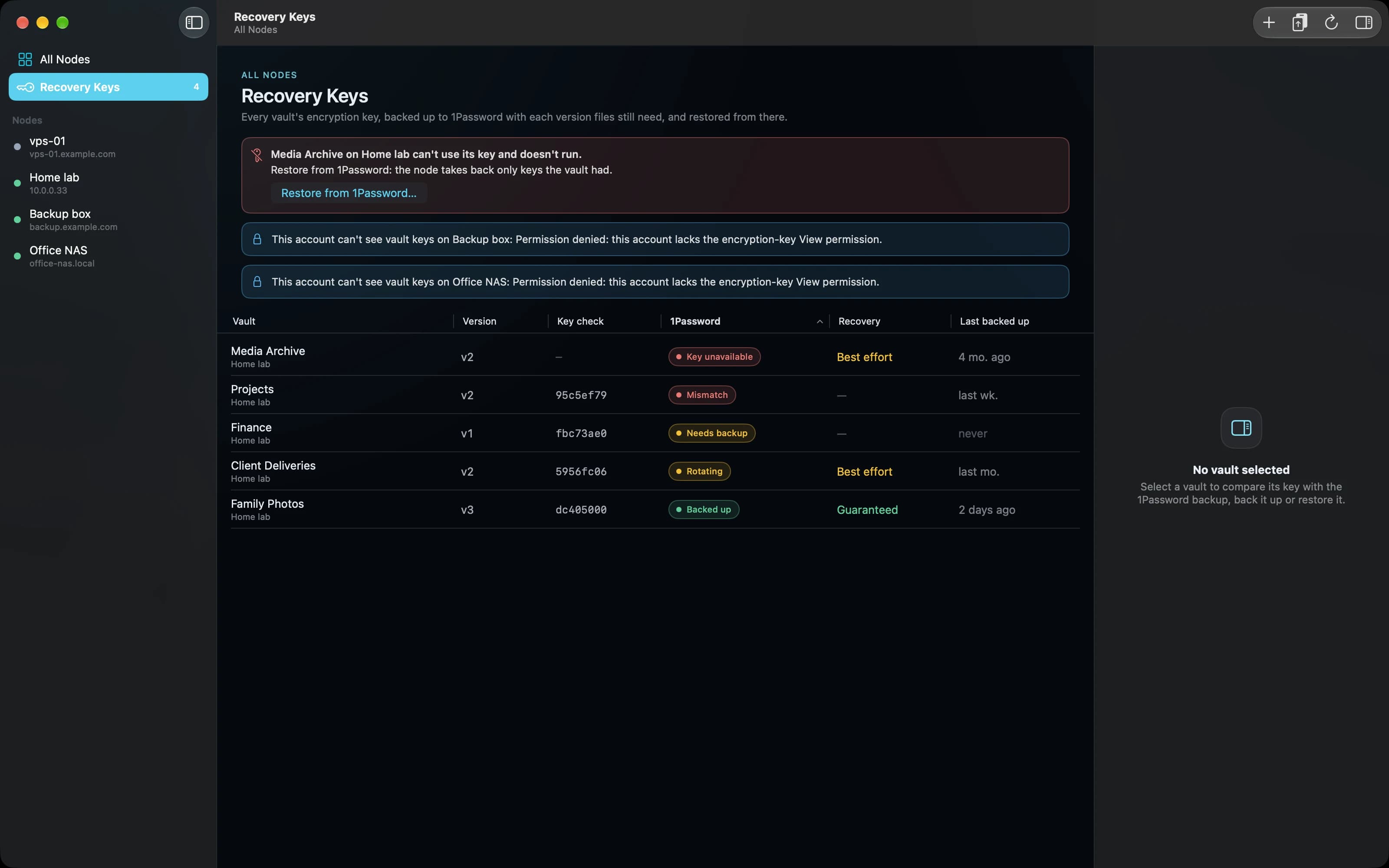
Recovery Keys shows every vault on every node as backed up, needs backup, rotating or mismatch, with Sync all. Key bytes never pass through command lines, logs or AI tools.

Recovery keys
Recovery Keys: each vault's encryption key, its 1Password backup state and how certain recovery is, including a key that needs restoring

Restore

A restore accepts only the vault's own keys

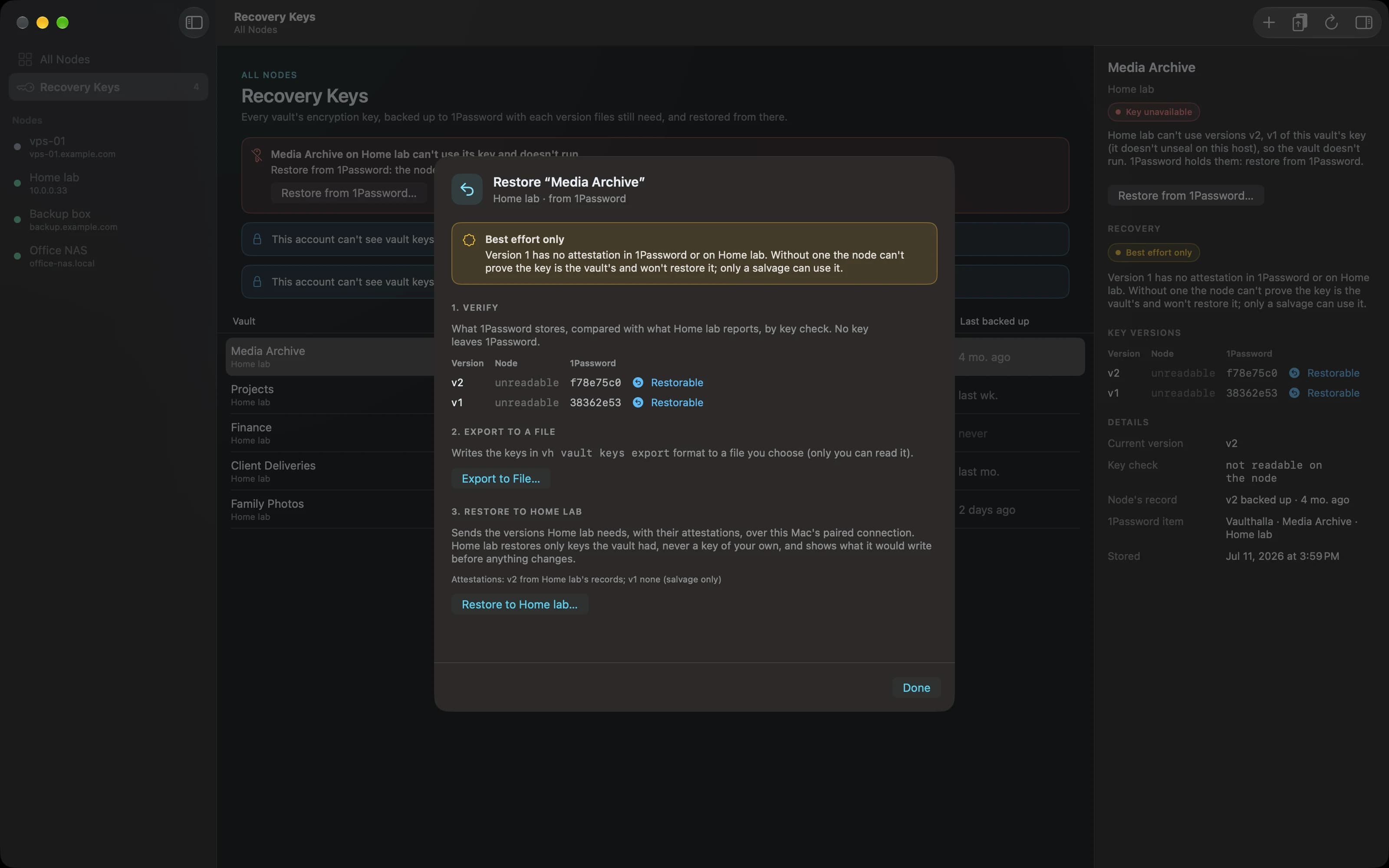
Verify the stored versions, export them to a file, or restore them to the node. The node accepts only key versions its own attestation proves belonged to that vault, so a restore can bring a lost key back but can never slip in a new one. Re-encrypting under a fresh key is a separate, explicit step.

Keys and key export
The Restore from 1Password sheet: verify the stored key versions, export them to a file, or restore them to the node

AI apps

Your servers, available to Claude and Codex

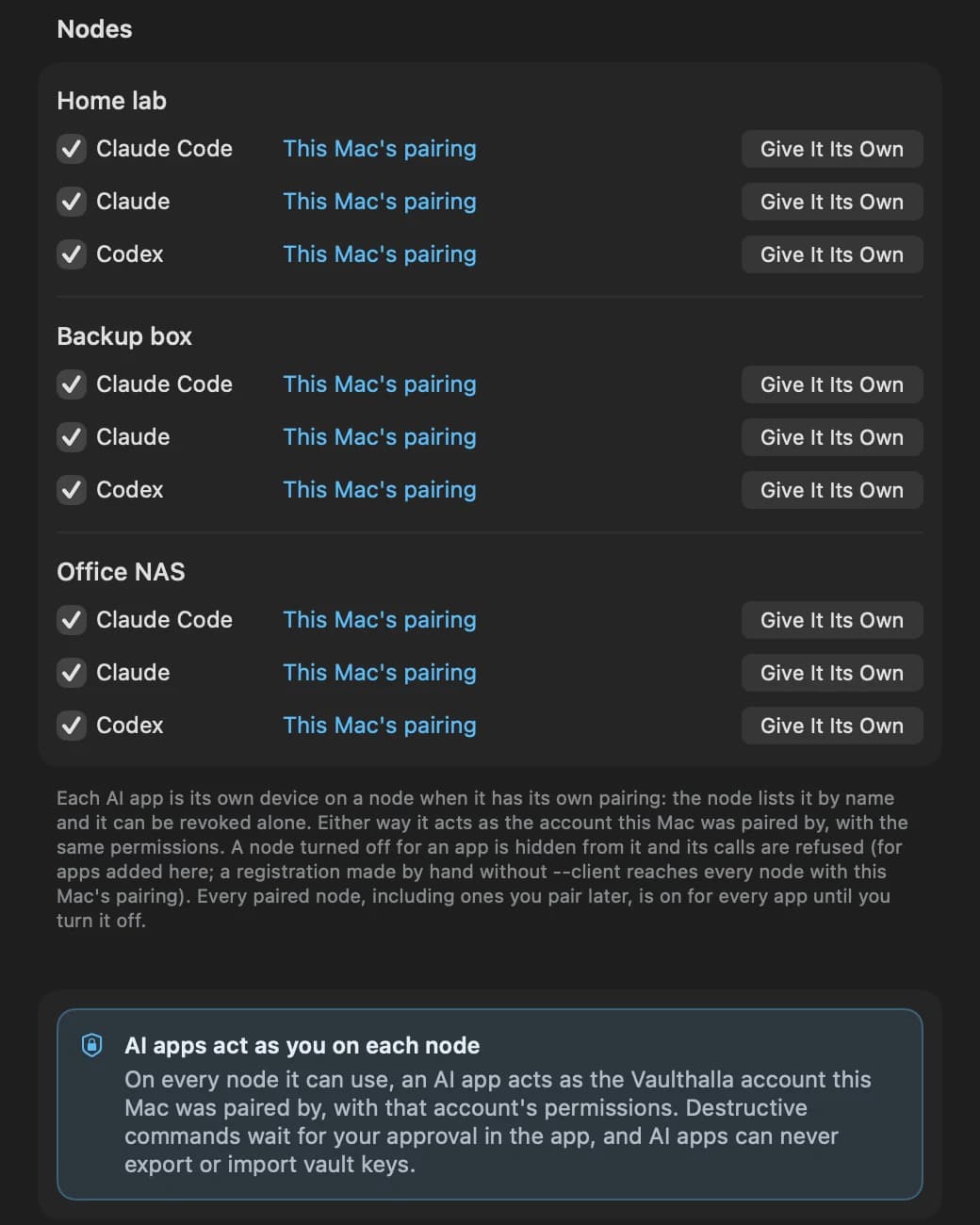
Settings › Agents sets up Claude Code, Claude desktop and Codex in one click, with a switch per node. One MCP server covers every paired node. An app acts as you and never beyond you, destructive commands wait for your approval, and no tool can export vault keys. Desktop can give each AI app its own revocable pairing and scope.

AI-native storage
Settings, Agents: which AI apps (Claude Code, Claude, Codex) may use each node, with a note that they act as you and can never export vault keys

Linked servers

Mirror a vault to a second server, and reconnect after a split

Link two servers in a stated handshake that a super admin approves on each side. Nothing is mirrored until a vault is offered and accepted. Then switch which server leads, take over when one is lost, or detach and keep your copy.

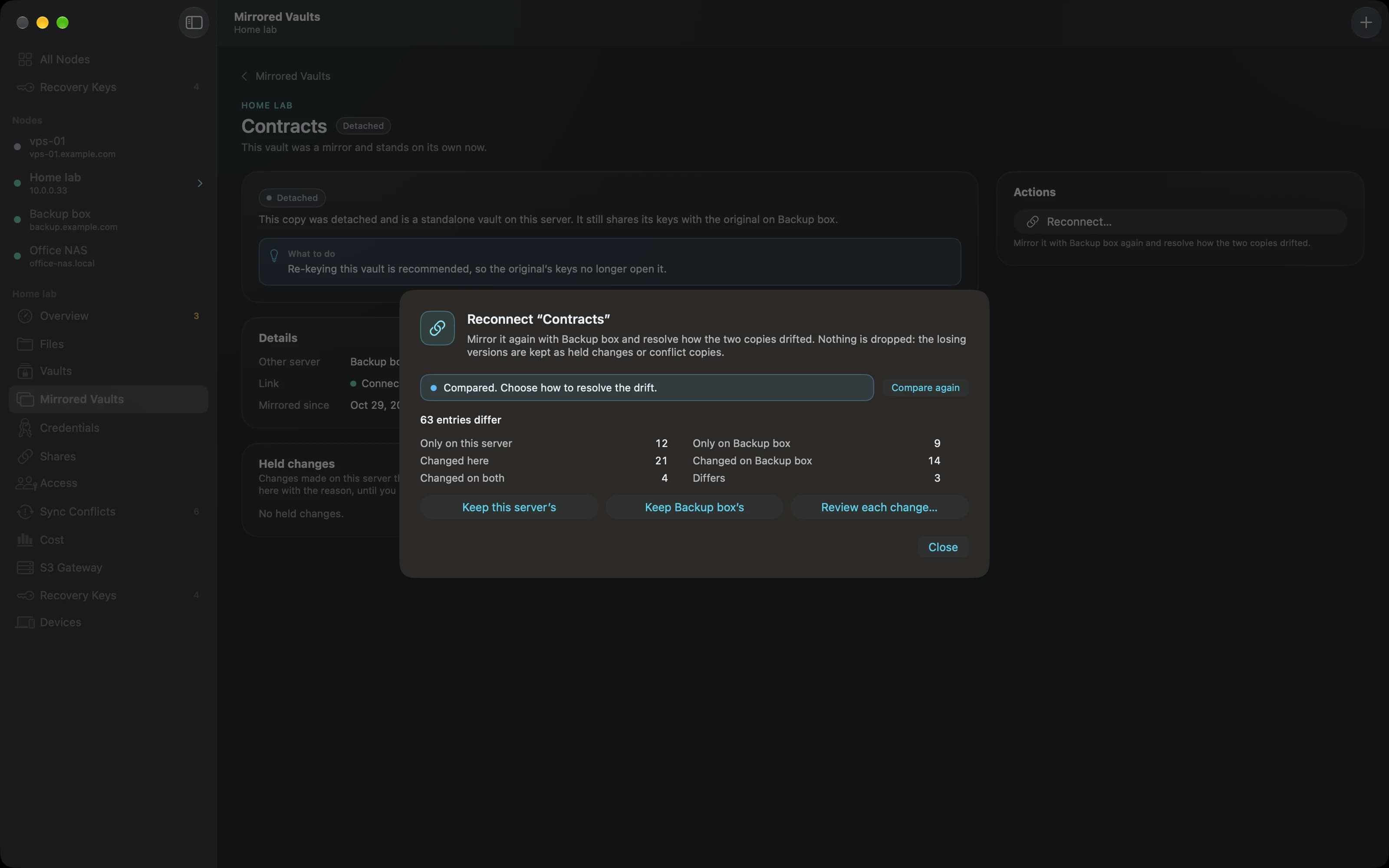
If two copies drifted apart, Reconnect compares them and lets you keep this server's entries, the other's, or review each change.

Mirrors in Desktop
The Reconnect sheet after comparing two copies that drifted apart: entries that differ on each side, with keep-this-server's, keep-the-other's or review-each-change options

Requirements, plainly

Mac Apple Silicon. No Intel Macs.
macOS macOS 27 or later
Server A Vaulthalla Server 1.17.0 or later to pair with. Linked servers and mirrored vaults need 1.27, scoped AI app pairings 1.24, resumable uploads 1.20.
Install The notarized DMG from GitHub, or brew trust valkyrianlabs/tap, then brew install --cask valkyrianlabs/tap/vaulthalla-desktop
Updates Automatic, signed with EdDSA and checked by the app before they install
Version 0.7.0. Desktop is at 0.x and moving fast: it went from 0.1.0 to 0.7.0 in its first month.

What it does not do

  • There is no Windows, Linux or iOS app, and Desktop is not on the Mac App Store.
  • Finder checks for changes every 60 seconds rather than receiving them instantly, and uses the system's own cloud status icons.
  • Desktop administers Vaulthalla servers. It does not store files without one.

Running the server on the same Mac? brew trust valkyrianlabs/tap, then brew install --cask valkyrianlabs/tap/vaulthalla installs both, and Desktop pairs with the local server without a code. See Vaulthalla Server and the installation guide.

Questions about Vaulthalla Desktop

Does Vaulthalla Desktop work without a server?

No. Desktop is the Mac app for Vaulthalla servers: it pairs with Vaulthalla Server 1.17.0 or later, on Linux or on a Mac. Get the server.

Does it run on Intel Macs or older versions of macOS?

No. Desktop needs an Apple Silicon Mac with macOS 27 or later. The server alone runs on macOS 14 or later.

Is there a Windows, Linux, iPhone or iPad app?

No. Desktop is the only client app. Other devices use the web console, share links or S3 tools.

Is Desktop end-to-end encrypted?

No. Vaults are encrypted by your server. Desktop talks to it over mutual TLS with pinned keys and sees files in the clear, as the web console does.

Do I need an account with Valkyrian Labs?

No. You sign in to your own servers, and key backups go to your own 1Password.

What if my Mac is lost?

Revoke it from the Devices page in the web console. Its device key never left that Mac's Secure Enclave, and it could only ever do what your account could.

How does it update?

Desktop checks for updates itself and installs only updates signed with its EdDSA key. With Homebrew, the cask leaves updates to the app.

Download

Get Vaulthalla Desktop

Notarized by Apple and signed by Valkyrian Labs LLC. Download the disk image, or install it with Homebrew.

macOS

Vaulthalla Desktop0.7.0

The Mac app for your Vaulthalla servers. Notarized, and it keeps itself up to date.

Released
Nov 28, 2026
Disk image
43.6 MB
Architecture
Apple Silicon (arm64)
Requires
macOS 27 or later
Download .dmg43.6 MB

Drag Vaulthalla to Applications. Signed updates install from the app.

Or with Homebrew

brew trust valkyrianlabs/tapbrew install --cask valkyrianlabs/tap/vaulthalla-desktop
SHA-2565aa9dfba3dc268b42411ff97eafbc50e6b47b7e21b97ebfd6a03f8312af0bc05
Verify the download
  1. Compare the checksum with the one above.

    shasum -a 256 Vaulthalla-0.7.0.dmg
  2. After copying the app, check it. It should report source=Notarized Developer ID, origin Valkyrian Labs LLC (ZG2G6V7GLC).

    spctl --assess -vv /Applications/Vaulthalla.app
  3. Updates are signed with EdDSA and checked by the app before they install.

macOS

Server and Desktop on one Mac

One Homebrew cask installs both. Desktop finds the local server and pairs with it by itself.

Server
1.28.1
Desktop
0.7.0
Architecture
Apple Silicon (arm64)
Requires
macOS 27 or later

Homebrew

brew trust valkyrianlabs/tapbrew install --cask valkyrianlabs/tap/vaulthalla
A woman works at a desk with vault folders on her screen, the vault towers of the city visible through the window

One window

Many vaults, one window, and the keys stay yours.

Pair your first node, switch a vault on in Finder, and let the menu bar keep watch.