Skip to content
Vaulthalla LogoVaulthalla

Vaulthalla vs iCloud

Your files in Finder, on a server you own

iCloud is a cloud you rent from Apple, with nothing to run. Vaulthalla is one you run yourself: vaults in Finder like iCloud Drive, kept on your own disks or in a bucket you choose, under keys you hold.

  • Vaults under Locations in Finder
  • No account with Valkyrian Labs to lose
  • Your own disks, or any S3-compatible bucket

Rented and owned

iCloud: rented

iCloud Drive is built into every Apple device. You buy storage from Apple (in the US, from 50 GB for $0.99 to 12 TB for $59.99 a month, checked November 28, 2026), share a plan with up to five family members, and never think about servers. The trade is that your data, and the account that reaches it, live inside Apple's service: Apple's iCloud terms let it suspend or end an account without prior notice and later delete its data.

Vaulthalla: owned

Vaulthalla turns that around. You run the server, on a Linux machine or an Apple Silicon Mac, and decide where the bytes live: its own disks, or an S3-compatible bucket in your account at AWS, Cloudflare R2, Backblaze B2 or another provider. There is no account with Valkyrian Labs, and nothing reports back. In exchange, you take on the work Apple was doing for you.
Row by row

A cloud you run beside one you rent

Both put your files in Finder. The rows below show who holds what, checked on November 28, 2026.

  • YesYes
  • PartlyPartly
  • NoNo
  • PlannedPlanned
  • Not applicableNot applicable
Vaulthalla compared with iCloud
DimensionVaulthallaStorage platformServer 1.28.1, Desktop 0.7.0iCloudConsumer cloudiCloud Drive and iCloud+
Ownership
Self-hosting and infrastructure ownership

This is the core difference: iCloud is a service you rent from Apple, and Vaulthalla is software you run yourself.

YesRuns on hardware you own

One daemon plus PostgreSQL, with nginx or Caddy in front, on a Linux server or a Mac you run. 12

NoApple-operated service

iCloud runs in Apple data centers; there is nothing for you to install or run. 34

Open-source license

With Vaulthalla you can read and audit the code that holds your keys. iCloud does not offer that.

YesAGPL-3.0-or-later

Server and Desktop are public under AGPL-3.0-or-later. Shared libraries such as vl-sigv4 are MIT. 56

NoProprietary service

iCloud is a closed service governed by Apple’s terms. 4

Runs without a vendor account or telemetry

Your iCloud data is tied to your Apple Account. A Vaulthalla server has no account that a vendor can suspend.

YesNo account, no telemetry

Running it needs no account with Valkyrian Labs, and it sends no telemetry. A password breach lookup runs when a password is set. 57

NoApple Account required

Apple’s terms let it suspend or end an account without prior notice and later delete its data. 4

Platforms

Both are strongest on Apple hardware. Vaulthalla adds Linux servers; iCloud adds iPhone, iPad and Windows.

PartlyLinux amd64 and Apple Silicon Macs

Server on Linux amd64 and macOS 14+ on Apple Silicon; Desktop needs macOS 27+. No Windows, ARM Linux or Intel Mac. 28

PartlyApple devices and Windows 11

Built into iPhone, iPad and Mac. iCloud for Windows needs Windows 11 or later. 9

Encryption and keys
Encryption at rest and toward the storage provider

iCloud encrypts with keys Apple holds unless you turn on ADP. Vaulthalla encrypts with keys sealed on a server you run.

YesOn by default, every vault

Every vault has its own AES-256-GCM key, and bucket-backed vaults encrypt each file before upload. Upstream encryption can be turned off per vault. 10

PartlyApple-held keys unless ADP is on

Under standard data protection, iCloud Drive keys are held by Apple. Advanced Data Protection (ADP) makes it end-to-end encrypted. 3

Who holds the keys

With Vaulthalla the keys sit on hardware you control. With iCloud they sit at Apple unless ADP moves them to your devices.

YesYou, on your own server

Keys are sealed by TPM2 on Linux or the Secure Enclave on macOS; Valkyrian Labs receives none. Whoever administers the server can read its vaults. 1011

PartlyApple, unless ADP is on

Apple holds iCloud Drive keys under standard data protection. With ADP, keys stay on your devices and Apple cannot recover the data. 3

File names and metadata hidden from the provider

Apple can read iCloud file names even with ADP. A Vaulthalla vault on a rented bucket keeps names and folders inside an encrypted manifest.

YesOpaque object names by default

Your storage provider only ever sees encrypted, opaquely named objects. It can’t see your file names, folders or contents. It can see how many objects you store, their sizes and when they change. 107

NoNames readable by Apple

Even with ADP, file names, checksums, dates and sizes stay readable by Apple. 3

Device-held keys the server cannot read

iCloud has device-held keys today through ADP, where it is available. Vaulthalla’s equivalent is designed, not yet built.

PlannedDesigned, not yet built

Vaults with keys held only on your devices are designed, not yet built. Today the server you run can read every vault on it. 10

PartlyOpt-in with ADP

ADP needs a recovery contact or recovery key. New UK users cannot turn it on since 21 February 2025. 31213

Files, S3 and storage
Native filesystem and desktop integration

Both appear in Finder under Locations. Vaulthalla downloads on demand from your own server and keeps pinned files offline.

YesFinder on the Mac, FUSE on Linux

Vaulthalla Desktop puts vaults in Finder with on-demand downloads and Keep Downloaded. On Linux the server mounts vaults at /mnt/vaulthalla. 614

YesBuilt into Finder

iCloud Drive is part of Finder on macOS, with sharing from the Finder menu. 15

S3-compatible API served to clients

Vaulthalla gives scripts and backup tools an S3 endpoint; iCloud is built for people and Apple apps.

YesBuilt-in S3 gateway

Bucket, object and multipart operations with SigV4 and presigned URLs, tested with AWS CLI, boto3, rclone and mc. No bucket policies, versioning API, lifecycle or object lock. 161718

NoNot part of iCloud

Apple’s iCloud documentation describes no S3 or object storage API. 3

Upstream providers and bring your own storage

With Vaulthalla you choose the disks or the bucket, and you can move later.

YesAny S3-compatible bucket you own

AWS S3, Cloudflare R2 and Backblaze B2 get full bucket administration; other S3-compatible buckets work as vault storage. Attach or detach a bucket in place. 1920

NoStored by Apple

Storage is bought from Apple in plans from 50 GB to 12 TB (US prices, checked 28 November 2026). 21

Recovery, access and agents
Independent disaster recovery and key recovery

With iCloud, recovery runs through Apple. With Vaulthalla it runs on a server you choose, from your bucket and your kit.

YesRestore from bucket and recovery kit

Restore from your bucket and your recovery kit into a server you run, even if the old one is gone. No account or payment needed. 1122

PartlyRecovery contact or key under ADP

Your data lives at Apple. With ADP you need a recovery contact or recovery key, and Apple cannot recover the data. 3

Granular permissions and scoped credentials

Vaulthalla adds users, groups, roles and per-path rules for a household or a team.

YesRoles, path overrides, scoped keys

Admin and vault roles with path overrides, S3 keys scoped to vaults with expiry, and devices scoped read-only (1.24.0). No IAM policy language. 232425

PartlyPer-share view or edit

Files and folders are shared by invitation or link, with view or edit access. 15

MCP and AI agents with permission gates

Vaulthalla lets Claude Code, Claude desktop and Codex administer your storage under your own permissions.

YesMCP with approval for destructive steps

Agents act as your account and never beyond it, destructive commands wait for a person’s approval, and keys are never reachable. Desktop sets up Claude and Codex in one click. 268

NoNo iCloud Drive MCP server found

We found no MCP server or agent API for iCloud Drive. Apple has shown MCP tools in Xcode 27 plug-ins. 27

Where others lead
Office, groupware and app ecosystem

iCloud ties into Apple’s own apps. Vaulthalla stores files and leaves the apps to you.

NoNot a goal

Vaulthalla is a storage platform: no office editing, calendars, contacts or app store. The web console previews files and edits text and Markdown. 28

PartlyiWork, Mail and Calendar

Apple’s own apps, including iWork collaboration, Mail, Contacts and Calendars, use iCloud. 3

Consumer device ecosystem and zero administration

If you want storage that needs no administration at all, iCloud does that and Vaulthalla does not.

NoYou run and update a server

Vaulthalla needs a server you run and update. There is no iPhone, iPad or Android app. 2

YesBuilt into every Apple device

Nothing to run, with Photos and device backups built in and plans shared with up to five family members. 293

Ownership

Self-hosting and infrastructure ownership

This is the core difference: iCloud is a service you rent from Apple, and Vaulthalla is software you run yourself.

VaulthallaYesRuns on hardware you own
iCloudNoApple-operated service
Notes and sources
Vaulthalla
One daemon plus PostgreSQL, with nginx or Caddy in front, on a Linux server or a Mac you run. 12
iCloud
iCloud runs in Apple data centers; there is nothing for you to install or run. 34

Open-source license

With Vaulthalla you can read and audit the code that holds your keys. iCloud does not offer that.

VaulthallaYesAGPL-3.0-or-later
iCloudNoProprietary service
Notes and sources
Vaulthalla
Server and Desktop are public under AGPL-3.0-or-later. Shared libraries such as vl-sigv4 are MIT. 56
iCloud
iCloud is a closed service governed by Apple’s terms. 4

Runs without a vendor account or telemetry

Your iCloud data is tied to your Apple Account. A Vaulthalla server has no account that a vendor can suspend.

VaulthallaYesNo account, no telemetry
iCloudNoApple Account required
Notes and sources
Vaulthalla
Running it needs no account with Valkyrian Labs, and it sends no telemetry. A password breach lookup runs when a password is set. 57
iCloud
Apple’s terms let it suspend or end an account without prior notice and later delete its data. 4

Platforms

Both are strongest on Apple hardware. Vaulthalla adds Linux servers; iCloud adds iPhone, iPad and Windows.

VaulthallaPartlyLinux amd64 and Apple Silicon Macs
iCloudPartlyApple devices and Windows 11
Notes and sources
Vaulthalla
Server on Linux amd64 and macOS 14+ on Apple Silicon; Desktop needs macOS 27+. No Windows, ARM Linux or Intel Mac. 28
iCloud
Built into iPhone, iPad and Mac. iCloud for Windows needs Windows 11 or later. 9

Encryption and keys

Encryption at rest and toward the storage provider

iCloud encrypts with keys Apple holds unless you turn on ADP. Vaulthalla encrypts with keys sealed on a server you run.

VaulthallaYesOn by default, every vault
iCloudPartlyApple-held keys unless ADP is on
Notes and sources
Vaulthalla
Every vault has its own AES-256-GCM key, and bucket-backed vaults encrypt each file before upload. Upstream encryption can be turned off per vault. 10
iCloud
Under standard data protection, iCloud Drive keys are held by Apple. Advanced Data Protection (ADP) makes it end-to-end encrypted. 3

Who holds the keys

With Vaulthalla the keys sit on hardware you control. With iCloud they sit at Apple unless ADP moves them to your devices.

VaulthallaYesYou, on your own server
iCloudPartlyApple, unless ADP is on
Notes and sources
Vaulthalla
Keys are sealed by TPM2 on Linux or the Secure Enclave on macOS; Valkyrian Labs receives none. Whoever administers the server can read its vaults. 1011
iCloud
Apple holds iCloud Drive keys under standard data protection. With ADP, keys stay on your devices and Apple cannot recover the data. 3

File names and metadata hidden from the provider

Apple can read iCloud file names even with ADP. A Vaulthalla vault on a rented bucket keeps names and folders inside an encrypted manifest.

VaulthallaYesOpaque object names by default
iCloudNoNames readable by Apple
Notes and sources
Vaulthalla
Your storage provider only ever sees encrypted, opaquely named objects. It can’t see your file names, folders or contents. It can see how many objects you store, their sizes and when they change. 107
iCloud
Even with ADP, file names, checksums, dates and sizes stay readable by Apple. 3

Device-held keys the server cannot read

iCloud has device-held keys today through ADP, where it is available. Vaulthalla’s equivalent is designed, not yet built.

VaulthallaPlannedDesigned, not yet built
iCloudPartlyOpt-in with ADP
Notes and sources
Vaulthalla
Vaults with keys held only on your devices are designed, not yet built. Today the server you run can read every vault on it. 10
iCloud
ADP needs a recovery contact or recovery key. New UK users cannot turn it on since 21 February 2025. 31213

Files, S3 and storage

Native filesystem and desktop integration

Both appear in Finder under Locations. Vaulthalla downloads on demand from your own server and keeps pinned files offline.

VaulthallaYesFinder on the Mac, FUSE on Linux
iCloudYesBuilt into Finder
Notes and sources
Vaulthalla
Vaulthalla Desktop puts vaults in Finder with on-demand downloads and Keep Downloaded. On Linux the server mounts vaults at /mnt/vaulthalla. 614
iCloud
iCloud Drive is part of Finder on macOS, with sharing from the Finder menu. 15

S3-compatible API served to clients

Vaulthalla gives scripts and backup tools an S3 endpoint; iCloud is built for people and Apple apps.

VaulthallaYesBuilt-in S3 gateway
iCloudNoNot part of iCloud
Notes and sources
Vaulthalla
Bucket, object and multipart operations with SigV4 and presigned URLs, tested with AWS CLI, boto3, rclone and mc. No bucket policies, versioning API, lifecycle or object lock. 161718
iCloud
Apple’s iCloud documentation describes no S3 or object storage API. 3

Upstream providers and bring your own storage

With Vaulthalla you choose the disks or the bucket, and you can move later.

VaulthallaYesAny S3-compatible bucket you own
iCloudNoStored by Apple
Notes and sources
Vaulthalla
AWS S3, Cloudflare R2 and Backblaze B2 get full bucket administration; other S3-compatible buckets work as vault storage. Attach or detach a bucket in place. 1920
iCloud
Storage is bought from Apple in plans from 50 GB to 12 TB (US prices, checked 28 November 2026). 21

Recovery, access and agents

Independent disaster recovery and key recovery

With iCloud, recovery runs through Apple. With Vaulthalla it runs on a server you choose, from your bucket and your kit.

VaulthallaYesRestore from bucket and recovery kit
iCloudPartlyRecovery contact or key under ADP
Notes and sources
Vaulthalla
Restore from your bucket and your recovery kit into a server you run, even if the old one is gone. No account or payment needed. 1122
iCloud
Your data lives at Apple. With ADP you need a recovery contact or recovery key, and Apple cannot recover the data. 3

Granular permissions and scoped credentials

Vaulthalla adds users, groups, roles and per-path rules for a household or a team.

VaulthallaYesRoles, path overrides, scoped keys
iCloudPartlyPer-share view or edit
Notes and sources
Vaulthalla
Admin and vault roles with path overrides, S3 keys scoped to vaults with expiry, and devices scoped read-only (1.24.0). No IAM policy language. 232425
iCloud
Files and folders are shared by invitation or link, with view or edit access. 15

MCP and AI agents with permission gates

Vaulthalla lets Claude Code, Claude desktop and Codex administer your storage under your own permissions.

VaulthallaYesMCP with approval for destructive steps
iCloudNoNo iCloud Drive MCP server found
Notes and sources
Vaulthalla
Agents act as your account and never beyond it, destructive commands wait for a person’s approval, and keys are never reachable. Desktop sets up Claude and Codex in one click. 268
iCloud
We found no MCP server or agent API for iCloud Drive. Apple has shown MCP tools in Xcode 27 plug-ins. 27

Where others lead

Office, groupware and app ecosystem

iCloud ties into Apple’s own apps. Vaulthalla stores files and leaves the apps to you.

VaulthallaNoNot a goal
iCloudPartlyiWork, Mail and Calendar
Notes and sources
Vaulthalla
Vaulthalla is a storage platform: no office editing, calendars, contacts or app store. The web console previews files and edits text and Markdown. 28
iCloud
Apple’s own apps, including iWork collaboration, Mail, Contacts and Calendars, use iCloud. 3

Consumer device ecosystem and zero administration

If you want storage that needs no administration at all, iCloud does that and Vaulthalla does not.

VaulthallaNoYou run and update a server
iCloudYesBuilt into every Apple device
Notes and sources
Vaulthalla
Vaulthalla needs a server you run and update. There is no iPhone, iPad or Android app. 2
iCloud
Nothing to run, with Photos and device backups built in and plans shared with up to five family members. 293

Choose iCloud if

  • You want nothing to run or update yourself.
  • Your household is on iPhone, iPad and Mac and wants Photos and device backups.
  • A family plan shared with up to five people suits you.
  • You want end-to-end encrypted contents without running a server, where ADP is available.

Choose Vaulthalla if

  • You want your files on hardware you own, under keys you hold, with no vendor account to lose.
  • You want file names and folders hidden from your storage provider.
  • You need S3 for scripts and backup tools, and Linux servers in the mix.
  • You want to choose your storage provider, and change it later.

What Advanced Data Protection covers, and what it does not

Under standard data protection, iCloud Drive, Photos, device backups and Notes are encrypted with keys Apple holds. Turning on Advanced Data Protection (ADP) makes 25 data categories end-to-end encrypted, those four included. Apple's own security overview lists what stays outside it:

  • File names, checksums, dates and sizes remain readable by Apple.
  • Mail, Contacts and Calendars are not end-to-end encrypted.
  • iWork collaboration, Shared Albums and "anyone with the link" shares are not either.
  • You need a recovery contact or a recovery key, and Apple cannot recover end-to-end encrypted data.
  • In the UK, new users have not been able to turn ADP on since February 21, 2025, and Apple says existing UK users will have to turn it off.

Vaulthalla draws the line somewhere else

Vaulthalla has no equivalent of ADP's device-held keys. Its boundary is the server. You run it, and whoever administers it can read what is on it. What it shields you from is the storage provider: for a vault in a rented bucket, files and names are encrypted on your server before upload. Your storage provider only ever sees encrypted, opaquely named objects. It can't see your file names, folders or contents. It can see how many objects you store, their sizes and when they change.

iCloud with ADP Vaulthalla vault in your bucket
Who holds the keys Your devices Your server, under a master key sealed by TPM2 or the Secure Enclave
Who can read contents Your devices Your server; not the storage provider
Who can read file names Apple Your server; not the storage provider
How you recover Recovery contact or recovery key Your bucket and your recovery kit, on a server you run

Under standard iCloud protection, Apple holds the keys, can read contents and names, and handles recovery.

Valkyrian Labs receives no keys and does not run your server. You control your server and its updates. Who can read what.

Day to day

Finder, sharing and storage

Finder

Finder on both

Both appear in Finder under Locations. iCloud Drive is built in, with sharing from the Finder menu.

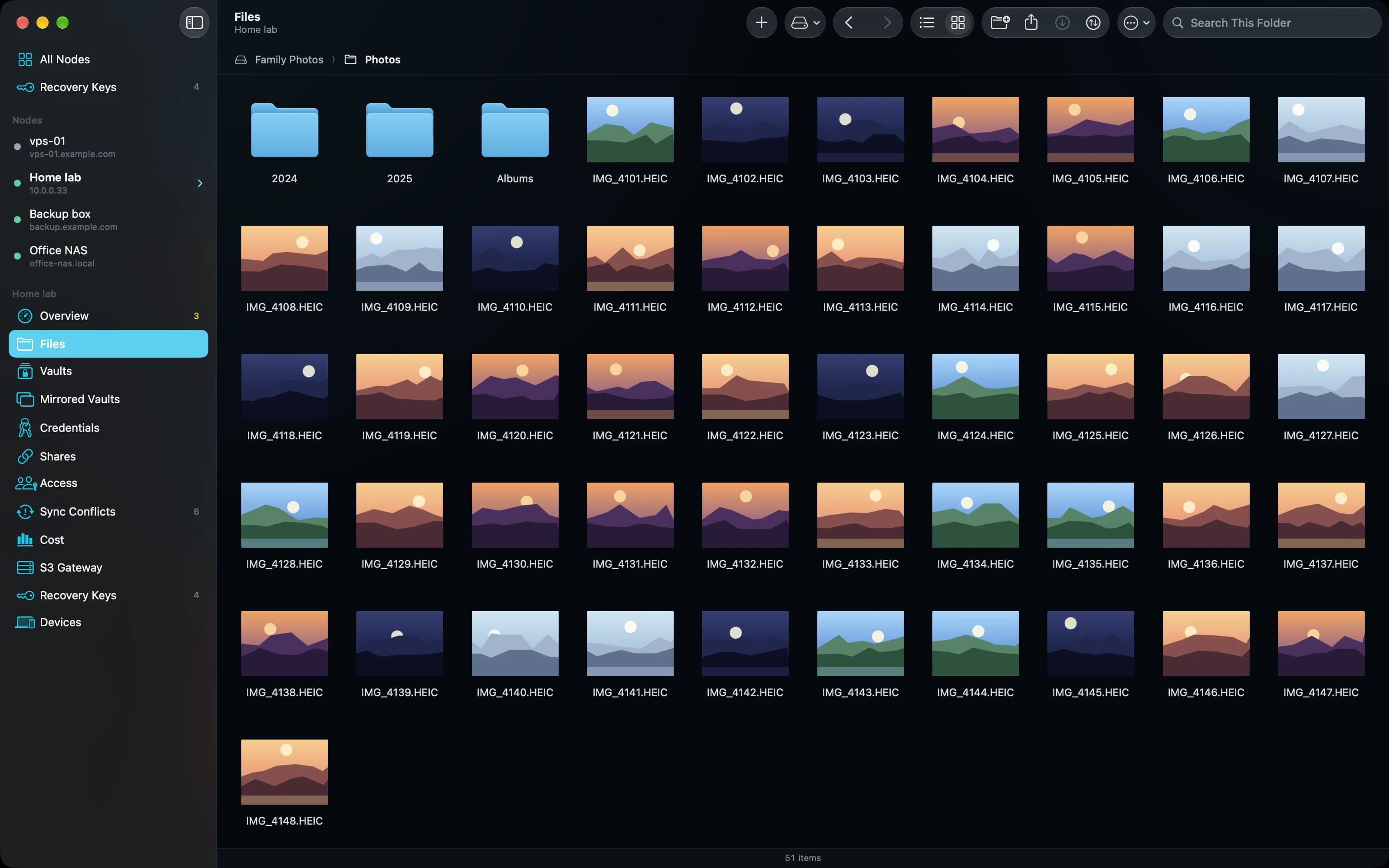
Vaulthalla Desktop adds one location per vault you switch on. Files download when you open them, Keep Downloaded pins them offline, macOS frees space by evicting copies, and a conflicting edit is saved as a copy beside the server's version instead of overwriting it. Finder keeps working with the app quit. Changes on the server are picked up every 60 seconds rather than pushed. Desktop needs an Apple Silicon Mac with macOS 27 or later.

Vaulthalla Desktop
Vaulthalla Desktop's Files browser in grid view, showing photo thumbnails from a Family Photos vault

Sharing

Share with people who are not on Apple devices

iCloud shares a file or folder by invitation or by link, with view or edit access.

Vaulthalla shares from the web console or Desktop with public links, or email-validated links that ask for a one-time code. Each link carries its own operations (browse, preview, download, upload), an expiry, and can be disabled or rotated. Recipients open it in any browser. Email-validated links need email set up on your server.

Sharing

Storage

Your hardware, or any bucket

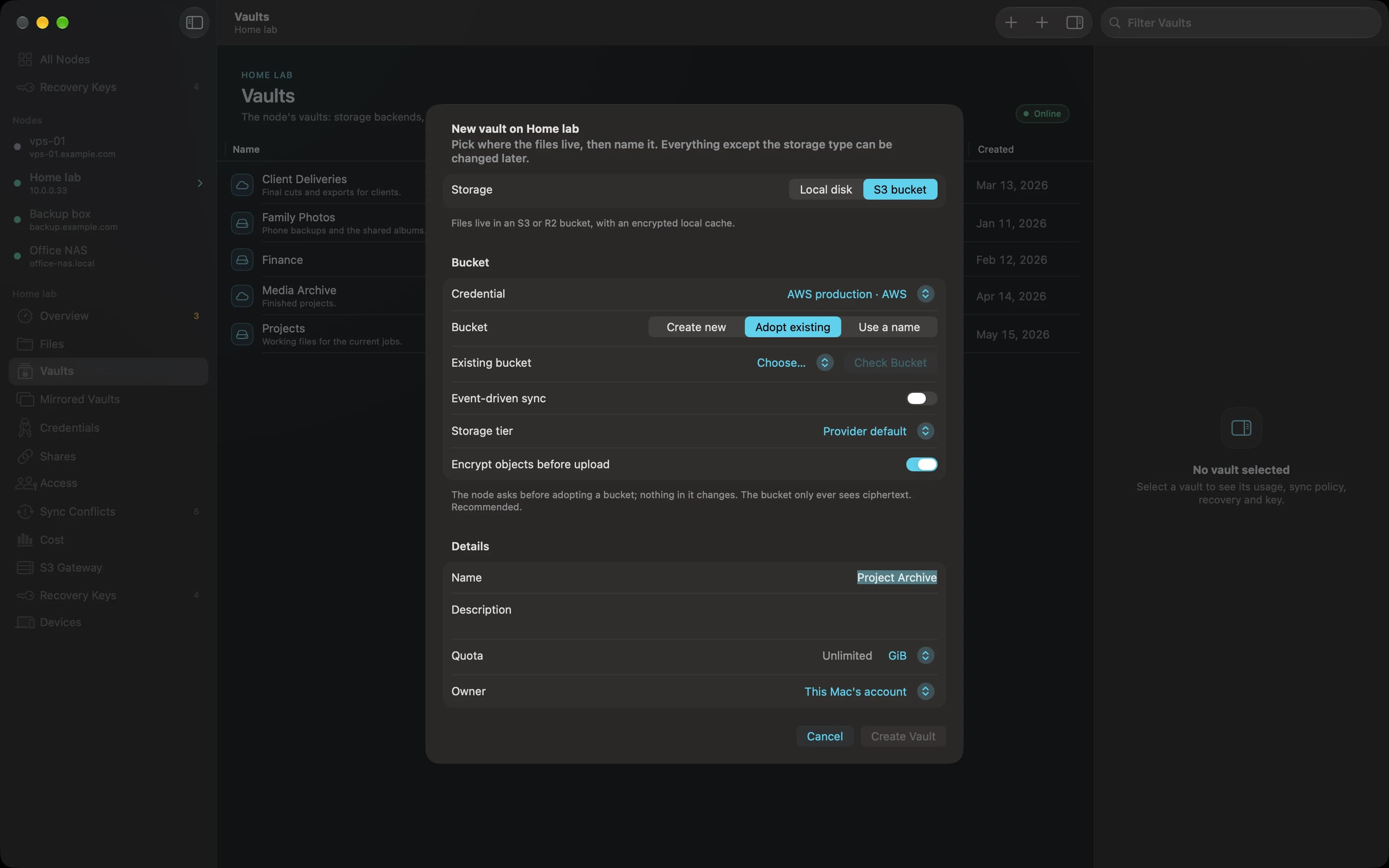
iCloud storage is bought from Apple. A Vaulthalla vault lives on the server's own disks or in an S3-compatible bucket you own, and a local vault can gain or drop a bucket later without changing its keys, permissions or shares. The same vault is reachable over S3 for scripts and S3-aware backup tools, and through the vh CLI.

Bring your own storage
The New Vault sheet in Vaulthalla Desktop, set up for an S3 bucket with a credential, storage tier and encryption before upload

What you give up, and what you gain

What you give up

  • iPhone and iPad apps. Vaulthalla has none. Desktop is for Apple Silicon Macs on macOS 27 or later.
  • Photos and device backups. No photo library, no Shared Albums, no iPhone backup.
  • Built-in Desktop and Documents sync. Vaulthalla vaults are their own Finder locations.
  • Zero administration. You run a server, keep it updated, back up its database and keep your recovery kit somewhere safe.
  • Apple's support. Help comes from the docs, the source and the issue tracker.

What you gain

  • Your hardware. Files on disks you own, or in a bucket at a provider you pick and can change.
  • Names hidden from your provider. For vaults in a bucket, file names and folders stay inside an encrypted manifest.
  • S3 and a CLI. Scripts, S3-aware backup tools and AI agents through MCP, under your own permissions.
  • Sharing beyond Apple. Links anyone can open in a browser, plus accounts, groups and roles for a household or a team.
  • No account with us to lose. Nothing at Valkyrian Labs can lock you out of your files, and the AGPL source is yours to read. A rented bucket is still an account at that provider.

Where iCloud is the better choice

  • You want nothing to run or update yourself.
  • Your household lives on iPhone, iPad and Mac and wants Photos and device backups.
  • A family plan shared with up to five people suits you.
  • You want end-to-end encrypted contents without running a server, and ADP is available where you live.

Using both together

They do not conflict. Both sit in Finder as separate locations. A common split: iCloud keeps Photos, device backups and what your phone needs, and Vaulthalla holds the archive, shared family or team folders, project files, and anything a script or backup tool should reach over S3. Moving a folder from one to the other is a drag in Finder.

FAQ

Questions

Is there a self-hosted iCloud Drive alternative for the Mac?

Vaulthalla shows your vaults in Finder like iCloud Drive, served from a server you run on Linux or an Apple Silicon Mac. It covers files, not Photos, device backups or iPhone apps.

Does Vaulthalla work on iPhone or iPad?

No. There is no iOS or iPadOS app. Share links open in any browser, including on an iPhone.

Is Vaulthalla end-to-end encrypted like iCloud with Advanced Data Protection?

Not in the same way. ADP keeps keys on your devices; Vaulthalla keeps them sealed on your server, so your storage provider sees only encrypted, opaquely named objects while whoever runs the server can read the vaults. There is no mode with keys held only on your devices.

I am in the UK and cannot turn on ADP. Does Vaulthalla depend on Apple's service?

No. Vaulthalla does not use iCloud. It runs on a server you control, with keys sealed by that server's TPM or Secure Enclave.

What does Vaulthalla cost compared with iCloud+?

The software is open source under AGPL-3.0-or-later and has no subscription. Your costs are the hardware you run it on and any bucket you rent.

Can I keep using iCloud alongside Vaulthalla?

Yes. Both appear in Finder as separate locations, and many people keep iCloud for Photos and backups while moving archives and shared folders to Vaulthalla.

Which Mac do I need?

Vaulthalla Desktop needs an Apple Silicon Mac with macOS 27 or later. The server runs on macOS 14 or later on Apple Silicon, or on Linux amd64.

Zeus and a colleague work at a rooftop workstation in the noon sun

Your own cloud

The Finder you know, on a cloud you own

Install the server and Vaulthalla Desktop on your Mac with one Homebrew cask, switch a vault on, and it appears under Locations.