Skip to content
Vaulthalla LogoVaulthalla

End-to-end encrypted storage

Rent the capacity. Keep the keys.

Vaulthalla encrypts files and their names on your own server before anything reaches a cloud bucket. Encryption and keys you hold are the default for every new bucket-backed vault, not a premium tier.

  • Opaquely named objects, with names in an encrypted manifest
  • A key per vault, sealed by TPM2 or the Secure Enclave
  • Valkyrian Labs never receives your keys

Who can see what

Who can read what, for three vault types. A, local vault: files are encrypted at rest with a per-vault key sealed by the TPM2 on Linux or the Secure Enclave on a Mac, and no storage provider is involved. B, bucket-backed vault with the opaque layout, the default for new encrypting vaults: your server encrypts files and names before upload, so your storage provider only ever sees encrypted, opaquely named objects. It cannot see your file names, folders or contents. It can see how many objects you store, their sizes and when they change. C, device-held keys, called sealed vaults, is designed but not yet built: keys would stay on your devices and the server would hold only ciphertext. In A and B you, the server’s operator, can read everything. Valkyrian Labs can read nothing in any mode: it receives no keys and runs none of your servers. It is the software vendor, and you control your server and its updates.

Vault type
Hardware you control

You the server’s operator

Your server

Encrypts at rest

Files on local disks, no provider involved

Per-vault key, sealed by the TPM2 (Linux) or Secure Enclave (Mac)

Can readEverything

  • Sees: Contents and names, through the server

The daemon holds the vault key while it runs.

no upload
Your storage provider

Your storage provider

No bucket

Not involved

Local vaults keep their bytes on your disks

Can readNot involved

  • Cannot see: A local vault never leaves your hardware
Software vendor

Valkyrian Labs

Ships the software

Signed packages

You decide when to update

Can readNothing

  • Cannot see: Receives no keys
  • Cannot see: Runs none of your servers

The software vendor. You control your server and its updates.

Hardware you control

You the server’s operator

Your server

Encrypts before upload

Files and names, both

Per-vault key, sealed by the TPM2 (Linux) or Secure Enclave (Mac)

Can readEverything

  • Sees: Contents and names, through the server

The daemon holds the vault key while it runs.

ciphertext
Your storage provider

Your storage provider

Your bucket

Opaquely named objects

  • o/3f9c1a…2.4 MB
  • o/a07e5b…18 KB
  • o/c41d92…610 KB

Can readNothing readable

  • Cannot see: File names, folders or contents
  • Sees: How many objects, their sizes, when they change
Software vendor

Valkyrian Labs

Ships the software

Signed packages

You decide when to update

Can readNothing

  • Cannot see: Receives no keys
  • Cannot see: Runs none of your servers

The software vendor. You control your server and its updates.

Designed, not yet built

Planned

You the server’s operator

Your devices

Hold the keys

The server stores only ciphertext

Keys stay on your devices (sealed vaults)

Can readEverything, on your devices

  • Sees: Contents and names, on your devices
  • Cannot see: Through the server alone: ciphertext
ciphertext only
Your storage provider

Your storage provider

Your bucket

Opaquely named objects

  • o/3f9c1a…2.4 MB
  • o/a07e5b…18 KB
  • o/c41d92…610 KB

Can readNothing readable

  • Cannot see: File names, folders or contents
  • Sees: How many objects, their sizes, when they change
Software vendor

Valkyrian Labs

Ships the software

Signed packages

You decide when to update

Can readNothing

  • Cannot see: Receives no keys
  • Cannot see: Runs none of your servers

The software vendor. You control your server and its updates.

What end-to-end means here

End-to-end encrypted between hardware you control: files and names are encrypted on your own server and devices before upload, with keys that are never readable outside hardware you control. Your storage provider cannot read them.

Your storage provider only ever sees encrypted, opaquely named objects. It can't see your file names, folders or contents. It can see how many objects you store, their sizes and when they change.

That holds for vaults backed by an S3-compatible bucket (Backblaze B2, Cloudflare R2, AWS S3 and others) in the opaque layout, which every new encrypting bucket vault has used since server 1.22.1. It does not make the server blind. The person who runs the server can read everything on it, because the server decrypts files to show previews, answer S3 requests and sync your Mac. When you run the server, that person is you.

You control your server and its updates. Valkyrian Labs ships signed packages and never receives your keys, but it is still the software vendor, so you decide when an update is installed. On Linux, sudo apt-mark hold vaulthalla pins a version.

On by default

New S3, R2 and B2 vaults encrypt before upload. Storing plaintext in a bucket is a choice you make explicitly for one vault, never a setting you forgot. No paid tier adds encryption: it is in every install.

A key per vault

Each vault has its own versioned AES-256-GCM key, wrapped by a sealed vault master. vh vault keys rotate re-encrypts live files under a new version.

No account in the path

Encryption, sign-in and recovery need no account with Valkyrian Labs and no contact with it. The server sends no telemetry.
How it works

Encrypted on your server, sealed by its hardware

Encrypted before upload

Encryption is part of creating the vault

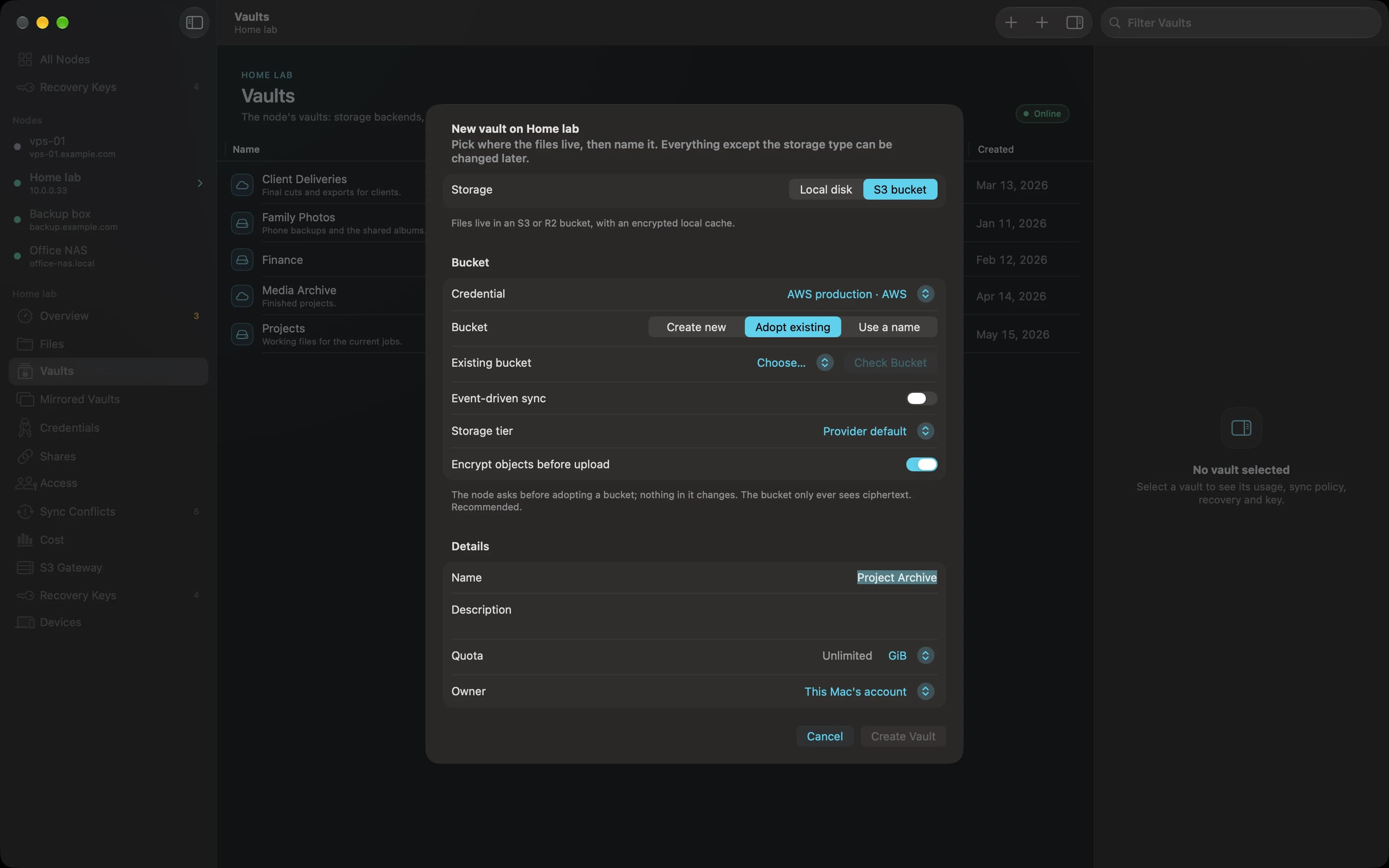
Create a vault on a bucket from Vaulthalla Desktop or with vh vault create --s3, and encryption before upload is already selected. Each file becomes one object named o/<random id>, with no x-amz-meta-* headers. Names, folders and history live in an encrypted manifest under .vaulthalla/ in the same bucket.

S3 and R2 vaults
The New Vault sheet set up for an S3 bucket: credential, adopting an existing bucket, storage tier and encryption before upload.

Key sealing

Keys sealed by the hardware in the box

  • Linux: TPM2 seals the vault master. Vaulthalla uses the hardware TPM at /dev/tpmrm0 when there is one, otherwise a managed swtpm. A software TPM is weaker: whoever takes its state and the sealed files can unseal them. Set secrets.require_hardware: true to refuse anything but hardware.
  • macOS: the Secure Enclave seals each key, bound to the server's launchd context, so not even root through sudo can open them. Without a Secure Enclave, sealing refuses instead of falling back to files.
  • Posture you can check: vh status, Health and the web console report sealing as hardware, software or development.
Secrets and key export

Keys you hold

Customer-held means you can hold a copy

The server holds the live keys. Copies are yours to make, in forms that never pass through Valkyrian Labs: export every needed key version encrypted to your GPG key, enroll a recovery kit made offline on your own computer, or let Vaulthalla Desktop back up vault keys to your own 1Password. A restore accepts only keys the server can prove were the vault's.

Backup and disaster recovery
Poster of a bold red key on a pale ground, lettered "Keep your keys"

Who can see what

Every encryption claim depends on the vault type. This is the full picture, taken from the server's encryption documentation.

Vault What your storage provider sees
On a bucket, opaque layout (the default since 1.22.1) Encrypted, opaquely named objects: their count, exact sizes, change times and read patterns, and that the bucket holds a Vaulthalla vault
On a bucket, older path layout Encrypted contents, plus file and folder names, the tree and sizes
On a bucket, encryption off Everything
On local disks Nothing: no provider is involved

In every case, whoever administers the server can read everything on it. Valkyrian Labs receives no keys, exports or recovery material; it ships the signed updates you choose to install.

Tampering in the bucket (replacing, reordering or rolling back objects) is detected, not prevented. Who can read what, in the docs

In practice

Your keys, from the command line

$ vh vault keys rotate photos
# re-encrypts live files under a new key version; older versions stay while recovery data needs them
$ vh vault keys export all --recipient <gpg-fingerprint> --output vaulthalla-vault-keys.json.gpg
# every key version still needed, encrypted to your GPG key
# on your own computer, offline
$ vh-recovery kit create --output vaulthalla-recovery-kit.json
# on the server: only the kit's public key is sent
$ vh vault keys recipient add photos --public-key 9jB0b7LvRAo3+fTz//m8OhJQkp39Kcd1PjiFpjtmrTs= --label "Kit 2026-11"
# see which files still use the legacy format
$ vh vault format status all
# move a pre-1.22.1 vault to the opaque layout
$ vh vault migrate-layout photos
# after the 7-day window, remove the old path-named objects
$ vh vault migrate-layout photos --cleanup --confirm photos
$ vh status
# reports key sealing as hardware, software (swtpm) or development

Commands from the server documentation. They run in a terminal on the server: the web console never receives key material, and AI agents can never export or import keys.

What else the encryption covers

An authenticated file format

Files are stored in VHF1: a 120-byte authenticated header that binds the vault, the file generation and the key version, then 64 KiB AES-256-GCM chunks authenticated with their index and a final flag. Truncated, reordered or spliced files are refused, and range reads authenticate every byte.

No plaintext on disk in flight

FUSE working copies, uploads, vh fs put, S3 gateway request bodies and multipart parts are written encrypted, under an in-memory key made at each boot or under the vault key.

Older vaults: migrate the layout

Bucket vaults created before server 1.22.1 use the path layout. File contents are encrypted before upload. File and folder names are visible to your storage provider. vh vault migrate-layout moves one vault at a time to the opaque layout and keeps the old objects for 7 days. Object Lock on the bucket can keep old names in the provider's history.

What this does not protect

Encryption before upload answers one question: can the company that holds your bucket read your files? It does not answer these.

  • The server's operator. A vault's contents are only as private as the server that runs it. Whoever administers that server can read every vault on it.
  • Traffic analysis. Objects are not padded. Their count, sizes, timing and access patterns are visible to the provider.
  • A provider that deletes or withholds your data. Encryption keeps a bucket unreadable, not available. Plan for that with backup and disaster recovery.
  • Names on a stolen server disk. File contents on the server are ciphertext and the keys are sealed, but file names and paths sit in the server's PostgreSQL database. On a Mac server, keep FileVault on.
  • The Mac app and local vaults. Vaulthalla Desktop talks to your server over mutual TLS and sees files as the server serves them, and a local vault's files never reach a provider. Neither is covered by the claim at the top of this page.

If you need storage where even the machine serving your files cannot read them, Vaulthalla does not offer that today. How each mode works, on the security page

Questions people ask

Is Vaulthalla end-to-end encrypted?

Between hardware you control, yes, for vaults on a bucket in the default opaque layout: files and names are encrypted on your own server before upload, with keys that are never readable outside hardware you control, and the provider sees only how many objects you store, their sizes and when they change. You control your server and its updates. The server decrypts files to serve them, so whoever administers it can read them.

Is Vaulthalla a zero-knowledge alternative?

This site does not use the term. Zero-knowledge suggests that the service holding your data cannot read it, but your Vaulthalla server holds live keys and can read everything it stores. What Vaulthalla does promise is narrower and checkable: your storage provider cannot read your files or their names.

Can I use client-side encryption with my own S3 bucket?

Yes, in the sense that your server is the client of the bucket: it encrypts each file and its name before upload and stores them as opaquely named objects with an encrypted manifest. It works with Backblaze B2, Cloudflare R2, AWS S3 and other S3-compatible providers.

What can my storage provider still see?

How many objects you store, their exact sizes, when they change, read patterns, and that the bucket holds a Vaulthalla vault. It can also delete or withhold the data; tampering is detected, not prevented.

What about vaults created before the opaque layout?

Their contents are encrypted, but file and folder names are visible to your storage provider. Run vh vault migrate-layout on each one to move it to the opaque layout.

Where are the encryption keys kept?

On your server, sealed by its TPM2 on Linux or its Secure Enclave on a Mac. Valkyrian Labs never receives them, and copies exist only where you put them: a GPG export, a recovery kit or your own 1Password.

Does the Mac app add its own layer of encryption?

No. Vaulthalla Desktop reaches your server over mutual TLS, and the server decrypts what you open. Files you keep downloaded in Finder are ordinary local copies on the Mac.

A hand holds a key by a train window while a sealed capsule crosses the sky in a glass tube

Your keys

Send the provider ciphertext. Keep the key.

Install the server, point a vault at a bucket you already pay for, and the provider holds opaquely named objects from the first upload. No vendor account, and nothing reporting back.