Skip to content
Vaulthalla LogoVaulthalla

AI-native storage

Hand storage chores to an agent, not the keys to the house

Claude Code, Claude desktop and Codex get Vaulthalla's admin tools through MCP. An agent works as your account and never beyond it, destructive commands wait for you, and keys and secrets stay out of its reach.

  • One-click setup from Vaulthalla Desktop
  • Destructive commands wait for a person
  • No tool can export keys or secrets

How it connects

One tool surface, two ways in

On a server, vh mcp is a stdio MCP server built into the CLI, and vh skill install registers it with Claude Code or Codex. On a Mac, Vaulthalla Desktop's bridge serves every node the Mac is paired with to your AI apps, over the same mutual TLS connection Desktop already uses.

AI under real permissions

AI apps such as Claude Code, Claude desktop and Codex connect to the Vaulthalla Desktop MCP bridge on your Mac, which reaches each node over mutual TLS with its key held in the Secure Enclave. Every call then passes three gates in order before it reaches the node’s own tool catalog. Gate one, the pairing’s scope: read only, read and change, or everything. Gate two, your account’s own permissions: an agent acts as you and never beyond you. Gate three, confirmation: destructive commands wait for a person to approve them. Behind a hard wall, keys and secrets are never reachable: no tool exports or imports them. Everything lands in the audit trail.

AI apps

Set up from Desktop

Claude CodeClaude desktopCodex
MCPHardware you control

On your Mac

Desktop MCP bridge

Mutual TLS to each node

Key in the Secure Enclave

Gate 1

Pairing scope

Read onlyRead and changeEverything

Gate 2

Your permissions

Acts as your account, never more than you.

Gate 3

Confirmation

Destructive commands wait for a person to approve.

On each node

Its own tool catalog

vaults_*users_*recovery_*vh_read

Hard wall

Never reachable

Keys and secrets

No tool exports or imports them.

Everything lands here

Audit trail

Every call runs as your account, recorded like your own commands.

Both paths reach the same catalog, with the same refusals and the same confirmation rules. The agent runs where you run it; Vaulthalla adds no service of its own in between.

What an agent can call

The tools come from each server's own operation catalog, so an agent always sees what that version of Vaulthalla can do. Every command is tagged read, write or destructive, and the tools carry matching MCP hints, so your AI app can tell a read from a change and stop for you before anything destructive.

  • nodes_list: every node your Mac is paired with, and whether it is reachable (Desktop bridge only)
  • vaults_*: list the vaults your account can reach, create and delete vaults
  • users_*: create, update, deactivate and delete accounts
  • groups_*: create and delete groups, add and remove members
  • roles_vault_*: assign and remove vault roles for users and groups
  • recovery_*: file history: list versions and snapshots, plan a restore, restore, take a snapshot
  • vh_help: browse the command reference, including each command's effect and confirmations
  • vh_read: run any read-only vh command, such as status or vault role list docs
  • vh_run: run any other command that is available to agents

Full reference: AI agents and MCP.
Set up from the Mac

One click per AI app

Settings › Agents

Claude Code, Claude desktop and Codex, set up for you

Open Settings › Agents in Vaulthalla Desktop and choose an app. Desktop registers its bridge with Claude Code and Codex through their own CLIs, and opens an install bundle for Claude desktop where you click Install. Each app shows its status, with Repair and Remove.

Move Vaulthalla to Applications first, so the path the AI app remembers stays valid.

Set up AI apps

Per node

Choose which apps reach which server

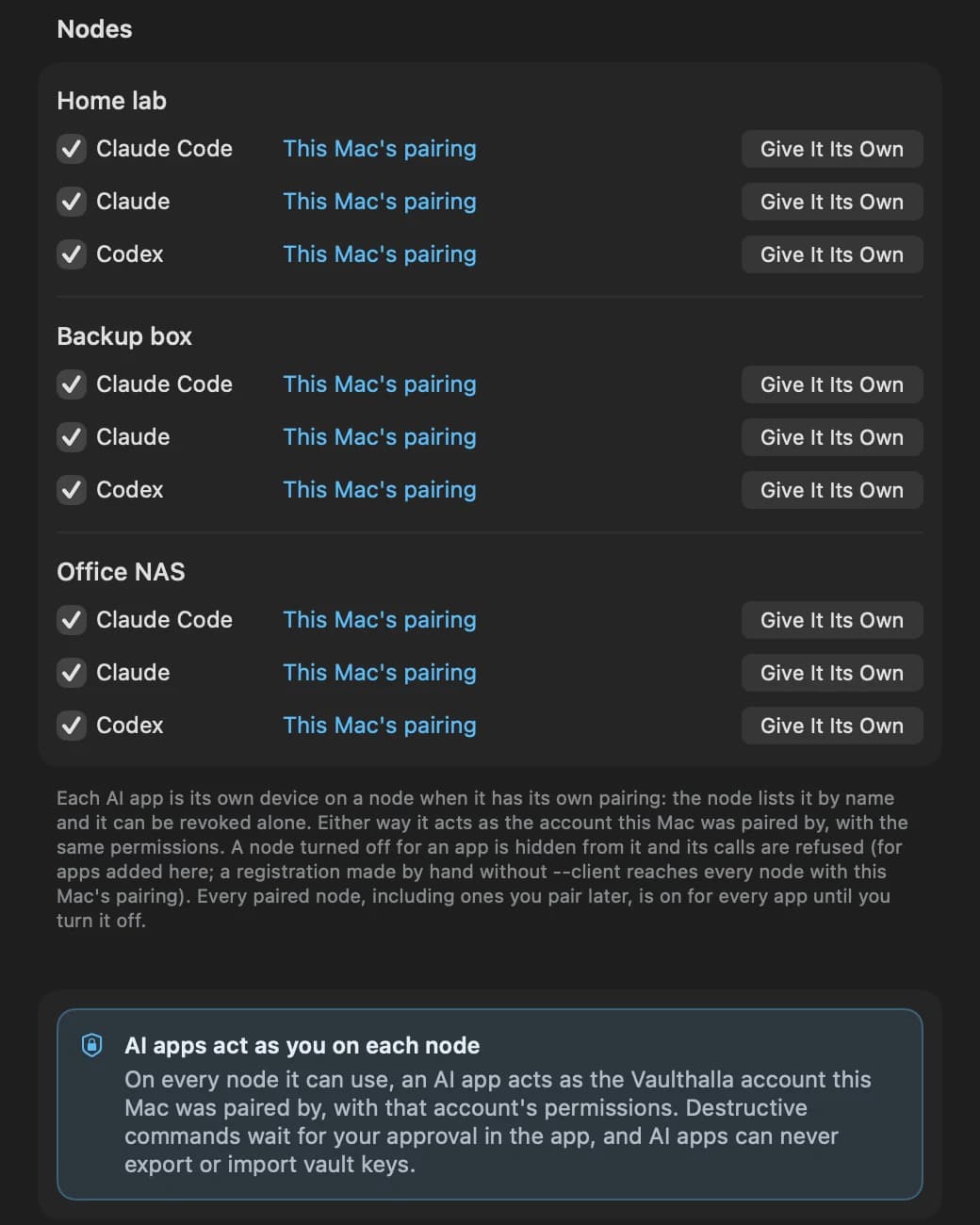
A switch per node decides whether an AI app may use it. Through the bridge, nodes_list shows the nodes it can reach, and every other tool takes the node it should act on.

Desktop can give each AI app its own revocable pairing and scope, so you can cut one app off without touching the others. Whatever the setup, an app acts as you and can never export vault keys.

Desktop security
Vaulthalla Desktop Settings, Agents: which AI apps (Claude Code, Claude, Codex) may use each node, with a note that they act as you and can never export vault keys

The gates, in order

Every call passes the same checks, on the server and through Vaulthalla Desktop. They are enforced by the server and the bridge, not by the agent's good intentions.

  1. It acts as your account, never beyond it

    Each tool call is an ordinary vh command that the daemon maps to your Vaulthalla account; through Desktop, to the account that paired the Mac. Your roles decide what works. An agent can't do anything your own vh can't, so give it an account whose roles match the job.

  2. Pairings can be scoped

    On server 1.24 or later, a paired device can be limited to Read only, Read and change, or Everything. A limited device can't pair others, back up or import keys, or manage connectors. Desktop can give each AI app its own revocable pairing and scope.

  3. Destructive commands wait for a person

    Deleting a vault or a user, or restoring over a file, returns needs_confirmation, and nothing happens. The agent shows you what will be affected, and the call goes through only after you approve that exact action. The server never adds --yes on its own, and actions that need a step-up confirmation stay with you.

  4. A hard wall around keys, secrets and setup

    No tool exports or imports vault keys or secrets, enrolls recovery recipients, rotates keys or master secrets, decides a pairing, turns on remote access, attaches or detaches a vault's bucket, or runs vh setup and vh teardown. File contents are out of reach too: vh fs get and vh fs put are never available to agents. Through Desktop, linking servers is refused as well.

  5. A record of what happened

    Agent calls run as your vh commands and land in the same hash-chained audit trail. A scoped device's actions are listed with vh audit list --device <name>. Desktop's bridge never writes tool arguments or results to its logs.

Set up on the server

Or register it from a terminal

On a Linux server or a Mac running the server, one command writes the skill and registers vh mcp with the agent's own CLI. The user who runs the agent needs the same access as for vh.

$ vh skill install --agent claude
# Writes ~/.claude/skills/vaulthalla/ and runs:
# claude mcp add --scope user vaulthalla -- vh mcp
$ vh skill install --agent codex
# Writes ~/.agents/skills/vaulthalla/ and runs:
# codex mcp add vaulthalla -- vh mcp
$ claude mcp add --scope user vaulthalla-desktop -- "/Applications/Vaulthalla.app/Contents/Helpers/vaulthalla-mcp" --client claude-code
$ codex mcp add vaulthalla-desktop -- "/Applications/Vaulthalla.app/Contents/Helpers/vaulthalla-mcp" --client codex

The skill tells the agent to read before it writes, prefer typed tools, never set a confirmation without your approval and report what it changed. Through Desktop's bridge, a call with no result after 10 minutes is abandoned.

Chores an agent can take off your plate

Four short exchanges, each using only the tools above. Server and vault names are examples.

You: Check every node for vaults whose keys have no backup.

1nodes_list2  → home-lab, backup-box3vh_read  node=home-lab  status4  → degraded: vault finance has no5    recovery material6vh_read  node=backup-box  status7  → healthy

Agent: home-lab is degraded because finance is encrypted in a bucket with no recovery recipient and no current key export. I can't create a recovery kit, add a recipient or export keys; those stay with you. Back the key up to 1Password from Recovery Keys in Vaulthalla Desktop, or create a kit on your own computer with vh-recovery kit create and enroll it from a terminal on the node.

What is not there yet

  • Remote sign-in for cloud-hosted assistants. A connector that lets an assistant running in someone else's cloud sign in to your server is designed, not built. Agents run on your machine: on the server with vh mcp, or on your Mac through Vaulthalla Desktop.
  • One-click setup for every AI app. Desktop sets up Claude Code, Claude desktop and Codex. Any other MCP client that speaks stdio can start vh mcp itself.
  • A document assistant. Agents administer storage. They can't read or write file contents, and there is no search or chat over your documents.

An agent with your account can still make every change your account can. Read what it proposes before you approve a confirmation.

Questions about agents and Vaulthalla

Which AI apps work with Vaulthalla?

Vaulthalla Desktop sets up Claude Code, Claude desktop and Codex in one click. On a server, vh skill install sets up Claude Code or Codex, and any MCP client that runs a stdio server can start vh mcp.

Can an agent read or download my files?

No. vh fs get and vh fs put are never available to agents. An agent sees what read-only commands show your account, such as vaults, users, roles and status.

Can an agent delete a vault?

Only if your account can, and only after you approve. A destructive call returns needs_confirmation and does nothing until you say yes to that exact action.

Can an agent export or restore encryption keys?

No. No tool exports or imports keys or secrets, enrolls recovery recipients or rotates keys. Those stay with you in a terminal or in Vaulthalla Desktop.

Does it work with ChatGPT or Claude on the web?

Not yet. Remote sign-in for cloud-hosted assistants is designed, not built, so today the agent runs on your server or your Mac.

Does any data go to Valkyrian Labs?

No. Vaulthalla has no telemetry. Tool results do become part of the conversation your AI app sends to its own model provider, so treat them like anything else you share with that app.

Which server version do I need?

vh mcp shipped in server 1.16.0, and scoped pairings need 1.24 or later. Vaulthalla Desktop pairs with servers from 1.17.0.

Odin and an engineer work at a lit maintenance bench on a great bridge at night

Your account, your rules

Put an agent on the night shift. Keep the keys.

Pair Vaulthalla Desktop with your servers, switch on the AI apps you use, and keep the keys where they belong.