

Vaulthalla odin and zeus convene in Vaulthalla

Vaulthalla

The Final Cloud | Forged for Valhalla

No PHP. No Bloat. No App Store. No Bullshit.

v1.14.0 Live Now

One cloud. Now on two platforms.

Vaulthalla was forged on Linux. It now runs natively on Apple Silicon too, and not as a port trailing behind: one code base, one compiled C++ daemon, one encrypted vault format, one set of permissions and the same vh CLI on both. Your cloud is no longer tied to one kind of box, and that is about to change what a Vaulthalla install can be.

amd64 · Debian & Ubuntu

Linux

The production platform, exactly as you know it: a signed APT repository, systemd services, TPM2-sealed keys, a native FUSE mount at /mnt/vaulthalla, and nginx with Let's Encrypt in one command.

New · Apple Silicon · macOS 14+

macOS

One Homebrew command or a self-contained installer that brings its own PostgreSQL and Caddy. It starts at boot under a hidden service account, before anyone logs in, and vh setup caddy puts it on HTTPS.

Vaulthalla - Official Web Banner

What sovereignty looks like on a Tuesday

Owning your data only matters if it's a pleasure to use. Vaulthalla shows up in the tools you already work with, on whichever machine you run it.

Your vault is just a folder

On Linux, every vault you can access is mounted at /mnt/vaulthalla through a native FUSE driver. Open it in your editor, point your scripts at it, back it up with the tools you already trust. The same permissions that govern the web console govern the mount.

On a Mac, the web console, vh fs and the S3 gateway carry your files in and out, under those same permissions, while a Finder mount is in the works.

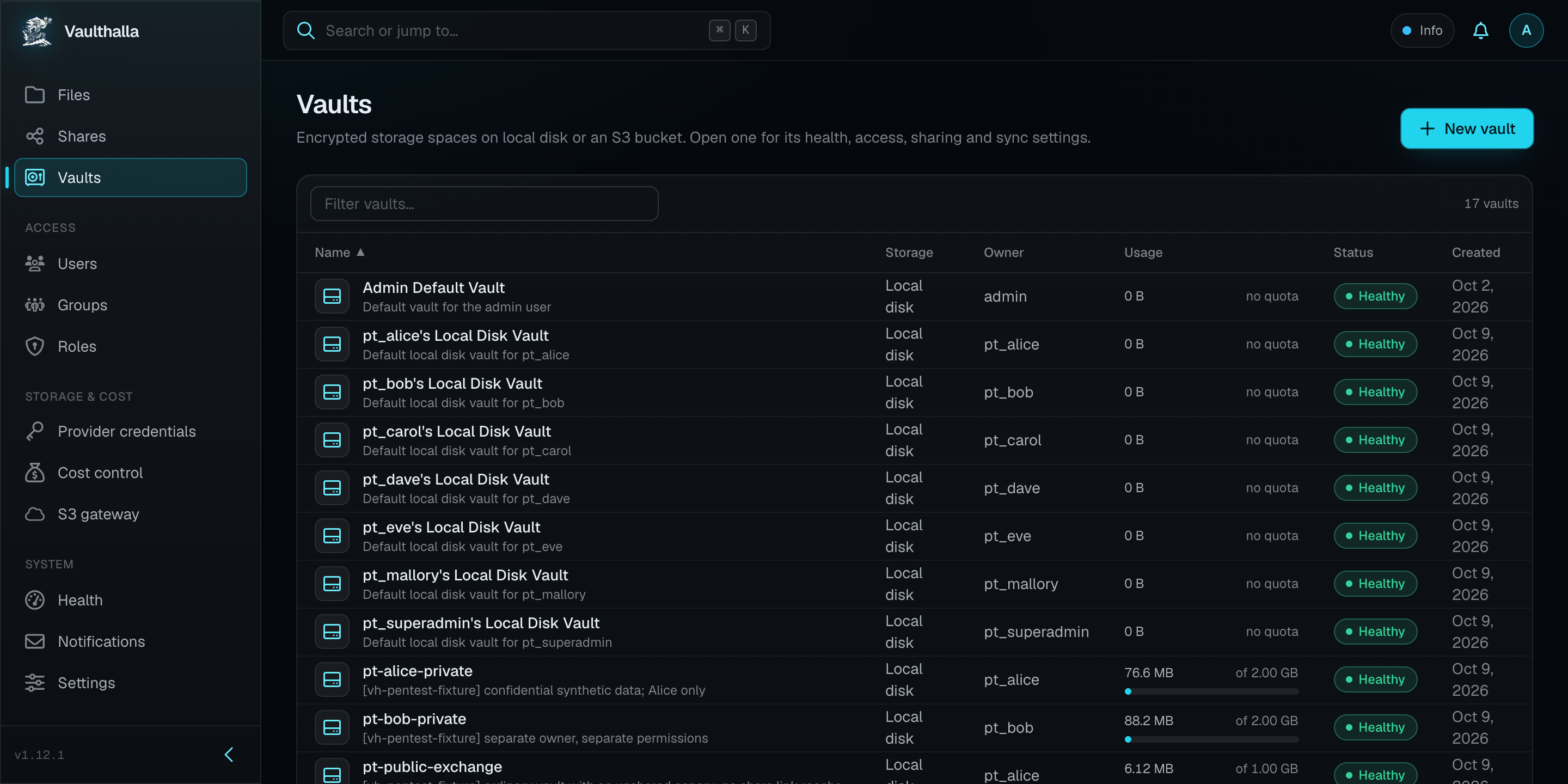
Vaulthalla Screenshot

Send a folder, not your password

Share a file or folder as download-only, browse-and-download, or an upload dropbox. Require email verification for anything sensitive, and rotate or revoke the link whenever you like.

Point your S3 tools home

AWS CLI, rclone, MinIO mc and S3-aware backup apps connect to Vaulthalla's S3 gateway, with credentials scoped to exactly the vaults they need.

Use the cloud on your terms

Back a vault with Cloudflare R2 or S3 and every sync runs inside a budget. Dry-run the plan first. If a job would cross a limit, it stops and tells you why.

C++ & libfuse3 Core Daemons

Welcome to the Kernel, Brother.

No web-proxy. No bullshit.

Engineered to keep the promise

Sovereignty is a claim. These four design decisions are what back it up, on every platform Vaulthalla runs on, and each one is written up in full.

Architecture

One daemon, not a fleet

The filesystem, web, sync and S3 services share one process, one hot cache and one dependency graph, kept alive by an internal watchdog. Nothing crosses an IPC boundary on the hot path.

Authentication

No live session, no access

HTTP requests only count when they belong to a live WebSocket session. A stolen token on its own opens nothing, and dropping the connection revokes access.

Access control

Permissions are resolved, not just checked

Roles, groups, path overrides and the action being taken are evaluated together by a deterministic policy engine. Anything not explicitly allowed is denied.

Cost control

Sync stops before it overspends

Request budgets and price budgets bound every S3 or R2 sync. A job that would cross a limit stalls with a reason instead of running up your bill.

Security you can verify

Every claim here is documented, every default is one you can inspect, and every platform difference is written down.

  • Encrypted before it's stored. Each vault has its own AES-256-GCM key. New S3 and R2 vaults encrypt objects before upload by default, so your provider stores ciphertext.
  • Keys protected by the host. On Linux, master keys are sealed by the TPM2, or a managed software TPM on VPS hosts. On macOS they live in a directory only the service account can read, behind FileVault, with Secure Enclave sealing on the roadmap.
  • One permission model everywhere. The mount, the CLI, the web console, the S3 gateway and share links all answer to the same role-based rules, down to path-level overrides.
  • No default password. Each install generates its own admin password, and repeated failed logins are rate-limited.
  • No telemetry. Vaulthalla never reports usage, files or metadata to us or anyone else. The only outbound request it makes on its own is an optional download of password lists from GitHub for strength checks, and admins can switch it off.
  • Recovery you can rehearse. Export vault keys and internal secrets as GPG-encrypted files, keep them off the host, and run the documented restore drill before you ever need it.
  • Honest health. When the daemon can't measure something, the console says "unknown" instead of showing green.

Running both? The Platform Comparison lists every difference between Linux and macOS. Everything else is the same Vaulthalla.


Claim your seat in Vaulthalla

One command on your server or your Mac, and the services are running.

On Debian or Ubuntu (amd64), this adds the signed Vaulthalla APT repository, installs the package with PostgreSQL and nginx, and starts the services.

1curl -fsSL https://apt.vaulthalla.sh/install.sh | bash
  1. Open http://<host>/ and sign in as admin with the password generated for your install: sudo cat /var/lib/vaulthalla/super_admin_initial_password.
  2. Turn on HTTPS with sudo vh setup nginx --domain <domain> --certbot.
  3. Create your first vault, and you're home.

Upgrades arrive through apt upgrade.

Vaulthalla watchdogs at the gates
Featured post

The Service Watchdog Reigns Supreme

How Vaulthalla, a self-hosted encrypted cloud, runs every service in one C++ daemon under a watchdog: shared hot caches, zero IPC, deterministic startup.