Skip to content
Vaulthalla LogoVaulthalla

Vaulthalla Server

Your files, your S3 endpoint and your sync, in one daemon

Vaulthalla Server is one compiled daemon that serves a cloud drive, an S3-compatible endpoint and sync with rented buckets, with a key for every vault. It runs on Linux and on Apple Silicon Macs, beside PostgreSQL and nginx or Caddy.

Linux amd64 and Apple Silicon Macs · free and open source

  • Linux amd64, and macOS 14+ on Apple Silicon
  • No default password, MFA for admins
  • AGPL-3.0, no vendor account, no telemetry

Latest release

Vaulthalla Server for Linux

1.28.1Nov 28, 2026amd64Ubuntu 24.04 LTS, Debian

curl -fsSL https://apt.vaulthalla.sh/install.sh | bash

Adds the signed APT repository, installs the server and starts it.

Vaulthalla Server for macOS

1.28.1Nov 28, 2026Apple SiliconmacOS 14 or later

Download for macOS129.6 MB
brew trust valkyrianlabs/tapbrew install --cask valkyrianlabs/tap/vaulthalla-server
admin@vault · ssh
$ curl -fsSL https://apt.vaulthalla.sh/install.sh | bash
Adding the Vaulthalla APT repository and signing key
Installing vaulthalla 1.28.1
Started vaulthalla.service
$ sudo vh setup nginx --domain vault.example.com --certbot
Certificate issued for vault.example.com
nginx is serving https://vault.example.com
$ vh vault create photos
Created vault photos
$ vh status
vaulthalla 1.28.1 · running
web      https://vault.example.com
vaults   1

What it serves

One process, every way in

The filesystem, the web console, sync, the S3 gateway, the device listener for Vaulthalla Desktop and the MCP tools for agents all run in one compiled C++ daemon, with one cache and one permission model. Metadata lives in PostgreSQL; nginx on Linux or Caddy on macOS sits in front.

One platform where there used to be three

Six ways in: Finder through Vaulthalla Desktop on the Mac, a mounted folder through FUSE on Linux at /mnt/vaulthalla, the web console and share links, S3 clients such as the AWS CLI, rclone and boto3, AI agents over MCP, and the vh command line. All of them reach one Vaulthalla server, a single daemon on hardware you control, with one permission model, per-vault AES-256-GCM keys, a sync engine, an S3 gateway and an audit trail. The server keeps the bytes on local disks, in your own S3-compatible buckets at your storage provider (Backblaze B2, Cloudflare R2, AWS S3 and others), or on a second Vaulthalla server that holds a mirrored vault.

01Ways in

02One daemon

03Where bytes live

Mac

Finder

Vaulthalla Desktop

Linux

Mounted folder

FUSE at /mnt/vaulthalla

Browser

Web console

and share links

S3 API

S3 clients

AWS CLI, rclone, boto3

MCP

AI agents

As your account

CLI

vh

The command line

Hardware you control

Vaulthalla server

One daemon

  • One permission model
  • Per-vault AES-256-GCM keys
  • Sync engine
  • S3 gateway
  • Audit trail
Hardware you control

On the host

Local disks

Encrypted at rest

Your storage provider

Bring your own

Your S3-compatible buckets

Backblaze B2, Cloudflare R2, AWS S3, and others

Hardware you control

Linked server

A second Vaulthalla server

Holds a mirrored vault

The FUSE mount, the console's HTTP and WebSocket, the CLI socket, the S3 gateway on port 39000 and the device listener on port 36972 are all the same process. Architecture.

Two platforms, one daemon

Both platforms run the same daemon, web console, CLI, encryption, access control, sharing and S3 gateway. They differ in how the service is installed, how keys are sealed, and whether vaults mount as a filesystem.

Production

Linux

  • amd64, Ubuntu 24.04 LTS tested, from a signed APT repository
  • systemd services, a FUSE mount at /mnt/vaulthalla
  • Master keys sealed by TPM2: the hardware TPM, or a managed software TPM where there is none
  • PostgreSQL on the same host (11 or newer) or a remote database
  • nginx and a Let's Encrypt certificate in one command: sudo vh setup nginx --domain vault.example.com --certbot

New

macOS

  • Apple Silicon, macOS 14 Sonoma or later, as a signed and notarized package or a Homebrew cask
  • Self-contained: bundles its own PostgreSQL 16 and Caddy
  • Master keys sealed by the Secure Enclave
  • Four launchd services under a hidden _vaulthalla account, none as root, loopback only until sudo vh setup caddy
  • No mount: Finder access comes from Vaulthalla Desktop
Interfaces

A console in the browser, a cockpit on the Mac

Web console

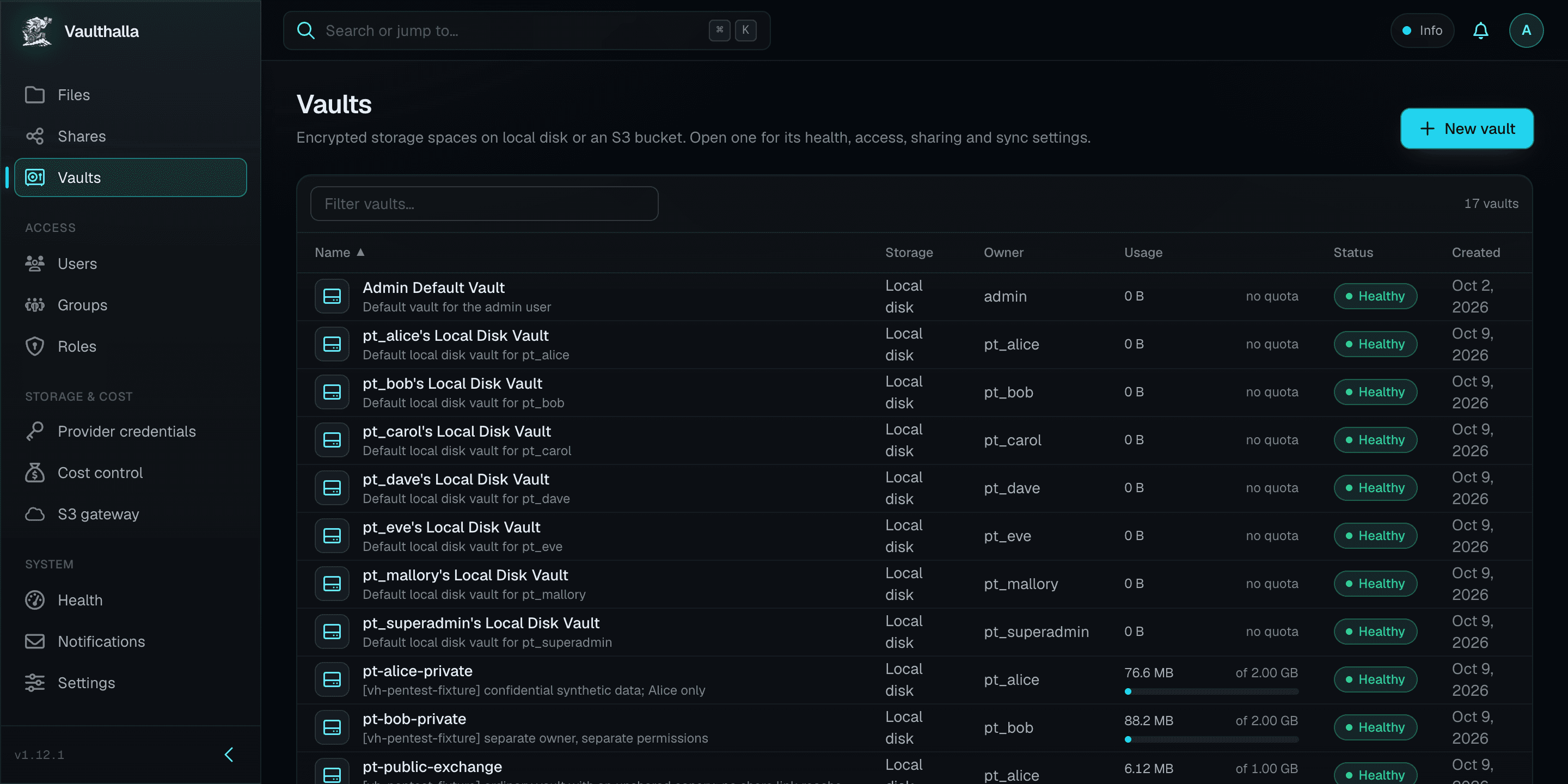
Everything in the browser, under the same rules

The console ships with the server: files with previews and resumable uploads, shares, vaults, users, groups and roles, provider credentials, cost control, the S3 gateway, devices, linked servers and mirrored vaults, the audit trail and health. Press ⌘K to jump anywhere. It never receives key material.

Web console docs
The Vaulthalla web console listing vaults with their storage, sync state and health

Vaulthalla Desktop

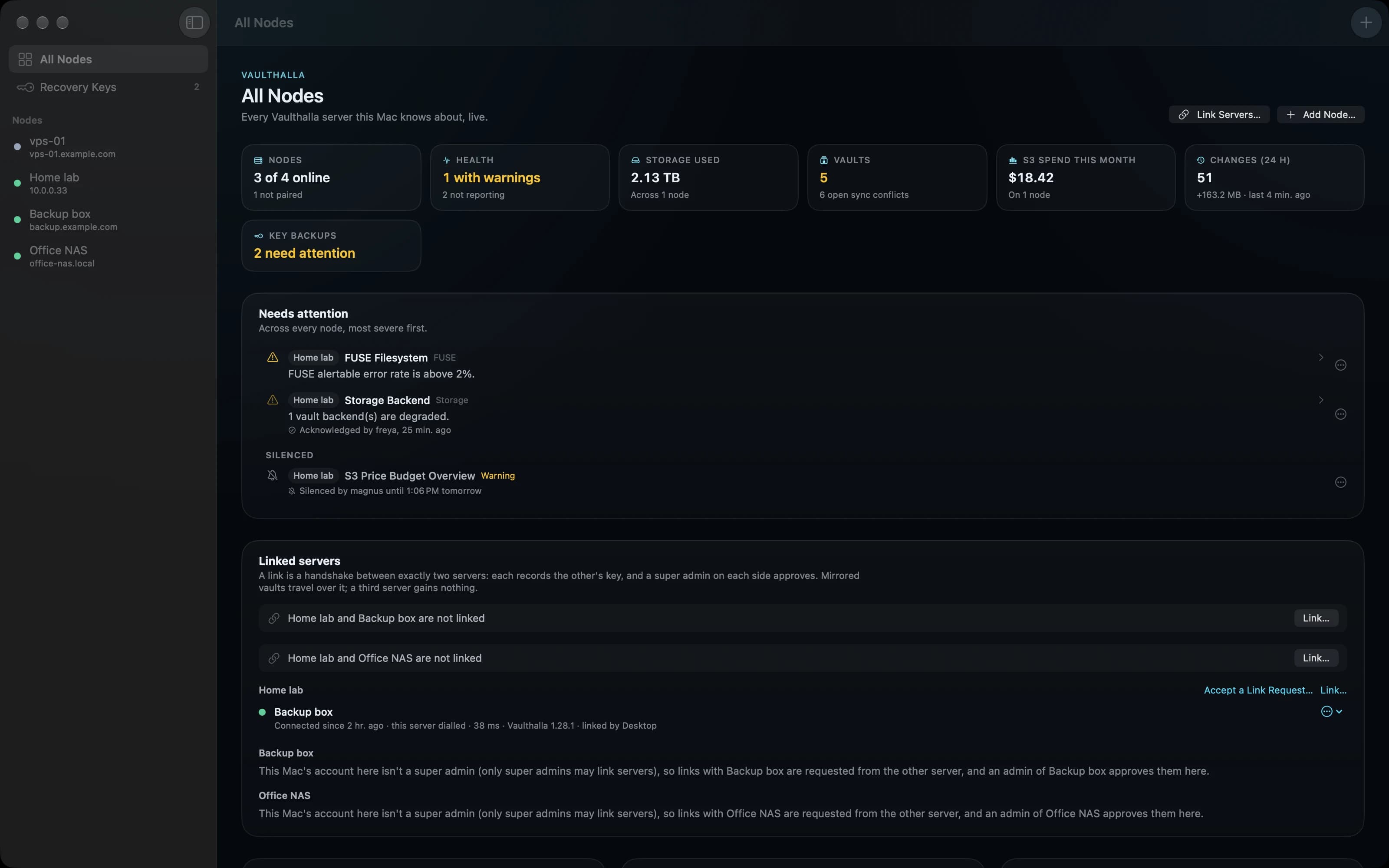
Every server from one Mac app

Pair a Mac with as many servers as you run. Desktop puts vaults in Finder, shows every server in the menu bar, and administers them all from one window, with the same permissions as the console.

Desktop docs
The Vaulthalla Desktop All Nodes dashboard: four servers with health, storage used, vaults, S3 spend, key backups and what needs attention

The vh CLI

From install to first vault

vh runs as your own user over a local socket and maps you to your Vaulthalla account. Day-to-day commands need no sudo; only lifecycle commands do.

# Adds the signed APT repository, installs the server with PostgreSQL and nginx
$ curl -fsSL https://apt.vaulthalla.sh/install.sh | bash
$ vh status
# 0 healthy, 1 degraded, 2 critical
$ sudo cat /var/lib/vaulthalla/super_admin_initial_password
# Sign in as admin at https://<host>/, then set your own password
$ vh setup set-super-admin-password
$ sudo vh setup nginx --domain vault.example.com --certbot
$ vh vault create docs --local --desc "Team documents" --quota 50G
$ brew trust valkyrianlabs/tap
$ brew install --cask valkyrianlabs/tap/vaulthalla-server
$ sudo cat "/Library/Application Support/Vaulthalla/state/super_admin_initial_password"
$ open http://127.0.0.1:36968
# Sign in as admin, then set your own password
$ vh setup set-super-admin-password
$ sudo vh setup caddy --domain vault.example.com --email [email protected]
$ vh vault create docs --local --desc "Team documents" --quota 50G
# Export every vault key, encrypted to your own GPG key
$ vh vault keys export all --recipient <gpg-fingerprint> --output vaulthalla-vault-keys.json.gpg
# Check the audit trail's hash chain
$ vh audit verify
$ vh audit list --action auth. --since 2026-11-01

Commands from First run and the CLI reference. --help never runs a command.

Secure before you touch a setting

No default password

Each install generates its own admin password and keeps a copy only root can read. Sign in with it, then set your own.

HTTPS by default

On Linux the console is served over HTTPS from the first start, with a local certificate whose fingerprint is printed; --certbot adds Let's Encrypt and HSTS. The S3 gateway and the device listener answer on loopback until you open them.

MFA for admins

Passkeys, TOTP and one-time recovery codes. Required for admins by default, with a fresh confirmation before sensitive changes such as roles, secrets and deletes.

A key per vault

Every vault has its own AES-256-GCM key, wrapped by a master key the TPM or Secure Enclave seals. Whoever administers the server can read what is on it.

An audit trail you can verify

A SHA-256 hash chain with signed heads every 15 minutes, kept six years by default. vh audit verify checks it. Tampering is detectable, not prevented.

Nothing reporting back

No telemetry and no vendor account. The one routine outbound call is a Have I Been Pwned range lookup when a password is set.

Daemon
1
Files, console, sync, S3 and devices in one process
Restart
~1 s
Stop in tens of milliseconds
Telemetry
0
No vendor account to run it
Audit retention
6 years
Default, hash-chained and signed

Running it

  • Health you can act on. The console's Health pages cover runtime, filesystem, storage and activity, with findings you can acknowledge or silence. vh status exits 0 healthy, 1 degraded and 2 critical, so it drops straight into monitoring.
  • Upgrades through your package manager. sudo apt update && sudo apt upgrade on Linux, brew upgrade --cask valkyrianlabs/tap/vaulthalla-server on a Mac. Hold a version with sudo apt-mark hold vaulthalla.
  • Restarts in about a second. Stopping takes tens of milliseconds, with a hard exit after ten seconds.
  • Your database, your web server. On Linux it uses the distribution's PostgreSQL and nginx, or a database you already run.

What it is not

  • Not a cluster. There is no erasure coding and no multi-node object store. The closest thing is a mirrored vault: one server leads, one linked server keeps a copy.
  • Not on every platform. No Intel Macs, no Windows, no ARM Linux.
  • Not a suite. No office editing, calendars, contacts or app store. See self-hosted cloud storage for what it does instead.

Questions about Vaulthalla Server

What hardware does Vaulthalla Server run on?

An amd64 Linux machine (Ubuntu 24.04 LTS is tested) or an Apple Silicon Mac on macOS 14 or later. Intel Macs, Windows and ARM Linux are not supported.

Can I use my existing PostgreSQL?

On Linux, yes: the package bootstraps a local PostgreSQL when one is installed, or sudo vh setup remote-db points it at another server running PostgreSQL 11 or newer. The Mac package always runs its own private PostgreSQL 16.

Do I need an account with Valkyrian Labs?

No. There is no registration, no license key and no telemetry. The server is AGPL-3.0-or-later.

Can I mount vaults on a Mac?

Not from the server: it never mounts on macOS. Vaulthalla Desktop shows vaults in Finder, and vh fs works from the terminal.

Is it clustered or highly available?

No. Each server is one daemon. A mirrored vault keeps a copy on a second, linked server that can take over if the first is lost.

How do I upgrade?

sudo apt update && sudo apt upgrade on Linux, or brew upgrade --cask valkyrianlabs/tap/vaulthalla-server on a Mac. To stay on a version until you choose to move, hold it with sudo apt-mark hold vaulthalla.

Download

Get Vaulthalla Server

A signed APT repository for Linux, and a signed, notarized package or Homebrew cask for Apple Silicon Macs.

Linux

Vaulthalla Server1.28.1

Signed APT repository for Ubuntu and Debian. Updates arrive through apt with the rest of the system.

Released
Nov 28, 2026
Package
30.1 MB
Architecture
amd64 (x86_64)
Systems
Ubuntu 24.04 LTS, Debian

One-line install

curl -fsSL https://apt.vaulthalla.sh/install.sh | bash

Adds the signed repository, installs the server and starts it.

Set up the repository by hand
  1. Install the signing key.

    curl -fsSL https://apt.valkyrianlabs.com/pubkey.asc | sudo gpg --dearmor -o /usr/share/keyrings/valkyrianlabs.gpg
  2. Add the repository.

    echo "deb [arch=amd64 signed-by=/usr/share/keyrings/valkyrianlabs.gpg] https://apt.valkyrianlabs.com stable main" | sudo tee /etc/apt/sources.list.d/valkyrianlabs.list
  3. Install Vaulthalla.

    sudo apt updatesudo apt install vaulthalla
  4. Optional previews for CAD and media files: vaulthalla-preview-cad vaulthalla-preview-media.

SHA-256203b32571195fd682a300e9a2712868224e70a70ba4ee332098f8d2ae43d5cfc
Verify the download
  1. APT checks the repository signature on every install and update. For a downloaded .deb, compare its checksum with the one above.

    sha256sum vaulthalla_1.28.1-1_amd64.deb
  2. Check the signing key. It should read 494D 71A1 EEDD F87B D48E 5048 6D64 CB7B DFC3 0EC6, Valkyrian Labs LLC (APT Signing Key).

    gpg --show-keys /usr/share/keyrings/valkyrianlabs.gpg
macOS

Vaulthalla Server1.28.1

Signed and notarized installer package. Runs the server on an Apple Silicon Mac.

Released
Nov 28, 2026
Installer
129.6 MB
Architecture
Apple Silicon (arm64)
Requires
macOS 14 Sonoma or later
Download .pkg129.6 MB

Open the package and follow the installer.

Or with Homebrew

brew trust valkyrianlabs/tapbrew install --cask valkyrianlabs/tap/vaulthalla-server
SHA-256789d2d44a48c356c45bba482003d933bdfc29f15e8b2c03af426c47b0f077c9e
Verify the download
  1. Compare the checksum with the one above.

    shasum -a 256 vaulthalla-1.28.1-arm64.pkg
  2. Check the signature. It should name Developer ID Installer: Valkyrian Labs LLC (ZG2G6V7GLC).

    pkgutil --check-signature vaulthalla-1.28.1-arm64.pkg
  3. Check notarization. It should report accepted, source=Notarized Developer ID.

    spctl --assess --type install -v vaulthalla-1.28.1-arm64.pkg
Odin seats a cartridge marked FUSE into a glowing server rack

The forge

Seat the daemon in your own rack.

One package, one service, and a console that is yours from the first sign-in.