Skip to content
Vaulthalla LogoVaulthalla

Security and encryption

Exactly who can read what, and why

The trust boundaries of Vaulthalla Server and Desktop in one place: what is encrypted, where the keys live, who can act on your data, and what is not protected. Each section links to the documentation behind it.

  • Your server's operator reads everything; providers see opaque objects
  • Keys sealed by TPM2 or the Secure Enclave
  • No telemetry, no vendor account

Who can see what

Who can read what, for three vault types. A, local vault: files are encrypted at rest with a per-vault key sealed by the TPM2 on Linux or the Secure Enclave on a Mac, and no storage provider is involved. B, bucket-backed vault with the opaque layout, the default for new encrypting vaults: your server encrypts files and names before upload, so your storage provider only ever sees encrypted, opaquely named objects. It cannot see your file names, folders or contents. It can see how many objects you store, their sizes and when they change. C, device-held keys, called sealed vaults, is designed but not yet built: keys would stay on your devices and the server would hold only ciphertext. In A and B you, the server’s operator, can read everything. Valkyrian Labs can read nothing in any mode: it receives no keys and runs none of your servers. It is the software vendor, and you control your server and its updates.

Vault type
Hardware you control

You the server’s operator

Your server

Encrypts at rest

Files on local disks, no provider involved

Per-vault key, sealed by the TPM2 (Linux) or Secure Enclave (Mac)

Can readEverything

  • Sees: Contents and names, through the server

The daemon holds the vault key while it runs.

no upload
Your storage provider

Your storage provider

No bucket

Not involved

Local vaults keep their bytes on your disks

Can readNot involved

  • Cannot see: A local vault never leaves your hardware
Software vendor

Valkyrian Labs

Ships the software

Signed packages

You decide when to update

Can readNothing

  • Cannot see: Receives no keys
  • Cannot see: Runs none of your servers

The software vendor. You control your server and its updates.

Hardware you control

You the server’s operator

Your server

Encrypts before upload

Files and names, both

Per-vault key, sealed by the TPM2 (Linux) or Secure Enclave (Mac)

Can readEverything

  • Sees: Contents and names, through the server

The daemon holds the vault key while it runs.

ciphertext
Your storage provider

Your storage provider

Your bucket

Opaquely named objects

  • o/3f9c1a…2.4 MB
  • o/a07e5b…18 KB
  • o/c41d92…610 KB

Can readNothing readable

  • Cannot see: File names, folders or contents
  • Sees: How many objects, their sizes, when they change
Software vendor

Valkyrian Labs

Ships the software

Signed packages

You decide when to update

Can readNothing

  • Cannot see: Receives no keys
  • Cannot see: Runs none of your servers

The software vendor. You control your server and its updates.

Designed, not yet built

Planned

You the server’s operator

Your devices

Hold the keys

The server stores only ciphertext

Keys stay on your devices (sealed vaults)

Can readEverything, on your devices

  • Sees: Contents and names, on your devices
  • Cannot see: Through the server alone: ciphertext
ciphertext only
Your storage provider

Your storage provider

Your bucket

Opaquely named objects

  • o/3f9c1a…2.4 MB
  • o/a07e5b…18 KB
  • o/c41d92…610 KB

Can readNothing readable

  • Cannot see: File names, folders or contents
  • Sees: How many objects, their sizes, when they change
Software vendor

Valkyrian Labs

Ships the software

Signed packages

You decide when to update

Can readNothing

  • Cannot see: Receives no keys
  • Cannot see: Runs none of your servers

The software vendor. You control your server and its updates.

Encryption modes and who can read them

Every vault is encrypted at rest on the server with its own versioned AES-256-GCM key, always. What changes between vault types is who else holds the bytes.

  • Local vault. Files live on disks the server owns. No storage provider is involved.
  • Bucket vault. Files live in an S3-compatible bucket and are encrypted on the server before upload. New vaults use the opaque layout: your storage provider only ever sees encrypted, opaquely named objects. It can't see your file names, folders or contents. It can see how many objects you store, their sizes and when they change.
  • Sealed vault: designed, not yet built. Keys held only on your devices, so that even your own server could not read the vault. A written design exists; no code does, and no vault works this way today.
Vault What your storage provider sees
Local vault Nothing: no provider is involved
Bucket vault, opaque layout Encrypted, opaquely named objects: their count, exact sizes, change times and read patterns
Bucket vault, older path layout Encrypted contents, plus file and folder names and sizes
Bucket vault, encryption off Everything

Whoever administers the server can read everything, in every row. Valkyrian Labs receives no keys, exports or recovery material in any of them; it ships the signed updates you choose to install.

The provider can also see version and delete counts, how many times keys were rotated, the manifest's size, and that the bucket holds a Vaulthalla vault. Replacing, reordering or rolling back objects in the bucket is detected, not prevented; a recovery kit with a freshness checkpoint is what lets a restore refuse an older state. Vaults created before server 1.22.1 keep the path layout until vh vault migrate-layout moves them. Who can read what · How this site uses the term end-to-end
Keys, sealing and the file format

Key hierarchy and sealing

Vault keys are wrapped by a sealed vault master and stored in PostgreSQL. The daemon holds unwrapped keys in memory while a vault runs. The other master secrets (API-key and S3 gateway masters, the JWT secret, the database password, the attestation seed, the device identity, and a host master for MFA seeds, the share pepper and email credentials) are sealed the same way.

  • Linux: TPM2. An explicit TCTI, then the hardware TPM at /dev/tpmrm0, else a managed swtpm. With swtpm, whoever takes its state and the sealed files can unseal them; secrets.require_hardware: true refuses anything but hardware.
  • Optional PCR7 binding. secrets.tpm_pcr_policy: pcr7 with sudo vh secret reseal --pcr7 ties sealing to Secure Boot state. It is off by default, and a firmware change then needs a recovery boot.
  • macOS: Secure Enclave. ECIES P-256 with AES-256-GCM per key, bound to the server's launchd context so not even root through sudo can open them. Upgrades keep them.
  • Fail-closed. No Secure Enclave means sealing refuses, with no silent file fallback. A lost master secret is never replaced silently: the daemon refuses and names the recovery path.
  • Visible posture. vh status, Health and the console report hardware, software or development. Sealed secrets sit in locked, zeroed memory.

The file format

Files are stored in VHF1, specified in the repository with test vectors. A 120-byte authenticated header binds the vault, the file generation and the key version. Contents follow in 64 KiB AES-256-GCM chunks, each authenticated with its index and a final flag, so truncation, reordering and splicing are refused, and range reads authenticate every byte.

Data in flight is never plaintext on disk: FUSE working copies, uploads, vh fs put, S3 gateway request bodies and multipart parts are encrypted under an in-memory key made at each boot, or under the vault key. Production hosts are expected to have AES-NI; Apple Silicon does.

Rotation runs from a terminal by a super admin, never from the console or an agent: vh vault keys rotate re-encrypts live files, vh secret master rotate rewraps with a 7-day rollback window, and vh secret jwt rotate signs everyone out.

Encryption · Secrets and key export

Check it yourself

Posture, rotation and audit from the command line

$ vh status
# key sealing posture: hardware, software (swtpm) or development
$ sudo vh secret reseal --pcr7
# optional on Linux: bind sealing to Secure Boot state
$ vh vault keys rotate all
$ vh secret master rotate --slot api-keys
# staged and verified, with a 7-day rollback window
$ vh secret jwt rotate
# signs everyone out
$ vh audit verify
$ vh audit list --action auth. --since 2026-11-01
$ vh vault role override add archive --user alice --pattern "/finance/*" --download --disable
$ vh device scope <device> read
$ vh audit list --device <device>

Commands from the server documentation. Secret rotation runs only from a terminal on the server, by a super admin.

Access

Who gets in, and what they can do

Sign-in

Sessions bound to a connection, passkeys and step-up

  • Web sessions ride the console's WebSocket and sign in once per connection. Access tokens last 15 minutes and refresh tokens 30 days by default; an idle session signs out after 30 minutes. Account › Security › Sessions lists and revokes them.
  • Passkeys (including passkey-only sign-in), TOTP and ten one-time recovery codes. MFA is required for admins by default; policy can require it for everyone or allow only passkeys for admins.
  • Step-up confirmation guards accounts and roles, secrets, settings, device approvals, deletes and key export or import: a 5-minute window, or one action at a time for key operations and data removal.
  • Password sign-in is rate-limited per address and per account. MFA failures back off from 1 to 15 minutes and never lock the account. Wrong credentials get one generic answer.
Multi-factor authentication

Devices

Devices prove themselves with pinned keys; people approve them

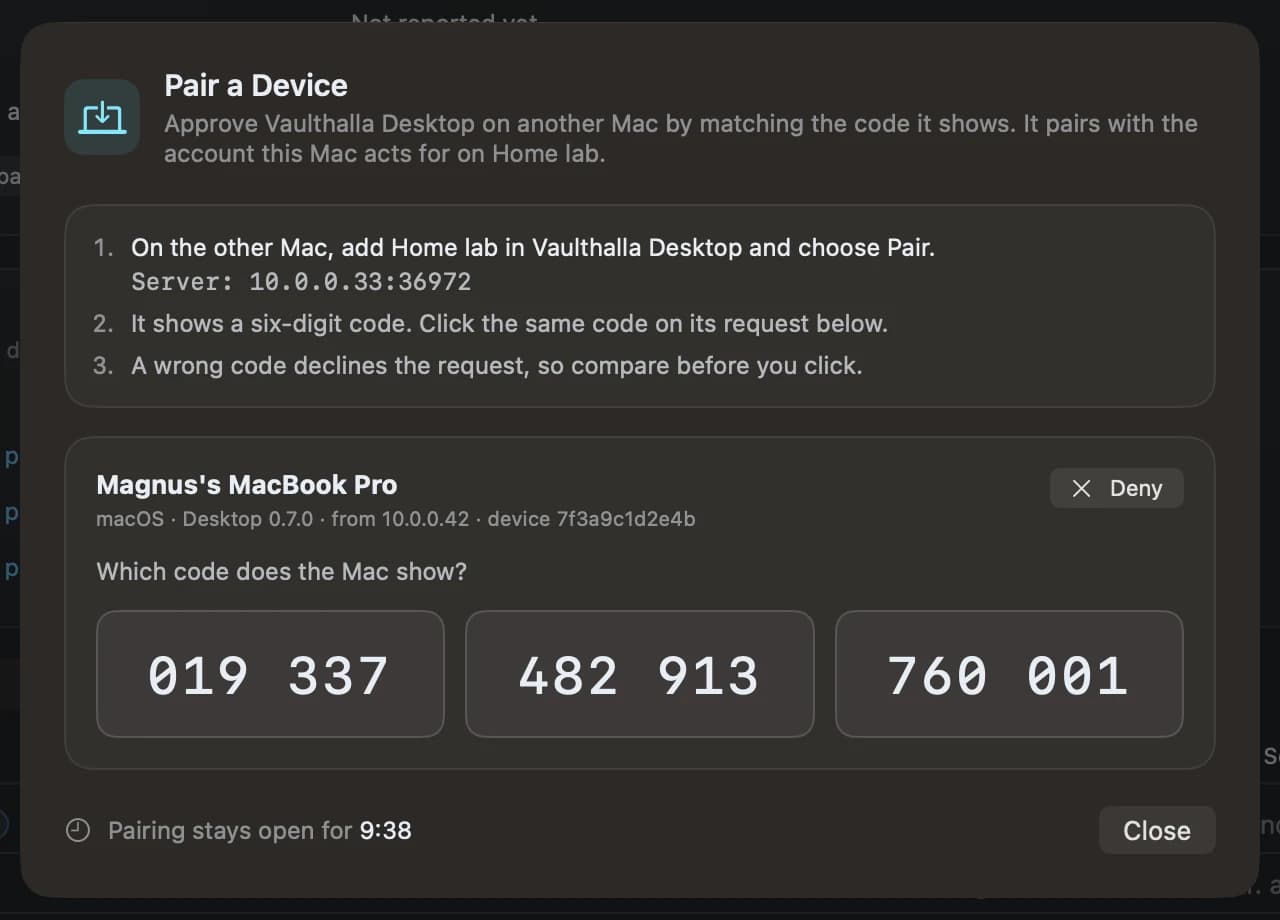
A Mac running Vaulthalla Desktop pairs over mutual TLS 1.3. Its private key stays in the Secure Enclave, it pins the server's key, and neither side consults a certificate authority. To approve it, the person at the server picks the six-digit code that Mac shows from three choices, and a wrong pick declines the request.

A device's key proves the device, never a person, so sensitive actions still need a person's approval. The device listener stays on loopback until vh device remote enable. Since server 1.24, a device can be scoped read-only or read-write, and a scoped device cannot pair others or back up or import keys.

Devices
Approving another Mac: pick the six-digit code that Mac shows from three choices; a wrong pick declines the request.

Permissions

One rulebook on every way in

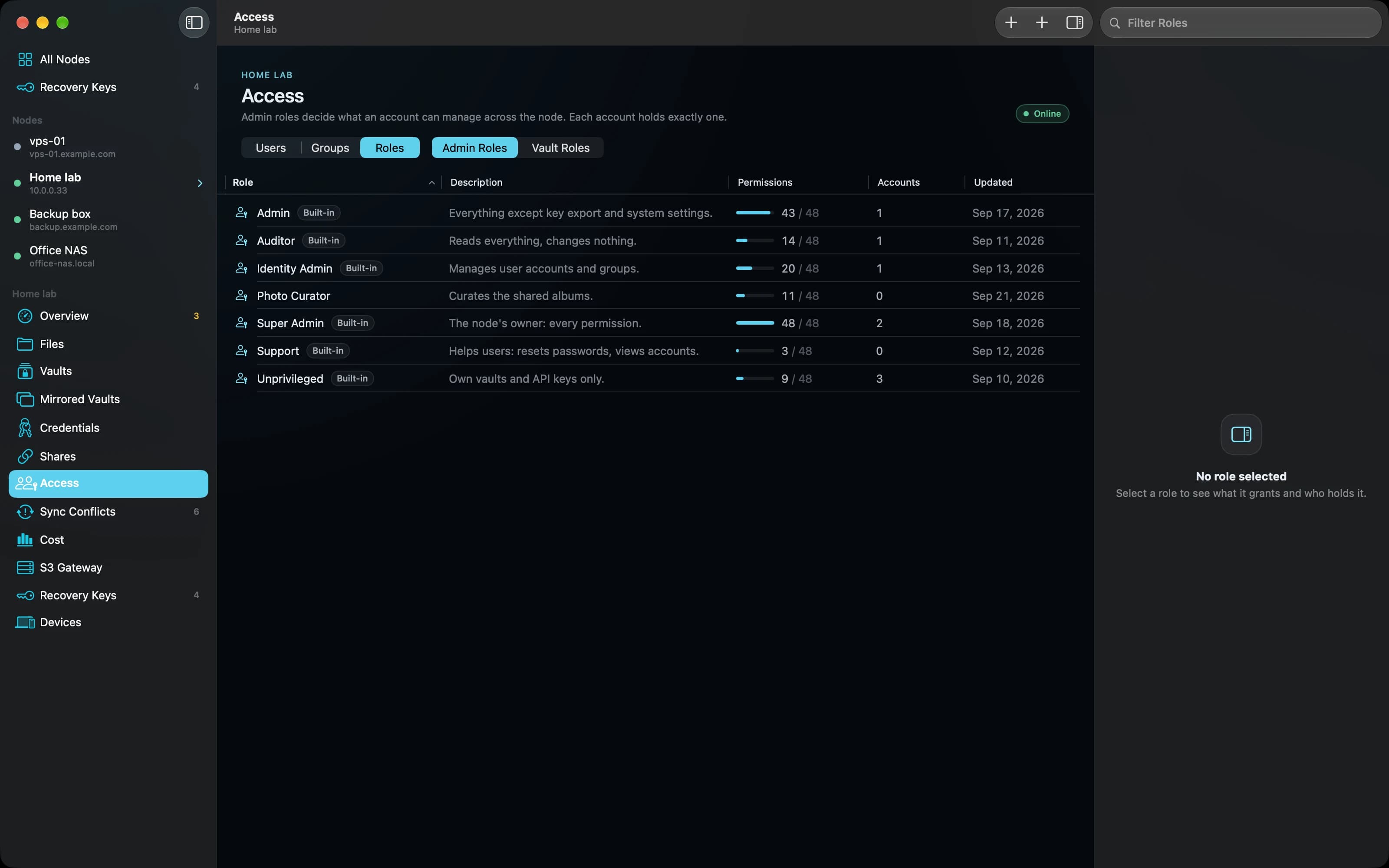
Linux users map to Vaulthalla users, who get groups, admin roles for the instance and vault roles per vault, with fine-grained permission flags. Path overrides narrow a role inside a vault. S3 gateway keys are scoped to the owner's access, a vault allowlist or global, and the owner's own permissions are always the ceiling. Linked servers get a vault role, never a user identity, and pin each other's keys after a six-digit code compare.

The console, the CLI, the S3 gateway, Finder and AI agents all answer to the same rules.

Users, groups and roles
Access, Roles: built-in and custom admin roles with what each grants and how many accounts hold it.

Audit trail, sharing, agents and the network

A tamper-evident audit trail

Sensitive actions go into append-only tables linked by a SHA-256 hash chain. Ed25519-signed chain heads are written every 15 minutes to audit.log and syslog, and records are kept for six years by default. vh audit verify checks the chain, and an offline verifier checks exports. It is tamper-evident, not tamper-proof: root or the database owner can rewrite it, and the chain and signatures make that detectable.

Sharing

Public links, or email-validated links that need a six-digit code, valid once for 15 minutes. The token sits after #, so it never reaches a server or a Referer header. Links can expire, be rotated or disabled, and every share access is audited. Previews are server-rendered images, never the original bytes.

What agents can never reach

AI agents act as your account and never beyond it, and destructive commands wait for a person's approval. They can never export or import keys or secrets, manage recovery recipients, read or write file bytes with vh fs get or put, make pairing decisions, enable remote access, rotate master, JWT or identity secrets, or confirm a step-up.

Network posture

HTTPS by default on Linux, with a self-signed certificate whose fingerprint is printed, or Let's Encrypt with HSTS through --certbot. The S3 gateway binds to loopback until you open it, and on macOS every listener stays on loopback until sudo vh setup caddy. The WebSocket refuses cross-origin pages, and the console sends frame-ancestors 'none'.

Telemetry
0
No usage reporting, registration or central authorization
Signed audit heads
15 min
Ed25519 signatures over the hash chain
Default audit retention
6 years
Exportable and verifiable offline
Mutual, with pinned keys
TLS 1.3
For paired devices and linked servers

What is not protected

  • The server's operator. Whoever administers the server can read every vault; the daemon holds keys while it runs. A vault's contents are only as private as the server that runs it. MFA does not cover root on the host, malware in a signed-in browser, an authorized admin, or what Vaulthalla Desktop does with keys it exports.
  • Traffic analysis. Objects are not padded. Sizes, counts, timing and access patterns are visible to the provider.
  • A provider deleting data. Encryption keeps a bucket unreadable, not available, and tampering is detected, not prevented. Plan for it.
  • Names on a stolen server disk. File contents are ciphertext and keys are sealed; with a hardware TPM or the Secure Enclave the sealed blobs are useless off the host, with swtpm they are not. File names and paths are plain columns in the server's PostgreSQL database, so a stolen disk with the database reveals names, the folder tree and sizes. Logs and URLs carry entry ids, not names, by default. On a Mac server, keep FileVault on.
  • The software vendor. You control your server and its updates. Valkyrian Labs ships signed packages; a malicious update could reach keys, so you decide when to install one (sudo apt-mark hold vaulthalla pins a version).
  • What is not built. Sealed vaults, hosted or custodial recovery, remote sign-in for AI apps, and reproducible builds.

Outbound requests, and how to verify all of this

Outbound requests

Vaulthalla has no telemetry, registration or central authorization. These are the outbound requests in the code:

  • Breached-password check. When a password is set, a range lookup to Have I Been Pwned (api.pwnedpasswords.com/range/) that gives up after a few seconds. Bundled breach lists cover offline hosts.
  • Price catalog refresh, off by default. A signed price catalog from Valkyrian Labs' rates service, fetched only if storage_rates_api.remote_refresh_enabled is turned on. It ships off.
  • Vaulthalla Cloud, planned and only after an explicit link. The server contacts api.vaulthalla.cloud only after a super admin links it to that planned service, which is not yet available.

Everything else goes where you point it: your buckets, your email provider, your linked servers.

How to verify

  • Read the source. Server and Desktop are open source under AGPL-3.0-or-later, on GitHub.
  • Check the packages. APT packages are signed by Valkyrian Labs LLC (APT Signing Key) 494D 71A1 EEDD F87B D48E 5048 6D64 CB7B DFC3 0EC6. macOS packages are Developer ID signed and notarized; check them with pkgutil --check-signature and spctl --assess.
  • Audit it with your own agent. SECURITY_AUDIT_PROMPT.md in the server repository is a read-only audit prompt for an AI agent you run. Its stance: "Don't trust Vaulthalla. Verify it."
  • Reproducible builds are not available yet.

Questions people ask

Can the person who runs the server read my files?

Yes. The server holds live keys while it runs so it can serve files, previews and S3 requests, so whoever administers it can read every vault on it.

Is Vaulthalla zero-knowledge?

No, and this site does not use the term. Your storage provider sees only opaquely named ciphertext in the default bucket layout, but your own server can read everything. Sealed vaults, where it could not, are designed, not yet built.

Where are encryption keys stored?

On the server, wrapped by a vault master sealed by TPM2 on Linux or the Secure Enclave on macOS. Valkyrian Labs never receives them, and the web console never receives key material.

Does Vaulthalla send telemetry or phone home?

It has no telemetry. The outbound requests are a breached-password range lookup when a password is set, an optional price catalog refresh that ships off, and the planned Vaulthalla Cloud only after an explicit link.

Can I use Vaulthalla for HIPAA or SOC 2 work?

Vaulthalla makes no compliance or certification claims. It provides technical safeguards such as encryption at rest, MFA, role-based access and a signed audit trail; whether a deployment meets a framework depends on how it is run.

Is the audit trail tamper-proof?

No, it is tamper-evident. A hash chain with signed heads makes rewriting detectable with vh audit verify, but root or the database owner can still rewrite it.

Can AI agents read my encryption keys?

No. Key and secret export and import, recovery recipients and secret rotation are never available to agents, and agents cannot confirm a step-up.

A vault door in a mountainside stands open for visitors on inspection day

Verify it

Read the source before you trust it.

Vaulthalla is open source under the AGPL. Read the code, check the package signatures, and point your own agent at the audit prompt in the repository.