Skip to content
Vaulthalla LogoVaulthalla

S3 gateway

Own the S3 endpoint. Rent the storage behind it.

Point every S3 client at an endpoint you run, and let it place each bucket on Backblaze B2, Cloudflare R2, AWS S3 or your own disks. Change providers without changing a client.

  • Upstream profiles chosen per request
  • Budgets that stall instead of spending
  • Locks on buckets Vaulthalla must not touch

Own the endpoint, rent the storage

S3 clients such as the AWS CLI, rclone, boto3 and MinIO mc talk to one endpoint you own, s3.vault.example.com, on hardware you control. Each request is signed with a gateway key that carries a scope and an allowlist of upstream profiles. The request’s region or LocationConstraint selects the profile: b2-archive for Backblaze B2, r2-edge for Cloudflare R2, s3-main for AWS S3, or local for a local vault. A profile outside the key’s allowlist is refused. A plain CreateBucket under a profile creates a real private bucket in that provider account and binds it to a vault. Reads of files already held locally are served from the encrypted local copy with no upstream request. Writes land locally first and are synced upstream inside the budgets you set.

Any S3 client

Your tools, unchanged

AWS CLIrcloneboto3MinIO mc
SigV4
Hardware you control

Your endpoint

s3.vault.example.com

Gateway key backupscope vault-allowlistallow b2-archive, r2-edge, s3-main

Upstream profile

Picked per request

The region or LocationConstraint names the profile. Anything outside the key’s allowlist gets a 403.

Your storage provider
b2-archive

Backblaze B2

A bucket in your own account

r2-edge

Cloudflare R2

A bucket in your own account

s3-main

AWS S3

A bucket in your own account

local
Hardware you control

Local vault

Encrypted on this server

CreateBucket
A plain CreateBucket under a profile makes a real private bucket in that provider account and binds it to a vault.
GET
Files already held locally are served from the encrypted local copy, with no upstream request.
PUT
Writes land locally first, then sync upstream inside the budgets you set.

One endpoint, many provider accounts

The gateway speaks S3 on your server. Each bucket it serves is bound to a vault, and each vault lives on local disks or in a bucket you rent. Clients only ever see your endpoint, so the provider behind it becomes a setting instead of a dependency.

Routing is decided by an administrator, not a client: granting a key a profile needs admin.upstream.provision plus rights on the provider credential.

Upstream profiles

A profile names a provider credential and how buckets under it behave: encryption, sync strategy and conflict policy. A client picks one where S3 carries a region: LocationConstraint=<profile> on CreateBucket, or region = <profile> when signing.

Chosen per request

The request's constraint wins, then the signing region, then the key's own profile, then the server default, which applies only to keys opted in with --upstream server-default. LocationConstraint=local forces a local vault, and real AWS region names select nothing.

Credential routing

Each gateway key has its own profile and an allowlist (--allow-upstream). One key can reach several provider accounts and no others: any other profile answers 403, never a quiet fallback to local storage. A profile references a vh api-key, never its secret.
In practice

Route, scope and budget from the command line

Three short sessions from the gateway and cost-control docs: a scoped key with a hard cap, profiles that route by region, and a plan before any money is spent.

# A key that reaches one vault, as a contributor
$ vh s3-gateway creds create backup --scope vault-allowlist --default-role contributor --selected-vault archive --json
# The secret is shown once and stored encrypted
# Cap what this key may spend upstream each month
$ vh s3-gateway budget set-key backup --monthly 5 --mode enforce --currency USD
# A profile on your B2 account: objects stay readable there, local edits win
$ vh s3-gateway upstream create b2-archive --api-key b2-main --no-encrypt --sync-strategy mirror --on-sync-conflict keep_local
# Give the key a default profile, and allow one more
$ vh s3-gateway creds scope backup set --upstream b2-archive --allow-upstream r2-edge
# A plain CreateBucket under r2-edge makes a real private bucket in that R2 account
$ aws s3api create-bucket --bucket reports --create-bucket-configuration LocationConstraint=r2-edge
{
    "Location": "/reports"
}
$ vh vault sync set archive --s3-budget-preset conservative
$ vh pricing budget set-vault archive --mode enforce --max-run 0.25
# Planned requests, traffic and price, worked out from the local index
$ vh vault sync dry-run archive

--no-encrypt is for buckets other tools must read: objects in it stay readable at the provider. Encrypting vaults use the opaque layout by default. See upstream profiles and cost controls.

A CreateBucket that makes a real bucket

Under a profile, a plain CreateBucket (aws s3 mb, rclone mkdir) creates a private <prefix><name> bucket in your AWS, Cloudflare R2 or Backblaze B2 account, creates a vault with the profile's encryption, sync strategy and conflict policy, and binds it as a remote_cache bucket. Profiles on B2 carry their own versioning default.

It never takes over what is not its own: an existing non-empty bucket, or a name another account holds, answers 409. A provider failure answers 503. Outside the gateway, vh vault create --s3 --bucket-mode create|adopt does the same job from the CLI, and adopt-check inspects an existing bucket read-only before you adopt it.

Three bucket modes decide where object bodies live. Wherever a file is held locally, it is served from its encrypted local copy with no request and no egress, and a range read touches only the bytes asked for. LIST is answered from metadata and never calls upstream. bucket backfill exposes files already in a vault as objects. Bucket modes and backfill.

local

Local

Bodies live in an encrypted local object store on your server. Reads cost nothing upstream.

remote_cache

Remote cache

Bodies live in your bucket, plus encrypted local copies of fetched files. A held file costs no request; a remote-only file is fetched once after a price check, verified and kept.

remote_proxy

Remote proxy

Bodies live in your bucket only. Each read is a fetch from the bucket, and no local copy is kept.

Clients and cost

Your tools stay the same. Your bill stays visible.

Clients

Point the tools you already use at your endpoint

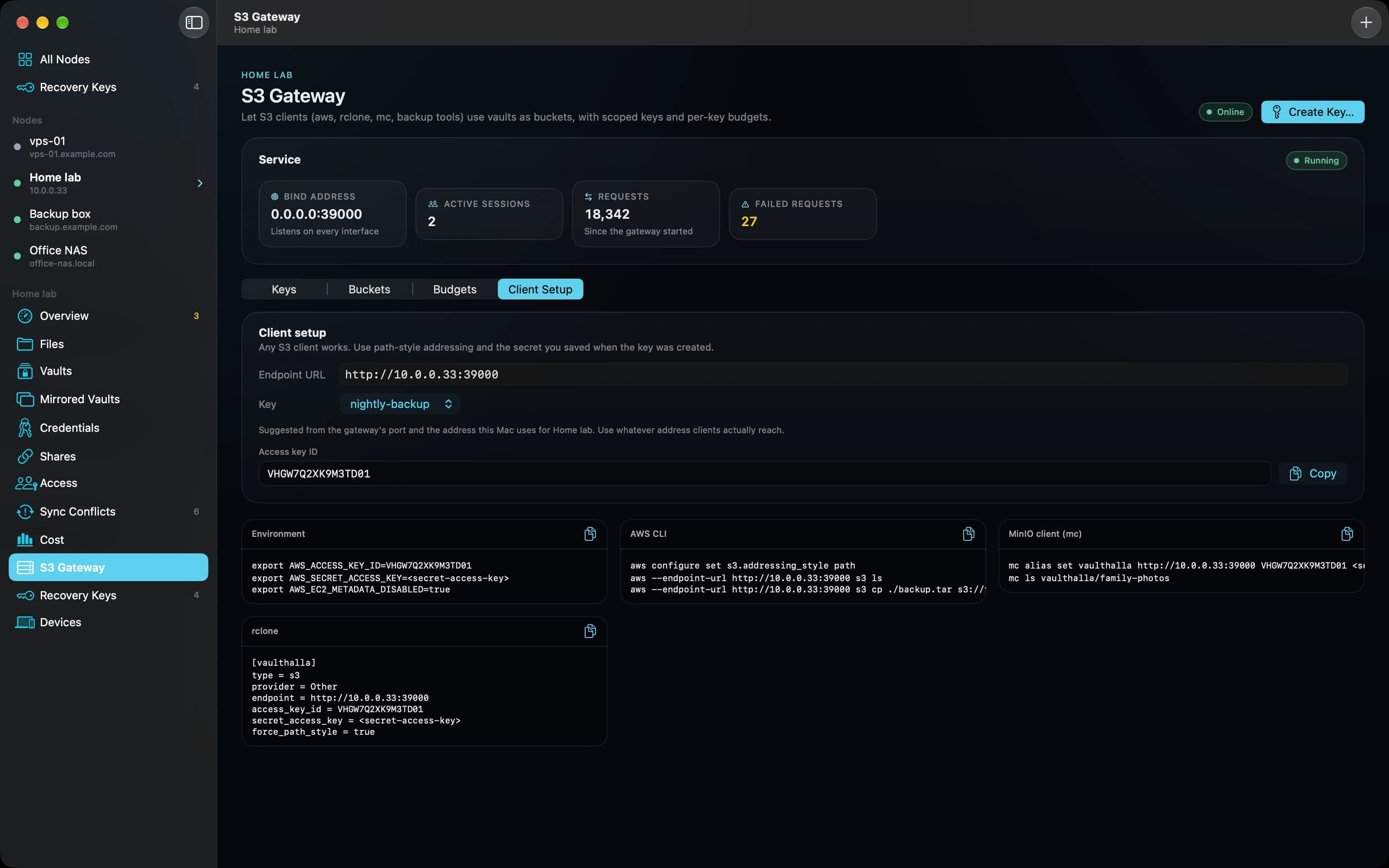
AWS CLI, boto3, rclone and MinIO mc have how-tos and smoke tests against the gateway. Vaulthalla Desktop shows the endpoint, the access key and ready-to-copy settings for each of them.

Requests are signed with SigV4 and checked with the error codes AWS uses. Presigned URLs work, and a signed streaming upload is verified chunk by chunk, with nothing stored until the body verifies.

Client setup
Vaulthalla Desktop's S3 Gateway client setup: the endpoint, an access key and ready-to-copy settings for the AWS CLI, rclone, the MinIO client and environment variables

Cost

Budgets you can read at a glance

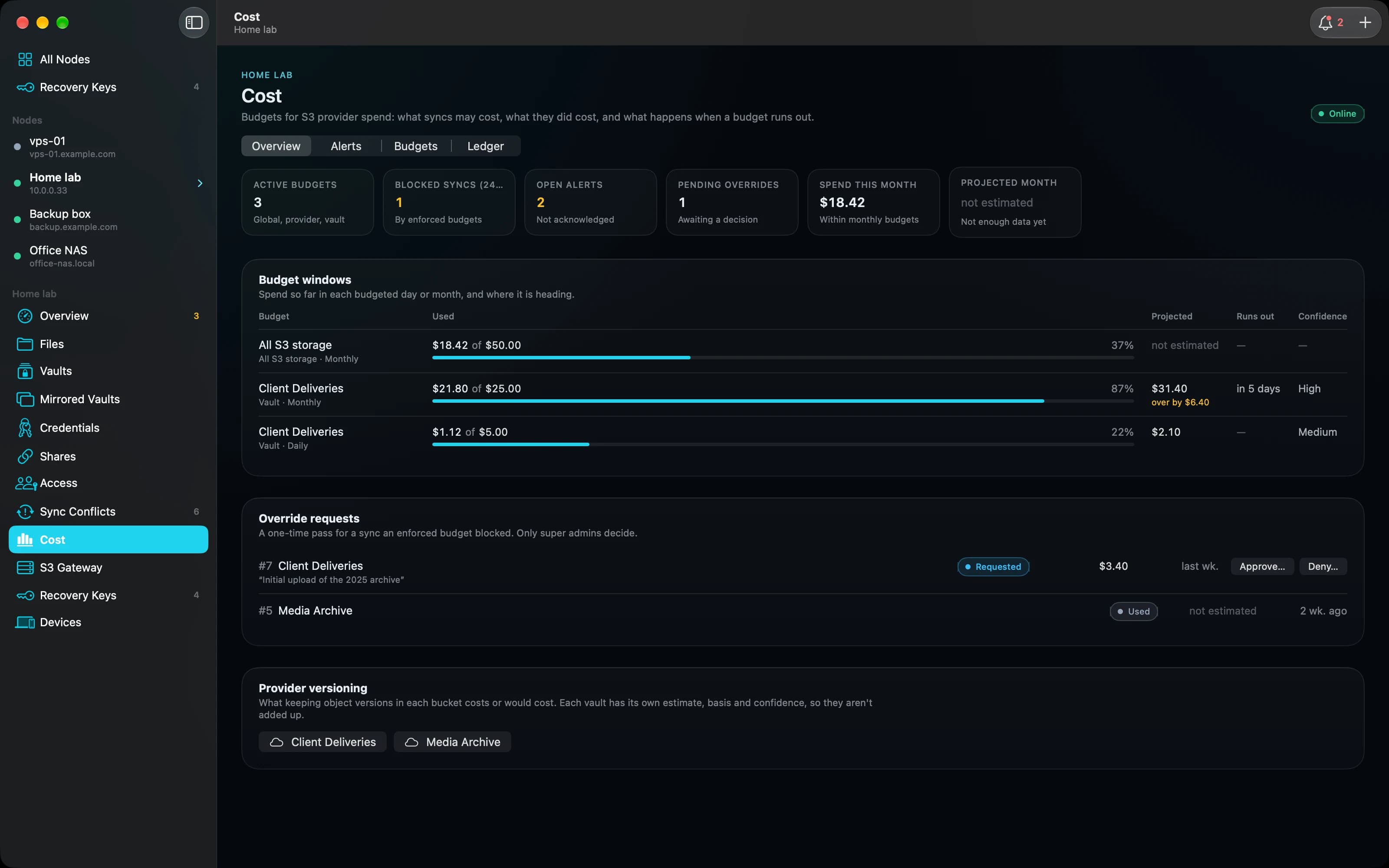
Price budgets cap a run, a day and a month, globally, per provider or per vault, with the modes off, report, warn and enforce, overrides and a ledger of what was spent. Gateway keys get their own monthly caps, per key and per key per vault.

The Cost page in Vaulthalla Desktop shows each budget window with spend, projections and run-out dates.

Price budgets
Vaulthalla Desktop's Cost page: S3 budget windows with spend, projections and run-out dates, override requests and provider versioning

Writes land locally. Spending stays bounded.

Gateway PUT, DELETE, COPY and multipart uploads are local-first: the server stores the change in the vault and answers, and sync performs the upstream upload or purge afterwards. The trade-off is plain: a 200 means your server has the object, not yet that your provider does.

Price estimates cover AWS S3 and Cloudflare R2. Work against B2 runs only with --accept-unpriced, so an unpriced provider is always a conscious choice.

Only real calls count

Provider, vault and global budgets are charged only for real upstream calls. A price denial answers 403 AccessDenied with a detailed reason. A request-budget denial answers 503 SlowDown. Metering of local requests is opt-in.

Request budgets that stall

Cap LIST, HEAD, GET, PUT, COPY, DELETE and downloaded bytes per pass, or pick a preset: conservative, balanced, bulk or unlimited. A pass that would cross a limit stalls with a reason, and since v1.26.0 the next pass continues from where it stopped.

Dry-runs before money moves

vh vault sync dry-run prints the planned requests, traffic and price from the local index, and reports archive-tier skips. Provider calls happen only when you ask for them with --refresh-index or --refresh-pricing.

No blind listing

reconcile refuses an unbounded LIST without a LIST budget or --allow-list-scan. A remote index older than max_remote_index_age stalls sync instead of being trusted.

Providers with full bucket administration
3
AWS S3, Cloudflare R2 and Backblaze B2
Lambda functions to deploy
0
Event sync pulls from SQS on AWS and Queues on R2
Cost of an idle sync pass
1 HEAD
For vaults in the opaque layout
When a bucket is not yours to take
409
Non-empty or foreign buckets are never taken over

Safe around the buckets you already have

Vaulthalla administers buckets in your provider accounts, so it is built to leave alone what it does not own.

Protection locks

vh upstream protect excludes a bucket from every Vaulthalla operation. A lock is keyed by provider, account and name, and survives re-creating the key.

Never taken over

A CreateBucket that meets an existing non-empty bucket, or a name held by another account, answers 409. Attaching a vault needs an empty, unused bucket, and adoption is always explicit.

Cleanup that knows what it made

cleanup deletes only buckets Vaulthalla created, after a typed confirmation. Separate admin.upstream.* permissions cover viewing, provisioning, locking and destroying, and vh upstream audit reports on them.

Change providers, keep your clients

The client sees your endpoint, so the account behind it can change. Your storage provider only ever sees encrypted, opaquely named objects. It can't see your file names, folders or contents. It can see how many objects you store, their sizes and when they change. That holds for encrypting vaults in the default opaque layout; a profile made with --no-encrypt stores objects exactly as sent. Whoever runs the server can read everything on it.

Attach and detach in place

Give a local vault a bucket, or bring it back to local disks, keeping its ID, keys, permissions, shares and files. Detach fetches and verifies every file and never writes to or deletes from the bucket.

Objects bound to the vault

Each encrypted object's header binds it to its vault, object, key version and salt, never to a bucket, so sealed objects are portable between buckets and providers.

One key, several providers

Through profiles, one gateway key can front B2, R2 and AWS at once, reaching only the accounts named on its allowlist.

What the gateway does not do

It is an S3 endpoint for your own vaults, not a full copy of AWS. Know these limits before you plan around it.

  • No IAM or bucket-policy language, and no ACLs. Access is roles, key scopes and path overrides.
  • No versioning, lifecycle or object lock API. ListObjectVersions answers 501. There is no legal hold, no MFA delete and no undo for a gateway delete. Bucket configuration GETs answer S3's "not configured", and PUT or DELETE answer 501.
  • No STS session tokens, no SigV4a and no multi-range GET. Single-range GETs work.
  • A 200 is not proof the object reached the upstream yet. Writes are local-first, and sync uploads later.
  • Price estimates cover AWS S3 and Cloudflare R2 only, and so does event-driven sync.
  • Fetched copies are kept. No automatic eviction of copies fetched by remote_cache is documented yet, so size the local disk for what you read.
  • One remote per vault, and upstreams are S3-compatible buckets only. This is not a stand-in for setups that used MinIO's old gateway mode in front of NAS, HDFS or Azure.

If you need bucket policies for many applications, compliance retention through object lock, or a multi-node object cluster, a distributed object store or your provider's own API is the better fit. Full list of S3 limitations · Vaulthalla and MinIO

FAQ

Questions about the S3 gateway

What does an S3 gateway do, and what does Vaulthalla's add?

It gives S3 clients one endpoint on your server and stores each bucket as a vault on local disks or in a cloud bucket you rent. Vaulthalla adds upstream profiles chosen per request, local copies, sync, request and price budgets, and locks on buckets it must never touch.

Is this a MinIO gateway alternative?

For S3-compatible upstreams, yes: MinIO removed its gateway mode in RELEASE.2022-10-29T06-21-33Z, and Vaulthalla fronts B2, R2, AWS S3 and other S3-compatible buckets. It does not front NAS, HDFS or Azure storage. Vaulthalla and MinIO.

Can I put an S3 proxy in front of Backblaze B2?

Yes. B2 storage shipped in v1.23.0 and B2 bucket administration in v1.25.0, so a CreateBucket under a B2 profile makes a real private bucket in your account. Event-driven sync and price estimates are not available for B2, and B2 work needs --accept-unpriced.

Does a successful PUT mean the object is in my cloud bucket?

No. Writes are local-first: a 200 means your server holds the object, and sync performs the upstream upload afterwards within your budgets.

Can one access key reach several provider accounts?

Yes. Each key has a default profile and an allowlist set with --allow-upstream. A request for any other profile answers 403 instead of falling back to local storage.

What stops sync from running up my cloud bill?

Request budgets per pass, price budgets per run, day and month, and monthly caps per gateway key. An exceeded budget stalls the work with a reason, and vh vault sync dry-run shows the plan before anything is spent. Cost controls.

Can my storage provider read what I store through the gateway?

Not with encrypting vaults in the default opaque layout: the provider sees encrypted, opaquely named objects, plus their count, sizes and change times. A profile made with --no-encrypt leaves objects readable at the provider, and whoever runs the server can read everything on it.

A harbor gate marked S3 above the water, where crews land chests from a longship

Own the endpoint

Put your own gate in front of the storage you rent

Install the server, create an upstream profile for the account you already pay for, and point your S3 tools at an endpoint that answers to you.